
NX Mod Manager Switch: Difference between revisions
More actions
No edit summary |
No edit summary |
||
| Line 4: | Line 4: | ||
|description=Nintendo Switch Mod Manager. | |description=Nintendo Switch Mod Manager. | ||
|author=TOM-BadEN | |author=TOM-BadEN | ||
|lastupdated= | |lastupdated=2026/05/08 | ||
|type=Utilities | |type=Utilities | ||
|version=3.0.0 | |version=3.0.0 | ||
| Line 19: | Line 19: | ||
|image_alt=NX Mod Manager | |image_alt=NX Mod Manager | ||
}} | }} | ||
NX Mod Manager is a mod management tool designed specifically for the Nintendo Switch platform. The current version features a complete code rewrite and underlying architecture redesign, with significant improvements in both functionality and stability. The project is fully open-source and permanently free, with no paid content of any kind. It supports online browsing and downloading of mods, and provides a complete on-device management workflow, allowing mod acquisition and management without manually handling the SD card. | NX Mod Manager is a mod management tool designed specifically for the Nintendo Switch platform. The current version features a complete code rewrite and underlying architecture redesign, with significant improvements in both functionality and stability. The project is fully open-source and permanently free, with no paid content of any kind. It supports online browsing and downloading of mods, and provides a complete on-device management workflow, allowing mod acquisition and management without manually handling the SD card. The development and maintenance of online mod resources relies on the participation and contribution of the community. | ||
'''Note:''' Please use at your own risk. | |||
== Features == | |||
* Game Management - Add games from installed game list or by manually entering TID; supports game removal and favorites. | |||
* Mod Management - Add, install, uninstall, and remove mods; compatible with both ZIP archives and folder formats. | |||
* Patch Conversion - Automatically converts pchtxt text patches to IPS patches during mod installation. | |||
* Smart Detection - Automatically identifies mod files with non-standard directory structures and detects file conflicts between mods. | |||
* Smart Search - Supports pinyin, polyphone, initials, fuzzy matching and other search methods, deeply adapted for Chinese users. | |||
* Mod Toggle - One-click disable or restore all mods for quick game issue troubleshooting. | |||
* File Transfer - Supports MTP (USB wired) and FTP (Wi-Fi wireless) for transferring mods to the console. | |||
* Online Store - Built-in mod store with browsing, searching, downloading and uploading; includes like and comment features. | |||
* Customization - Customize various content such as game name, mod name, description, version, author, and type. | |||
* Multi-language - Simplified Chinese, Traditional Chinese, and English interfaces. | |||
* Theme Switching - Light and dark themes with automatic system-following option. | |||
* Auto Update - Check and download new versions within the app. | |||
* Force Cleanup - Fix reference count corruption caused by abnormal interruptions. | |||
== Installation == | |||
Download the [https://github.com/TOM-BadEN/NX-Mod-Manager/releases latest .nro file] and install it on your SD card. | |||
For detailed usage instructions, please or view the basic tutorial within the app under "About". | |||
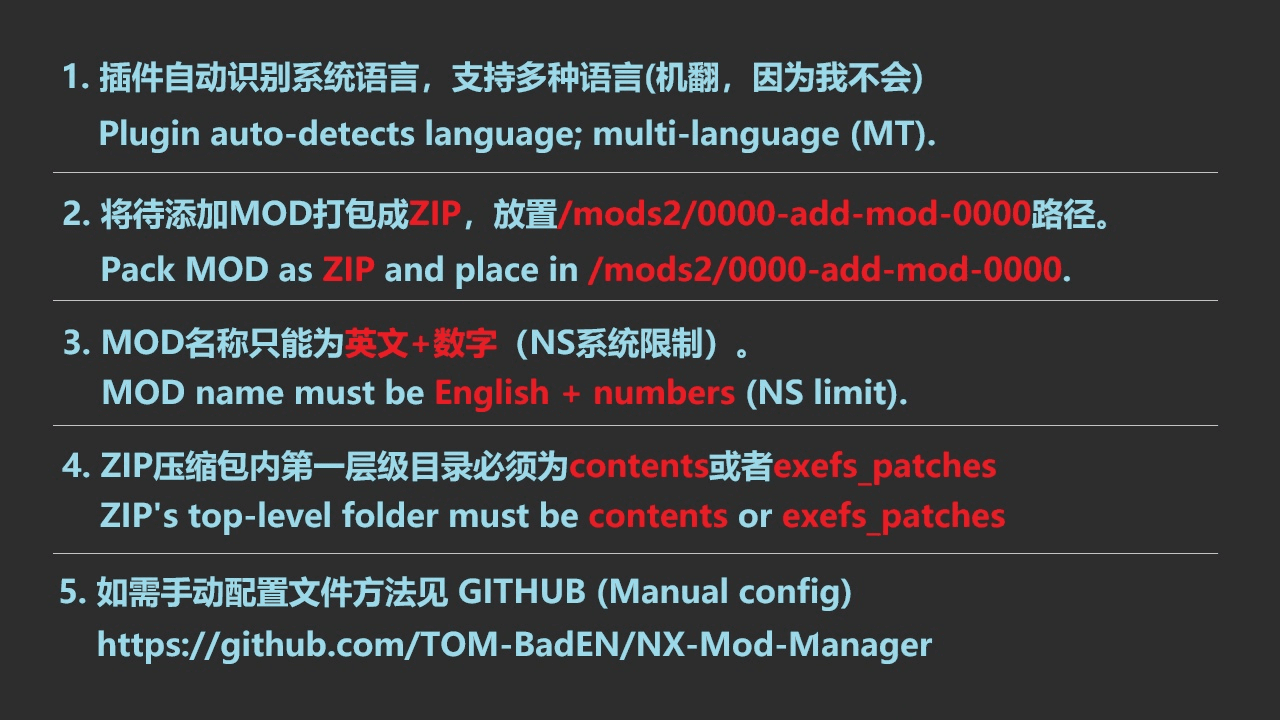
Notes: The first level inside the ZIP package must be <code>contents</code> and <code>exefs_patches</code>, otherwise it cannot be recognized. | |||
< | |||
</ | |||
< | |||
</ | |||
==Screenshots== | ==Screenshots== | ||
Revision as of 03:40, 14 May 2026
| NX Mod Manager | |
|---|---|
 | |
| General | |
| Author | TOM-BadEN |
| Type | Utilities |
| Version | 3.0.0 |
| License | GPL-2.0 |
| Last Updated | 2026/05/08 |
| Links | |
| Download | |
| Website | |
| Source | |
NX Mod Manager is a mod management tool designed specifically for the Nintendo Switch platform. The current version features a complete code rewrite and underlying architecture redesign, with significant improvements in both functionality and stability. The project is fully open-source and permanently free, with no paid content of any kind. It supports online browsing and downloading of mods, and provides a complete on-device management workflow, allowing mod acquisition and management without manually handling the SD card. The development and maintenance of online mod resources relies on the participation and contribution of the community.
Note: Please use at your own risk.
Features
- Game Management - Add games from installed game list or by manually entering TID; supports game removal and favorites.
- Mod Management - Add, install, uninstall, and remove mods; compatible with both ZIP archives and folder formats.
- Patch Conversion - Automatically converts pchtxt text patches to IPS patches during mod installation.
- Smart Detection - Automatically identifies mod files with non-standard directory structures and detects file conflicts between mods.
- Smart Search - Supports pinyin, polyphone, initials, fuzzy matching and other search methods, deeply adapted for Chinese users.
- Mod Toggle - One-click disable or restore all mods for quick game issue troubleshooting.
- File Transfer - Supports MTP (USB wired) and FTP (Wi-Fi wireless) for transferring mods to the console.
- Online Store - Built-in mod store with browsing, searching, downloading and uploading; includes like and comment features.
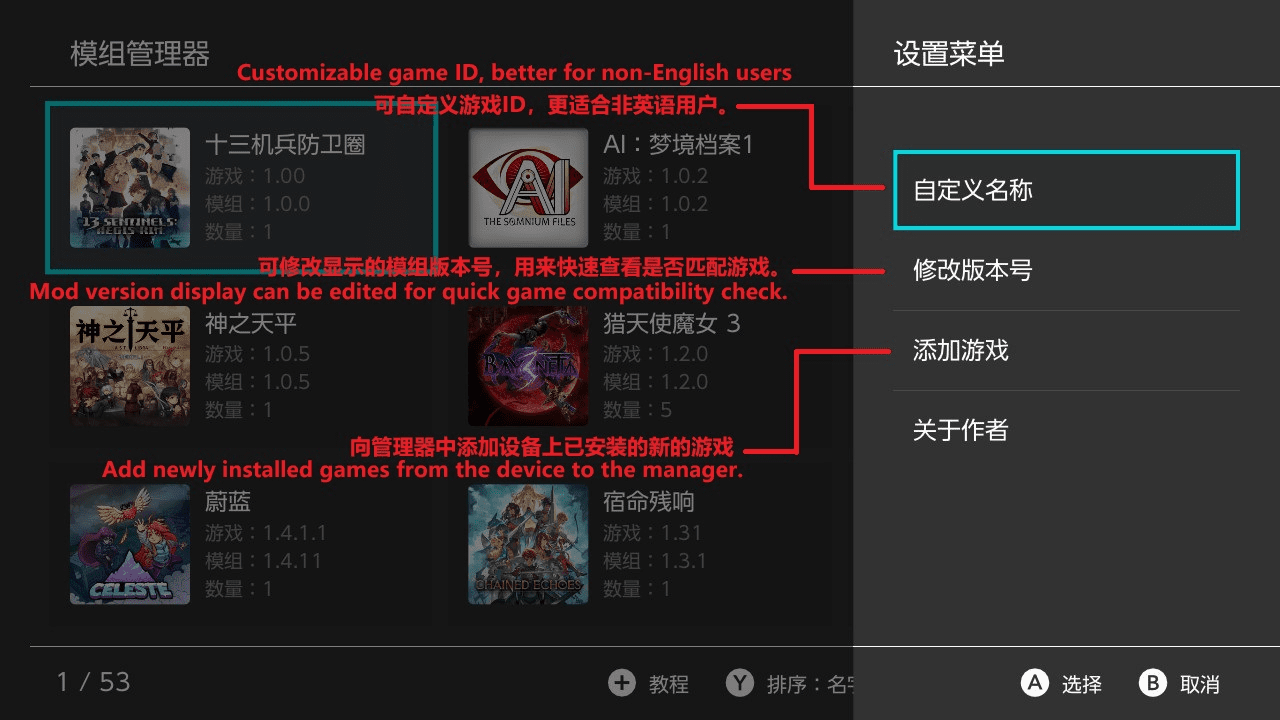
- Customization - Customize various content such as game name, mod name, description, version, author, and type.
- Multi-language - Simplified Chinese, Traditional Chinese, and English interfaces.
- Theme Switching - Light and dark themes with automatic system-following option.
- Auto Update - Check and download new versions within the app.
- Force Cleanup - Fix reference count corruption caused by abnormal interruptions.
Installation
Download the latest .nro file and install it on your SD card.
For detailed usage instructions, please or view the basic tutorial within the app under "About".
Notes: The first level inside the ZIP package must be contents and exefs_patches, otherwise it cannot be recognized.
Screenshots
|
|

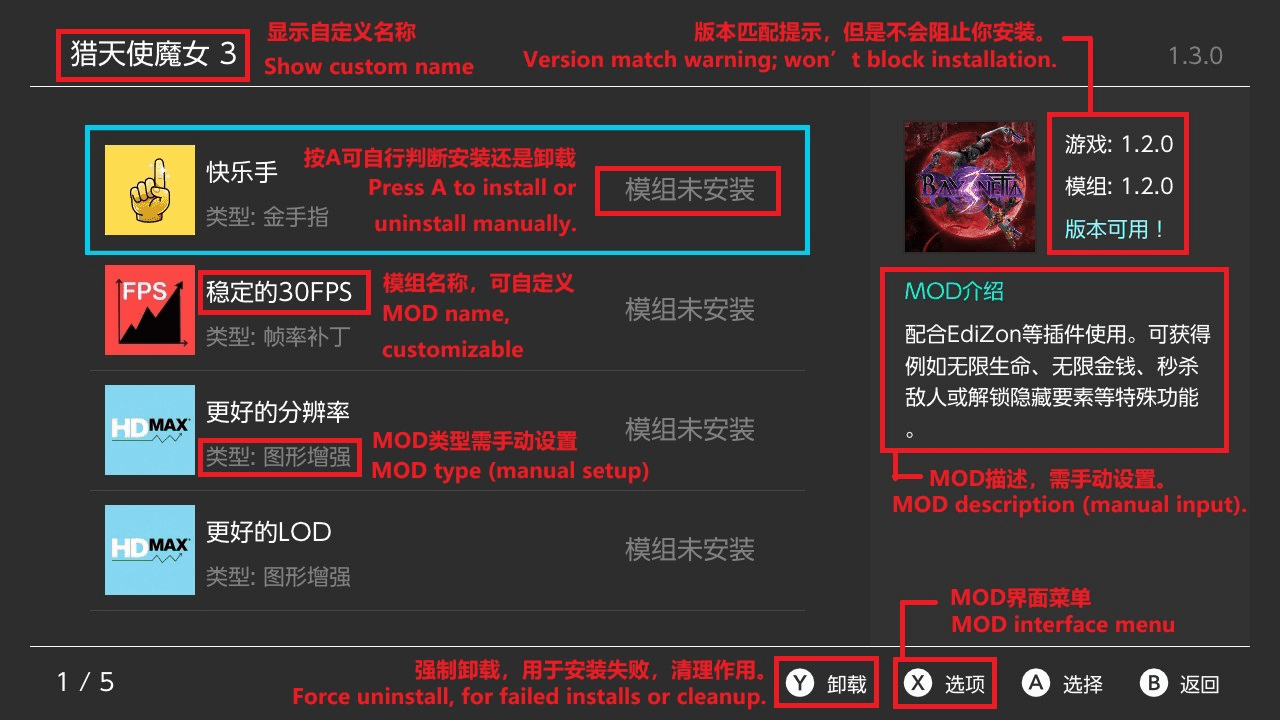
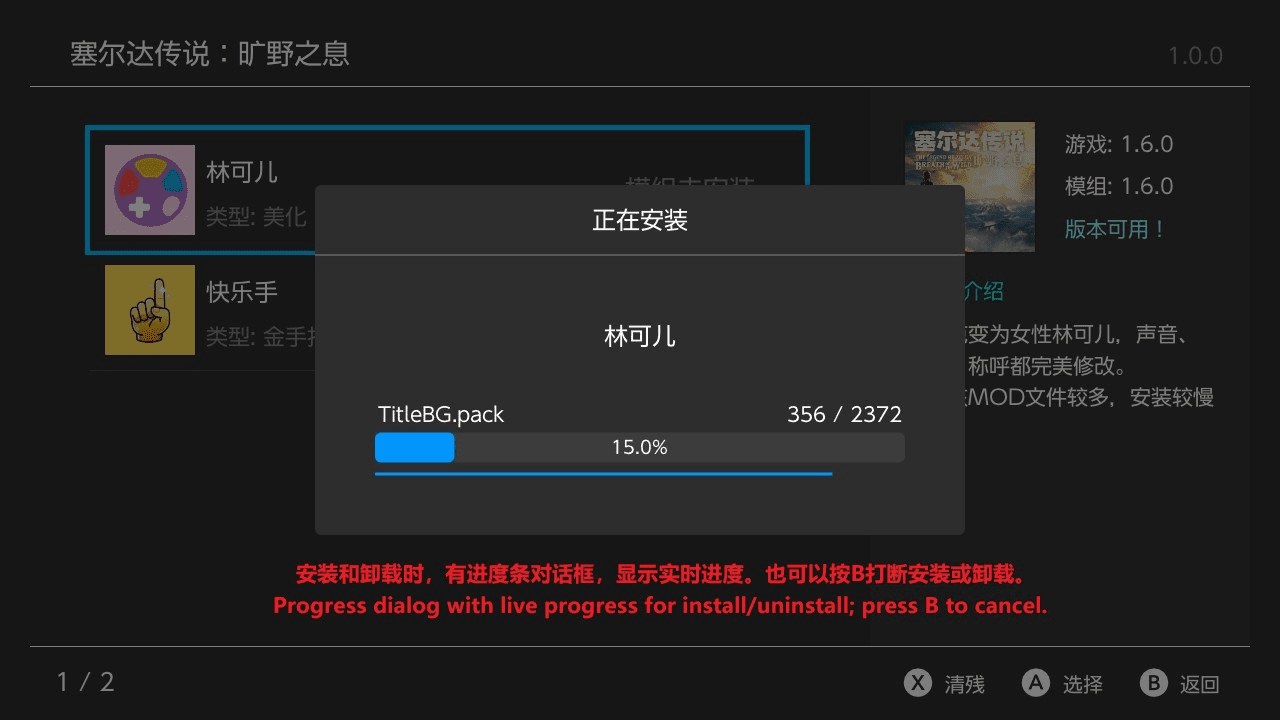
Changelog
v3.0.0
- Although this is a subsequent version, it is a major overhaul: the entire project has been rewritten, and the architecture has been redesigned. It is incompatible with the old version of the manager. Users of the old version must first use the old manager to uninstall all installed mods before installing the new version.
- Completely new UI design, improved quality.
- Redesigned various interactions, enhanced user experience.
- Added online mod download feature, covering 200+ games and 380 mods in total, including hundreds of exclusive mods. Thanks to Qingfeng Mingyue for the free contribution.
- Two theme color schemes available, freely switchable.
- Mod store content supports Simplified Chinese, Traditional Chinese, and English, and automatically adapts to the user's system language.
- Mod store content supports fuzzy search by Pinyin, initials, or English.
- Supports
pchtxtfiles, which are automatically converted to IPS files during installation. - Adopts a new custom keyboard in multiple places, improving aesthetics and smoothness.
- Full touch support, can be used entirely without a controller.
- Supports self-updating plugins, no need to monitor release pages.
- Game names customizable, can be fetched from the server database, supporting Simplified Chinese, Traditional Chinese, and English.
- Plugin text itself supports multiple languages; currently only Simplified Chinese, Traditional Chinese, and English. If you wish to add new languages, please do not submit a PR directly, as this is a release repository, not the native repository. Contact the author through the proper channels.
- Added one-click disable all mods function, convenient for quick debugging.
- Added forced clean-up feature (see in-plugin instructions for details).
- Optimized multi-mod file conflict detection and resolution.
- Added intelligent mod file path recognition, no longer need to fully follow the old mod file structure.
- Added FTP feature, supporting mod file transfer to a relay station via FTP.
- Rewritten MTP feature for more stable transfer (however, folder-based mods may still cause MTP freezing; in such cases, it is recommended to package as ZIP or use FTP).
v2.2.7
- Recompiled with the latest libnx, supporting AMS 1.10 and HOS 21.
- Fixed the issue where zip files with additional "." in the filename could not be recognized.
v2.2.6
- Optimized conflict detection logic, now allowing multiple mods to share common files.
- Removed the feature to cancel mod uninstallation by pressing B.
- Fixed a critical bug in file-type mod installation.
v2.2.5
- Added Bilibili video tutorial and GitHub QR code images to the guide.
- Adjusted some details.
v2.2.4
- Fixed an issue where MTP transfers of large files could occasionally freeze (thanks to TotalJustice's libhaze fix).
- Added conflict detection when installing MODs: if the target path contains the same file, the system will compare and identify conflicting MODs.
- Added automatic cleanup of installed files when installation is interrupted by pressing B.
- Added automatic cleanup of installed files if installation fails due to an error.
- Adjusted the text position in confirmation dialogs: previously centered, now centered horizontally but left-aligned.
- Changed the Y button label from "Uninstall" to "Force Clean".
- Added confirmation dialog text for Force Clean.
- Added dynamic timer display in the console during MTP transfers.
- Fixed an error in MOD list sorting.
v2.1.4
- Added transfer speed information to the MTP transfer interface
- Slightly improved MTP stability for LITE models
- Completed the missing text in languages other than Simplified Chinese
v2.1.3
- Home Screen
- Added favorite marking feature
- Added search function, supporting touch, pinyin, fuzzy, initials, and full spelling search
- Added MTP transfer option in the menu (experimental; known issue: on LITE, uploading files larger than 1.5 GB will freeze)
- Added Remove Game option in the menu; removed mods will be moved to the addmod folder
- Added View Location option in the menu
- Added pre-sorting: games are displayed in A–Z order when opening the plugin
- Add Game Screen
- Added search function
- Added a reminder when installing mods if the version does not match
- Mod Screen
- Added Remove Mod option in the menu
- Added View Location option in the menu
- Others
- Simplified version comparison rules: now only compares the numeric part
- Added repeat input for Up/Down keys when held
- Adjusted the add function: it can only be used after the home scan finishes, to avoid blocking
- Removed the mod count display at the bottom left of the add-mod list, since long text in other languages caused overlap
- Adjusted some details to improve user experience (forgot the exact changes)
- Bug Fixes
- Fixed an exception where modifying the version number did not update the corresponding JSON file
- Fixed an issue where some game icons failed to load
- Fixed an issue where folders containing a dot were misidentified as files
- Fixed an exception with down-key navigation in the 3×3 grid under special conditions
- Fixed some minor bugs that didn't affect usage (details forgotten)
v2.0.3
- Fixed an issue where the scanned game version on the Switch remained outdated after the game version changed.
v2.0.2
- Fixed a bug that caused the program to crash when adding mods.
v2.0.1
- Fix the issue where the text on the virtual keyboard is invisible when the Switch theme is set to the light theme.
- Newly added games will now appear at the top of the page, eliminating the need to search for them.
v2.0.0
- Main Interface
- The vertical list interface has been rebuilt into a grid interface, allowing more content to be displayed at once.
- Added menu functionality for the X button.
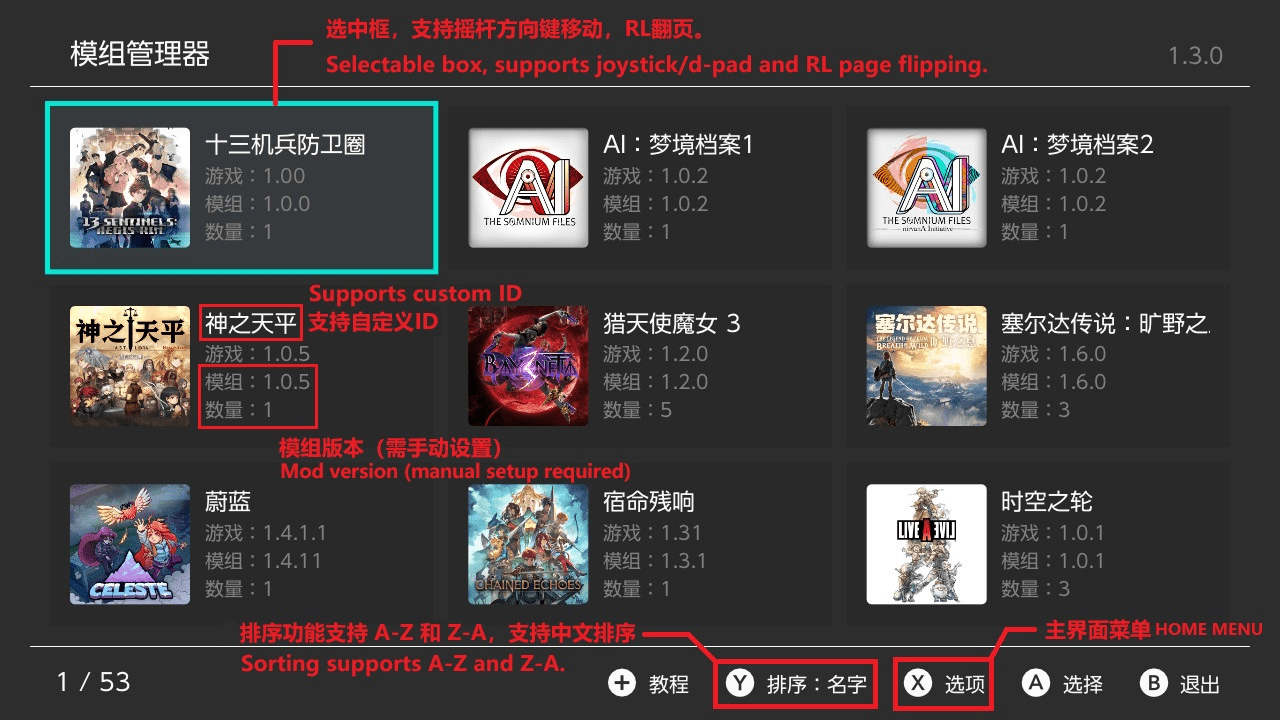
- Supports custom game names and mod version editing (display purposes only).
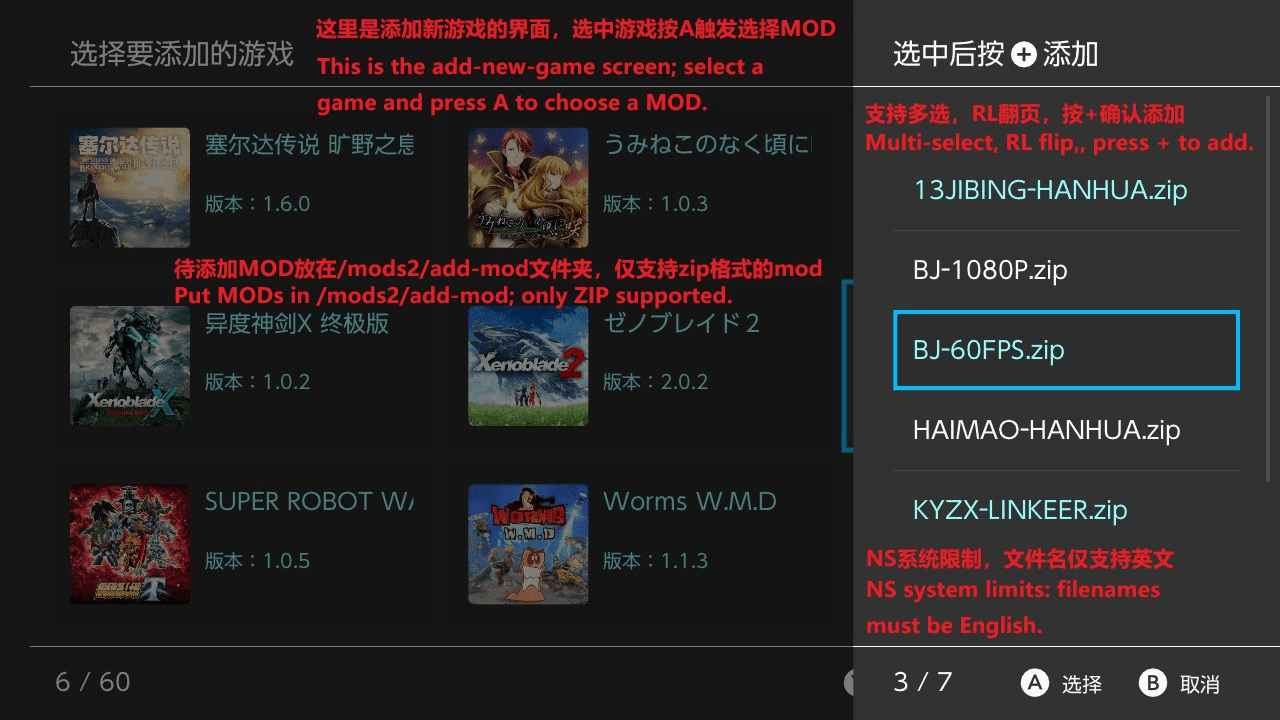
- Added the ability to add games directly from installed games into the mod manager, avoiding the need for complex manual configuration.
- Installed Games Interface
- A new interface has been added to support the "Add Game" function from the main interface.
- MOD Interface
- Added menu functionality for the X button.
- Supports custom mod names, mod type modification, and adding mod descriptions.
- Supports appending mods freely, with mod files placed in /mods2/0000-add-mod-0000.
- Tutorial Interface
- The tutorial interface has been rebuilt. Previously, it was all text-heavy and hard to follow; now it is image-based.
- Others
- Added pinyin sorting, allowing Chinese game names to be sorted alphabetically.
- Fixed a bug that could cause installed mods to fail.
- Fixed several minor bugs that did not affect functionality.
v1.3.0
- Significantly improved ZIP MOD uninstallation speed
- Linkoer can now be uninstalled within 20 seconds.
- Princess Flower uninstallation improved from 3 minutes 30 seconds to 1 minute 30 seconds.
- Significantly improved installation speed for file-based MODs
- Linkoer installation improved from 1 minute 40–50 seconds to 1 minute–1 minute 20 seconds.
- Princess Flower installation previously unmeasured, now takes 7 minutes 10 seconds; using ZIP-based MOD installation is recommended.
- Significantly improved installation speed for ZIP-based MODs
- Linkoer installation improved from 1 minute 5–20 seconds to a more stable time, close to 1 minute 5 seconds.
- Princess Flower installation improved from 6 minutes 13 seconds to 4 minutes 50 seconds–5 minutes 10 seconds.
- Adjusted the file count background layer in the progress dialog to ensure it is not obscured by file names.
- Fixed a minor bug that does not affect usage.
v1.2.0
- Added support for installing MODs in ZIP format, primarily targeting large MODs, significantly improving installation speed.
- Refactored the installation and uninstallation code.
- For example, the Lin Ke'er MOD consists of 2,732 files totaling 500 MB.
- Slightly improved file-based installation speed, reducing the time from 1:50–2:00 to 1:40–1:55.
- Slightly improved uninstallation speed, now completing in most cases within 20 seconds (previously around 20 seconds).
- Greatly improved installation speed for ZIP-based MODs. When the Lin Ke'er MOD was packaged as a ZIP, installation time decreased from 1:40–1:55 to 1:05–1:20.
- The larger the MOD, the greater the relative performance improvement. For details on configuring ZIP installation, see the provided template or README.
v1.1.0
- Modified the bottom-left text in the game and mod interface from "Total" to "Current Index / Total".
- Fixed two minor bugs that did not affect usability.
- Added a per-file copy progress bar in the installation dialog, which only appears for large files.
- Significantly improved mod uninstallation speed. For example, uninstalling the "Lin Ke'er MOD" is reduced from over 1 minute 30 seconds to about 20 seconds.
- Slightly improved mod installation speed. For example, installing the "Lin Ke'er MOD" is reduced from 2:00–2:10 to 1:50–2:00.
- The "Lin Ke'er MOD" contains a total of 2732 files.
- Added timing display for installation and uninstallation completion. If under 1 second, it will display as 0.1s.
v1.0
- First Release.
Credits & Libraries
Thanks to the following open-source projects:
| Project | Description | Author |
|---|---|---|
| borealis | UI Framework | xfangfang, natinusala |
| libhaze | MTP | ITotalJustice |
| ftpsrv | FTP | ITotalJustice |
| yyjson | High-performance JSON parsing | ibireme |
| cpp-pinyin | Pinyin search | wolfgitpr |
| lunasvg | SVG rendering | sammycage |
| QR-Code-generator | QR code generation | nayuki |
| miniz | ZIP compression & decompression | richgel999 |
| libnxtc | Game info caching | DarkMatterCore |