
PkHouse Switch: Difference between revisions
More actions
1.10.1 |
1.10.2 |
||
| Line 4: | Line 4: | ||
|description=Nintendo Switch homebrew for local bank system for Pokemon Games. | |description=Nintendo Switch homebrew for local bank system for Pokemon Games. | ||
|author=Insektaure | |author=Insektaure | ||
|lastupdated=2026/04/ | |lastupdated=2026/04/30 | ||
|type=Other Apps | |type=Other Apps | ||
|version=1.10. | |version=1.10.2 | ||
|license=GPL-2.0 | |license=GPL-2.0 | ||
|download=https://dlhb.gamebrew.org/switchhomebrews/pkHouseLocalPokeBankSwitch.7z | |download=https://dlhb.gamebrew.org/switchhomebrews/pkHouseLocalPokeBankSwitch.7z | ||
| Line 547: | Line 547: | ||
== Changelog == | == Changelog == | ||
'''v1.10.2''' | |||
* Add Wondercard support for Shiny Volcanion (Legends Z-A). | |||
'''v1.10.1''' | '''v1.10.1''' | ||
* Add box-state icons in ZL/ZR all-boxes overview (box cell now shows a small icon on the left indicating its state). | * Add box-state icons in ZL/ZR all-boxes overview (box cell now shows a small icon on the left indicating its state). | ||
Revision as of 05:02, 1 May 2026
| pkHouse | |
|---|---|
 | |
| General | |
| Author | Insektaure |
| Type | Other Apps |
| Version | 1.10.2 |
| License | GPL-2.0 |
| Last Updated | 2026/04/30 |
| Links | |
| Download | |
| Website | |
| Source | |
pkHouse is a Nintendo Switch homebrew application that provides a local bank system for Pokemon games. It allows moving Pokemon between save files and local bank storage directly on the console, similar to Pokemon HOME but as a free offline solution.
The application supports multiple Pokemon games across different save formats, with automatic save backup, multi-select capabilities, search and filtering, and multiple color themes.
Note: Moving Pokemon between different games is not supported. Banks are separated by game family because transferred Pokemon would lack the HOME Tracker ID required for cross-game compatibility.
Disclaimer
This software is provided "as-is" without any warranty. While the app has been tested, it may contain bugs that could corrupt or damage your save files.
Use at your own risk. The author is not responsible for any data loss or damage to your save data.
This is why the automatic backup system exists — always verify your backups before making changes.
If you need to restore a backup, use a save manager such as Checkpoint or JKSV to import the backup files back onto your Switch.
Supported games
| Game | Tested Version | Save Format | Boxes | Slots/Box |
|---|---|---|---|---|
| Pokemon Let's Go Pikachu | 1.0.2 | BEEF blocks (savedata.bin) |
40 | 25 |
| Pokemon Let's Go Eevee | 1.0.2 | BEEF blocks (savedata.bin) |
40 | 25 |
| Pokemon Sword | 1.3.2 | SCBlock (main) |
32 | 30 |
| Pokemon Shield | 1.3.2 | SCBlock (main) |
32 | 30 |
| Pokemon Brilliant Diamond | 1.3.0 | Flat binary (SaveData.bin) |
40 | 30 |
| Pokemon Shining Pearl | 1.3.0 | Flat binary (SaveData.bin) |
40 | 30 |
| Pokemon Legends: Arceus | 1.1.1 | SCBlock (main) |
32 | 30 |
| Pokemon Scarlet | 4.0.0 | SCBlock (main) |
32 | 30 |
| Pokemon Violet | 4.0.0 | SCBlock (main) |
32 | 30 |
| Pokemon Legends: Z-A | 2.0.2 | SCBlock (main) |
32 | 30 |
| Pokemon FireRed | 1.0.0 | GBA sectors (FireRed_e.sav) |
14 | 30 |
| Pokemon LeafGreen | 1.0.0 | GBA sectors (LeafGreen_e.sav) |
14 | 30 |
User guide
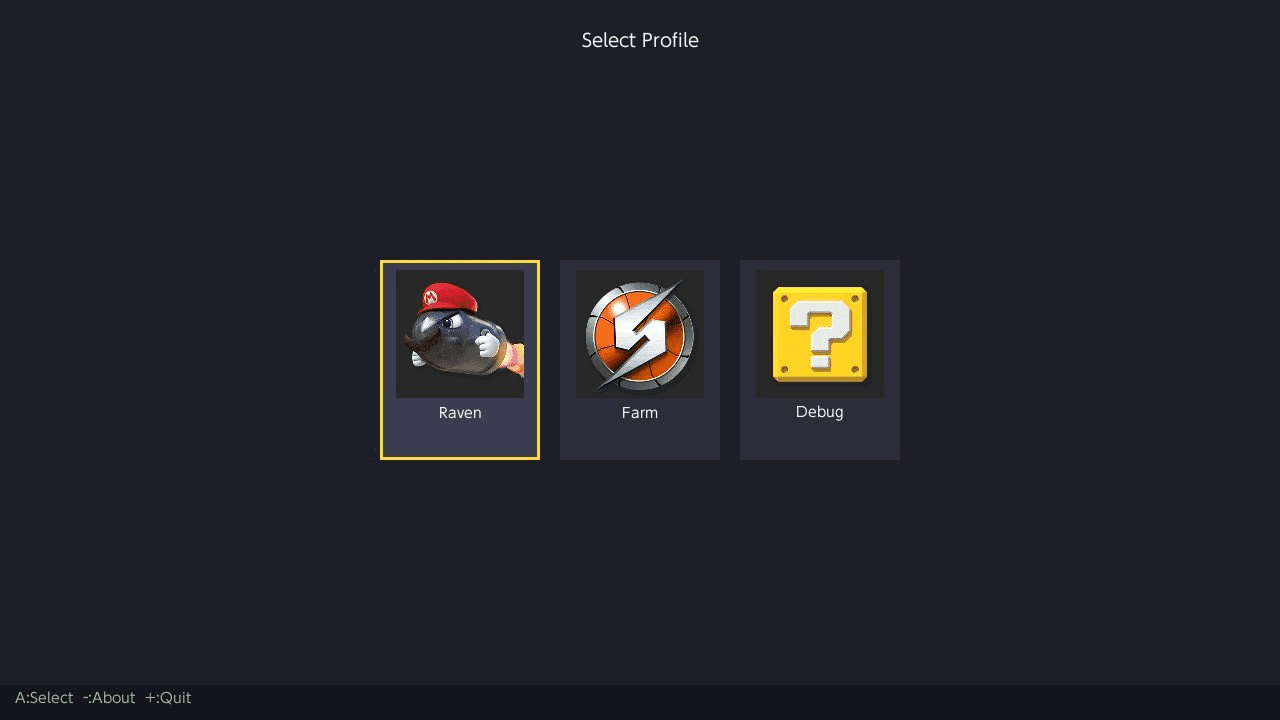
Profile Selection
On Switch, pkHouse loads all user profiles from the system.
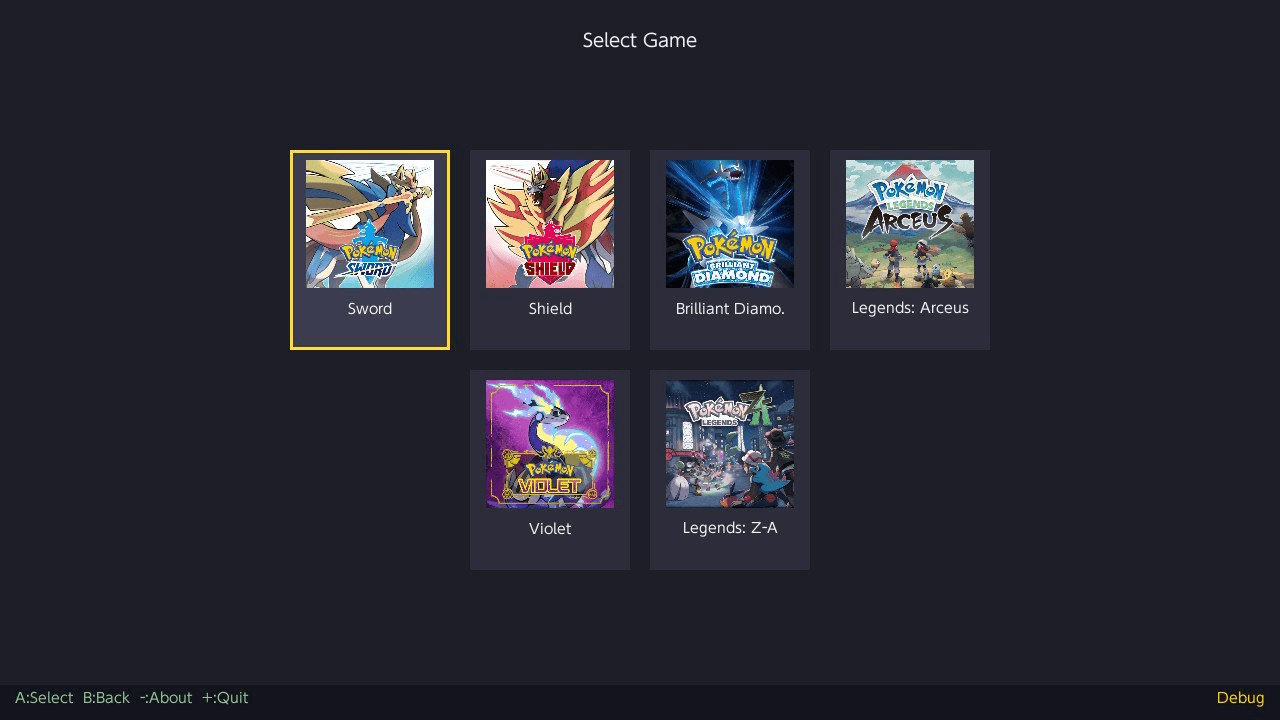
Select your profile, then choose a game.
The app detects which games have save data for the selected profile.
Your profile name is shown alongside the game name in all views.
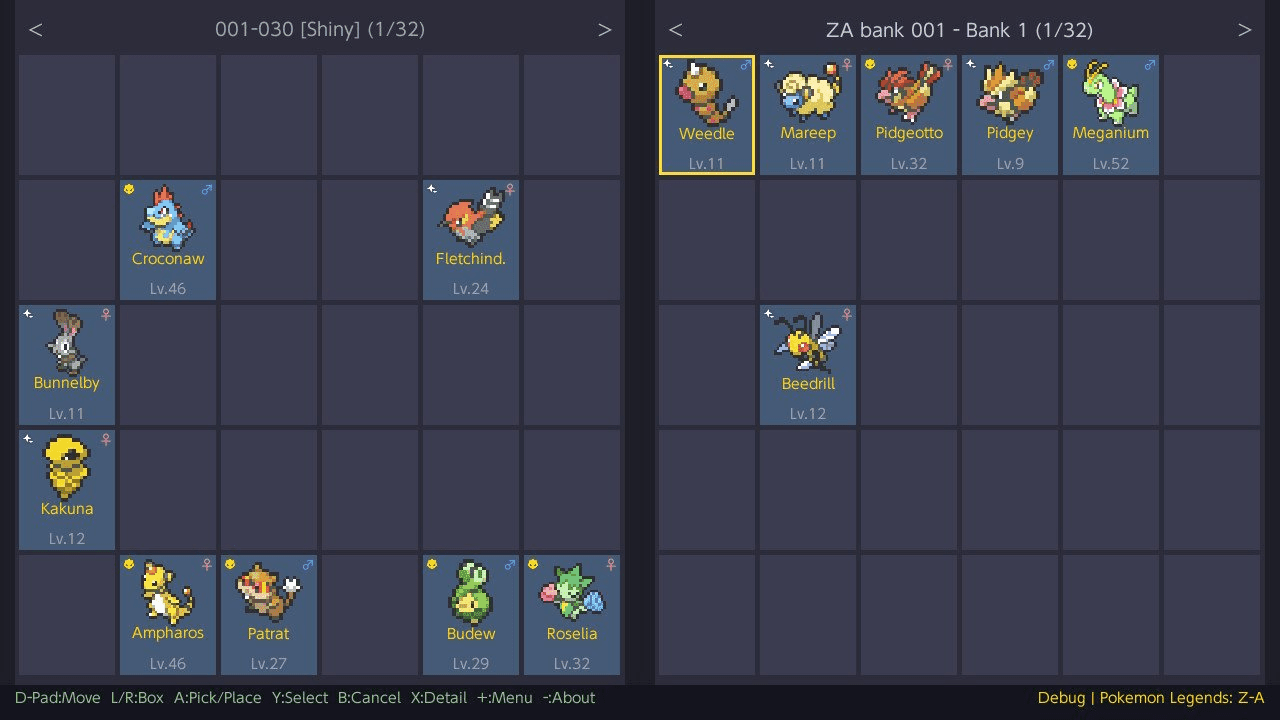
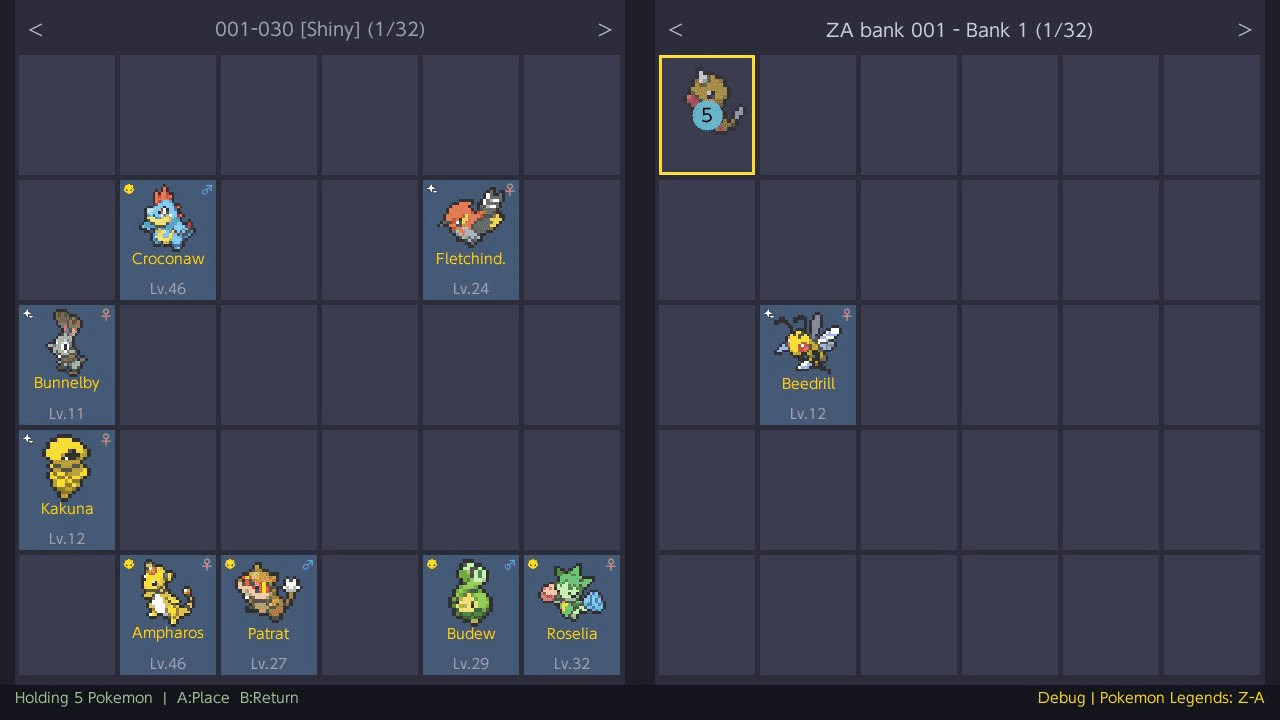
Two-Panel Box Viewer
In "title override mode", the main view displays your "game save" on the left and your "bank" on the right, side by side.
In "applet mode" (bank-only), both panels show "banks", allowing bank-to-bank transfers.
Navigate freely between both panels to move Pokemon back and forth.
View All Banks
Browse banks across all your games from a single screen. On the game selector, navigate below the game cards to the "View All Banks" option.
Banks are displayed in a grouped list organized by game family (e.g. "Sword / Shield", "Scarlet / Violet"), in the same order as the game cards.
Selecting a bank opens it in dual-bank mode — no save file needed. After picking your first bank, you're prompted to pick a second bank from the same game for side-by-side management.
Pick & Place
Press A on a Pokemon to pick it up, navigate to any slot (in either panel), and press A again to place it.
Placing on an occupied slot swaps the two Pokemon.
Press B to cancel and return the Pokemon to its original slot.
Press X while holding Pokemon to delete them (with confirmation). Useful for clearing boxes of rejected eggs.
Multi-Select
There are three ways to select Pokemon:
- Tap Y on individual Pokemon to toggle selection one by one.
- Hold Y + D-Pad to draw a rectangular selection across multiple slots at once.
- Double-tap Y to select all Pokemon in the current box (shown in green).
Only occupied slots are selected. Selected slots display a numbered badge showing the pick-up order.
Press A to pick up all selected Pokemon, then navigate to another box and press A to place them.
Regular selections (cyan) place Pokemon into the first available empty slots.
"Select all" selections (green) preserve original positions — each Pokemon is placed at the same slot index in the target box. All matching slots must be empty.
Press B to cancel and return all Pokemon to their original positions.
Selection is cleared when switching boxes or panels.
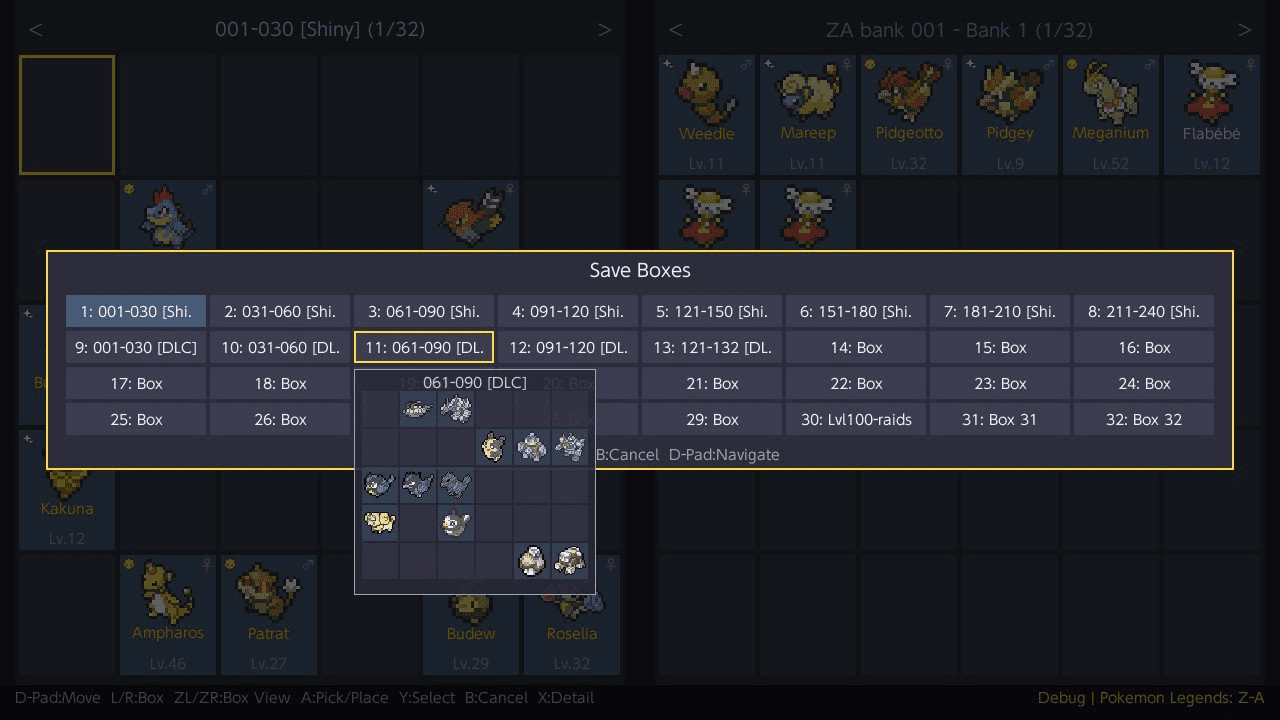
Box View
Press ZL to open a box overview of all save boxes, or ZR for all bank boxes.
Navigate the grid with the D-Pad. A semi-transparent preview of the highlighted box's contents (Pokemon sprites) appears as you move.
Press A to jump directly to that box, Y to rename the box (bank boxes only, max 16 characters), or B to cancel.
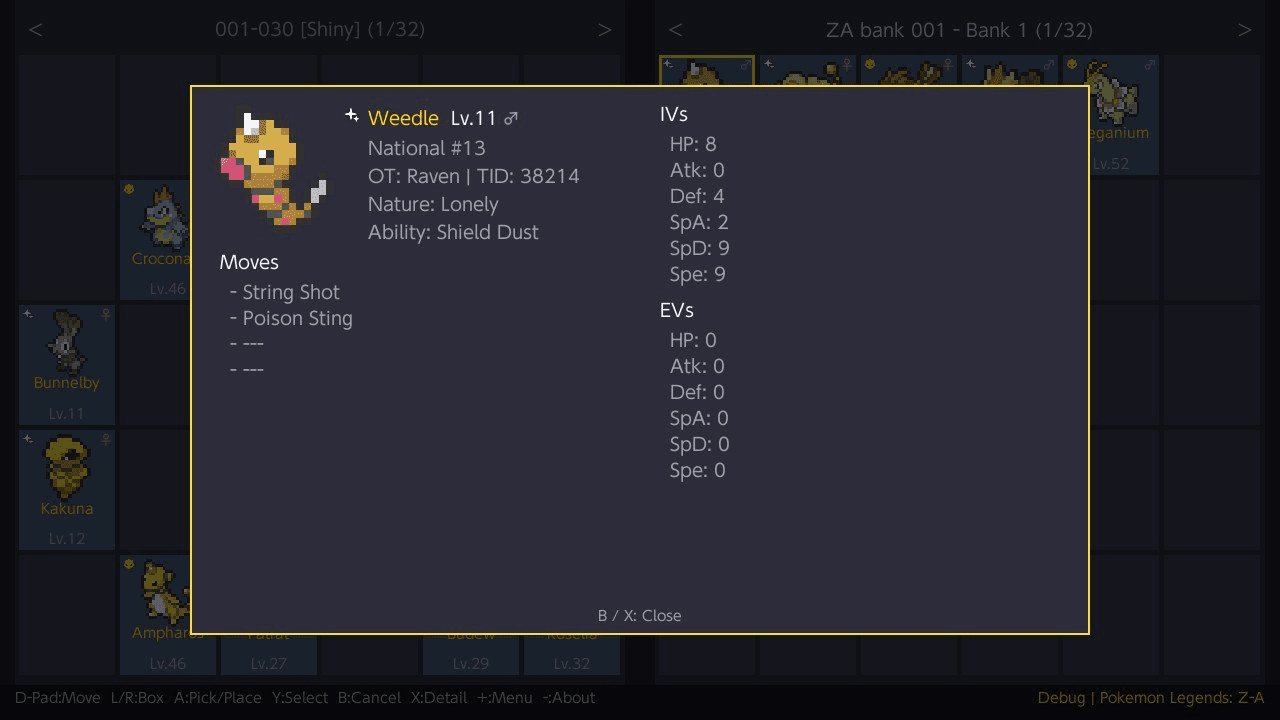
Pokemon Details
Press X on any Pokemon to view detailed information:
- Catch ball icon and species name, level, gender
- National Pokedex number
- Original Trainer (OT) and Trainer ID
- Nature and Ability
- Held item (or "---" if none)
- All 4 moves with type icons (2x2 grid layout)
- IVs displayed as a hexagonal radar chart (perfect 31s highlighted in gold)
- EVs displayed as a hexagonal radar chart
- Ribbons and marks (displayed as sprite icons with names)
- Technical data: PID, EC, raw TID/SID, and TSV
Sprites are form-aware — alternate forms like Alolan, Galarian, Hisuian, Paldean, Origin, Therian, and many others display their correct sprite.
Shiny Pokemon use their shiny color sprites. Both apply everywhere: box grid, detail popup, held overlay, box view preview, and wondercard list.
If a form or shiny sprite is not available, the base sprite is used as fallback.
Shiny names are displayed in gold.
Alpha Pokemon (Legends: Arceus / Z-A) show a dedicated icon.
Use L/Rin the detail view to navigate to the next or previous non-empty slot without closing the popup.
Bank System
Banks are local .bin files stored per game family. Paired games share the same bank folder, so you can move Pokemon between versions (e.g. Sword and Shield).
| Game Family | Bank Folder |
|---|---|
| Let's Go Pikachu / Eevee | banks/LetsGo/
|
| Sword / Shield | banks/SwordShield/
|
| Brilliant Diamond / Shining Pearl | banks/BDSP/
|
| Legends: Arceus | banks/LegendsArceus/
|
| Scarlet / Violet | banks/ScarletViolet/
|
| Legends: Z-A | banks/LegendsZA/
|
| FireRed / LeafGreen | banks/FireRedLeafGreen/
|
From the bank selector you can:
- Create a new bank (up to 32-character name). On Switch, available SD card space is checked before creating — if there isn't enough room, an error is shown.
- Rename an existing bank
- Delete a bank (with confirmation)
Each bank has the same box capacity as its game family (32 or 40 boxes).
The bank list shows the number of occupied slots for each bank.
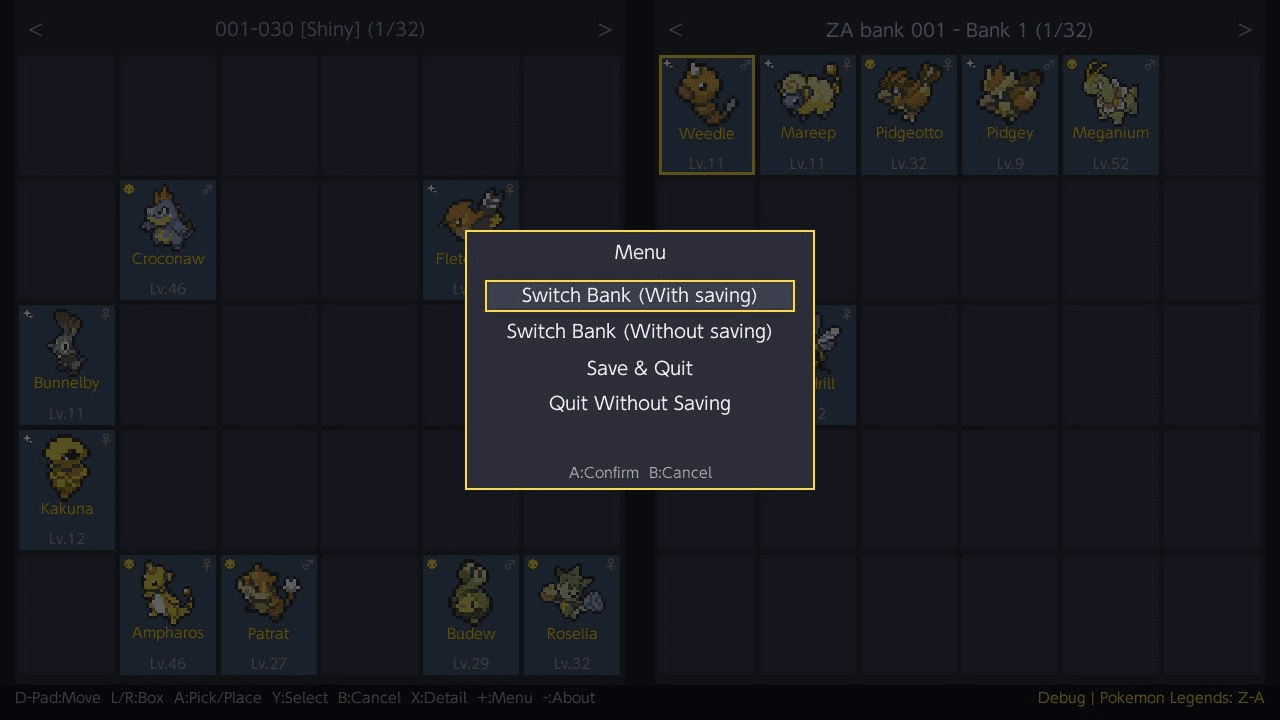
You can switch between banks from the main view via the menu. Both the save and bank are saved together before switching to prevent data inconsistency.
If no other bank is available when switching, the app offers to create a new one directly.
You cannot delete a bank that is currently loaded.
Backup System
When loading a game save on Switch, an automatic backup is created before any modifications:
backups/<profile>/<game>/<profile>_YYYY-MM-DD_HH-MM-SS/
This is a full copy of the mounted save directory.
The backup is only created once when initially selecting a game — switching banks does not trigger additional backups.
Before backing up, the app checks available SD card space. If there isn't enough free space (2x the save size), a warning is shown with the option to continue without a backup or cancel. If the backup itself fails, you'll see a similar prompt before proceeding.
Themes
pkHouse includes 7 color themes:
| Theme | Style |
|---|---|
| Default | Dark blue-gray (original) |
| HOME | Light pastels inspired by Pokemon HOME |
| HOME - Violet | Purple/lavender tones from HOME's Pokedex |
| HOME - Blue | Blue palette from HOME's GTS |
| HOME - Green | Green variant of the HOME style |
| HOME - Red | Red variant of the HOME style |
| Pikachu | Yellow and brown Pikachu colors |
Change themes from the "menu" (+ button) in the main view, or press Y on the profile/game selection screens.
A live preview is applied as you scroll through the list. Press A to confirm or B to cancel and revert.
Your theme choice is saved automatically and persists across sessions.
Language
pkHouse supports 9 languages:
- English (en)
- Deutsch (de)
- Español (es)
- Français (fr)
- Italiano (it)
- Nederlands (nl)
- Português (pt)
- Русский (ru)
- 日本語 (ja)
The app automatically detects the Switch system language on startup. You can also manually override the language from the menu (+ button → Language).
Your language choice is saved to language.txt and persists across sessions. Delete this file to revert to automatic system detection.
Missing keys automatically fall back to English.
Note: Korean (한국어), Simplified Chinese (简体中文), and Traditional Chinese (繁體中文) translation files are included but currently disabled. The system font (PlSharedFontType_Standard) does not include CJK/Korean glyphs - enabling these languages requires loading additional system fonts.
Search / Filter
Search for Pokemon across both panels (save and bank) using the "menu" (+ button > Search).
Available filters:
| Filter | Description |
|---|---|
| Species | Alphabetical picker — select a letter, then choose from species available in the current game (with sprites). Letters with no matching species are dimmed and skipped. |
| OT Name | Text search (substring, case-insensitive) |
| Shiny | Toggle to match shiny Pokemon only |
| Egg | Toggle to match eggs only |
| Alpha | Toggle to match alpha Pokemon only (Legends: Arceus / Z-A only) |
| Gender | Cycle: Any / Male / Female / Genderless |
| Level | Min and max level range |
| Perfect IVs | Off / 1+ (at least one 31 IV) / 6IV (all 31) |
| Ribbons/Marks | Off / Has Ribbon / Has Mark / Has Any |
Two result modes are available (selectable in the filter with Left/Right, defaults to Highlight):
- Highlight (default): Returns to the box view with matching Pokemon outlined in color and non-matching Pokemon dimmed. The highlight follows Pokemon as you move them between slots. In box view (ZL/ZR), boxes containing matches are outlined and matching slots are highlighted in the preview. Press B to clear highlights, or open the menu to start a new search.
- List: Results are shown as a scrollable list with status badges ([S] shiny, [A] alpha, [E] egg), species name, level, gender, and location. Press A to jump directly to a result in the box view, L/R to skip 10 results (hold to auto-repeat), X to go back and adjust filters, or B to close.
Wondercard Injection
Inject event wondercard files directly into your save as fully formed Pokemon. Access from the "menu" (+ button > Wondercard).
Place wondercard files in the corresponding folder on your SD card:
| Game Family | Folder | File Extension |
|---|---|---|
| Let's Go Pikachu / Eevee | wondercards/LetsGo/
|
.wb7 / .wb7full
|
| Sword / Shield | wondercards/SwordShield/
|
.wc8
|
| Brilliant Diamond / Shining Pearl | wondercards/BDSP/
|
.wb8
|
| Legends: Arceus | wondercards/LegendsArceus/
|
.wa8
|
| Scarlet / Violet | wondercards/ScarletViolet/
|
.wc9
|
| Legends: Z-A | wondercards/LegendsZA/
|
.wa9
|
The wondercard list shows each card's species, level, and shiny status. Select a card and press A to inject it into the currently selected box slot.
The injected Pokemon is fully generated from the wondercard data — PID, IVs, nature, ability, moves, OT, and all metadata are set according to the event's rules, matching official distribution behavior.
Wondercard files can be downloaded from the Project Pokemon EventsGallery repository.
Pokedex Auto-Registration
When transferring Pokemon from a bank to a save file, the Pokedex is automatically updated to register the Pokemon as caught. This solves the issue where version-exclusive Pokemon transferred between paired games would not appear in the Pokedex.
| Game Family | What gets registered |
|---|---|
| Scarlet / Violet (+ DLCs) | Caught, seen, heard, gender, language (Pokemon + save), shiny, display, neighbor discovery |
| Sword / Shield (+ DLCs) | Caught, seen (all gender/shiny regions), language, display, battled count, Gigantamax, Alcremie forms, Eternatus |
| Brilliant Diamond / Shining Pearl | Caught, gender, shiny, language, alternate form tracking (Unown, Rotom, Arceus, etc.) |
| Let's Go Pikachu / Eevee | Caught, seen, display, language, size tracking (height/weight), capture count |
| FireRed / LeafGreen | Caught, seen (with all 3 copy sync), Unown/Spinda PID |
Legends: Arceus and Legends: Z-A are excluded from auto-registration as all Pokemon are obtainable in a single playthrough without trading.
Pokedex completion rewards (Shiny Charm, diplomas) are triggered by the in-game NPC when the dex is complete.
Export Pokemon
Export Pokemon as decrypted .pk files compatible with PKHeX. Access from the "detail view" (single export) or the "menu" (batch export of selected Pokemon).
Exported files are saved to:
export/<GameFamily>/<filename>
Filenames follow the PKHeX naming convention: game tag, national dex number, form name, status flags ([S]hiny/[A]lpha/[E]gg), species name, and checksum.
| Game Family | File Extension |
|---|---|
| Let's Go Pikachu / Eevee | .pb7
|
| Sword / Shield | .pk8
|
| Brilliant Diamond / Shining Pearl | .pb8
|
| Legends: Arceus | .pa8
|
| Scarlet / Violet | .pk9
|
| Legends: Z-A | .pa9
|
| FireRed / LeafGreen | .pk3
|
LED Activity Indicator
The controller notification LED blinks during save and backup operations (save writes, bank saves, backup creation) to provide visual feedback that data is being written.
- Standard / OLED Switch: The Joy-Con or Pro Controller LED pulses briefly during writes.
- Switch Lite: The built-in motherboard notification LED lights up during writes and turns off when the operation completes.
This works automatically with no configuration required.
Note: To disable the LED Indicator, place a noled.cfg file in the pkHouse folder (next to the NRO). Remove it to re-enable. The file can be empty — only its presence is checked.
Save Integrity
- SCBlock saves (ZA, SV, SwSh, PLA): Decrypted, modified, and re-encrypted. A round-trip verification runs on load to confirm the cycle is lossless.
- BDSP saves: Flat binary with MD5 checksum, recalculated on every save.
- LGPE saves: BEEF block format with CRC16 checksums, recalculated on every save. Storage is compacted before writing.
- FRLG saves: GBA sector-based format (128KB, two save slots). CheckSum32 recalculated per sector on save. Both slots are updated.
- All saves are written in-place to preserve the Switch filesystem journal.
Controls
Main view
D-Pad - Move cursor
L/R - Switch box (hold to repeat)
ZL/ZR - Box view (save / bank)
A - Pick up, Place Pokemon
B - Cancel, Return held Pokemon
Y - Toggle multi-select
X - View Pokemon details, Delete held Pokemon, Export (in detail view)
Plus - Open menu
Minus - About
Profile selector
D-Pad Left/Right - Navigate profiles
A - Select profile
Y - Theme selector
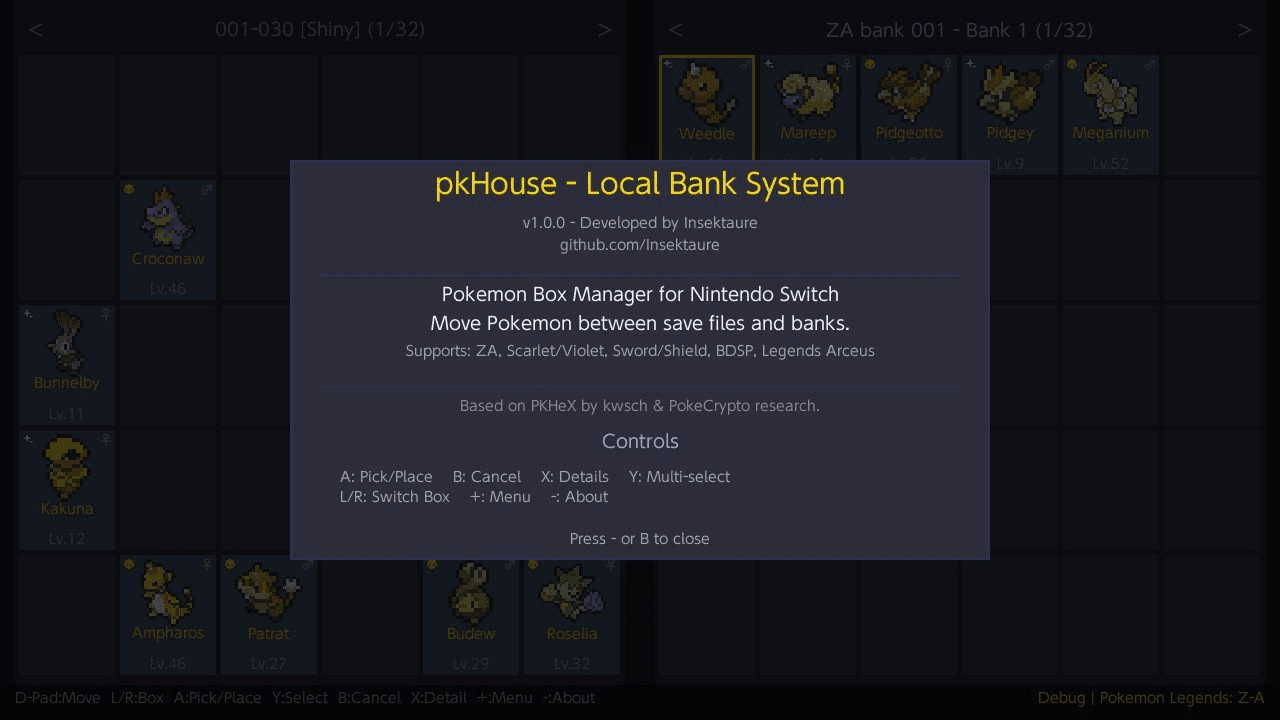
Minus - About
Plus - Quit
Game selector
D-Pad - Navigate game grid and "View All Banks" option
A - Select game / View All Banks
B - Back to profile selector
Y - Theme selector
Minus - About
Plus - Quit
Bank selector
D-Pad Up/Down - Navigate bank list
A - Open bank
Y - Create new bank
X - Rename bank
Plus - Delete bank
B - Back (main view if bank loaded, otherwise game selector)
Minus - About
Menu options
Title Override Mode
| Option | Description |
|---|---|
| Theme | Open the theme selector |
| Language | Open the language selector |
| Search | Search for Pokemon across both panels |
| Wondercard | Inject event wondercards as Pokemon (supported games only) |
| Export Selected | Export selected Pokemon as .pk files (shown when Pokemon are selected)
|
| Switch Bank | Save game and bank, return to bank selector |
| Change Game | Save everything, return to game selector |
| Save & Quit | Save everything and exit |
| Quit Without Saving | Exit without saving changes |
Applet / Bank-Only Mode
| Option | Description |
|---|---|
| Theme | Open the theme selector |
| Search | Search for Pokemon across both panels |
| Wondercard | Inject event wondercards as Pokemon (supported games only) |
| Export Selected | Export selected Pokemon as .pk files (shown when Pokemon are selected)
|
| Switch Left Bank | Save both banks, switch the left bank |
| Switch Right Bank | Save both banks, switch the right bank |
| Change Game | Save both banks, return to game selector |
| Save Banks | Save both banks |
| Quit | Exit |
Screenshots
|
|
Changelog
v1.10.2
- Add Wondercard support for Shiny Volcanion (Legends Z-A).
v1.10.1
- Add box-state icons in ZL/ZR all-boxes overview (box cell now shows a small icon on the left indicating its state).
v1.10.0
- Multi-Language Support
- Internationalization (i18n): the app now supports 9 languages, with automatic detection based on the Switch system language.
- Support English, Deutsch, Español, Français, Italiano, Nederlands, Português, Русский, 日本語
- Language Selector: New "Language" option in the menu (+) to manually override the language at any time. Your choice is saved and persists across sessions.
v1.9.1
- FireRed / LeafGreen Multiple Version Support
- All regional versions of FireRed / LeafGreen are now supported (English, Spanish, French, German, Italian, and Japanese)
- Each version is detected automatically by title ID
- All FRLG versions share the same bank folder, so Pokemon can be moved freely between any language version via the bank
- Japanese character encoding support
- Nicknames and OT names from Japanese FRLG saves now display correctly in hiragana / katakana
- Uses the per-Pokemon language byte, so Japanese Pokemon traded into other language saves (or stored in the bank) are always decoded correctly
- Box names in Japanese saves also display properly
- Game selector pagination
- When more than 12 games are available, the selector is paginated across multiple pages
- Navigate pages with L / R shoulder buttons or buttons on the left and right edges
v1.9.0
- New: Pokedex Auto-Registration
- Pokemon transferred from the bank or wondercard to a save file are now automatically registered in the Pokedex as caught.
- This fixes the potential issue where version-exclusive Pokemon transferred between dual games would not appear in the Pokedex.
- Supported games:
- Scarlet / Violet (+DLCs)
- Sword / Shield (+DLCs)
- Brilliant Diamond / Shining Pearl
- Let's Go Pikachu / Eevee
- FireRed / LeafGreen
- Legends: Arceus & Legends: Z-A are excluded since all Pokemon are available (no version exclusive).
- What gets registered:
- Caught & Seen status
- Gender, Language, and shiny flags
- Form tracking (BDSP alternate forms, SwSh Alcremie decorations, Eternatus Gigantamax)
- Display entry (form, gender, shiny) on first registration
- Size data and capture count (LGPE)
- Seen copies sync (FRLG)
- Neighbor discovery / "heard" entries (SV)
- Battled count (SwSh)
v1.8.1
- Consolidated game format data.
- Unified Pokemon data field offsets.
- Shared binary I/O helpers.
- Modularized input handling.
- Removed dead PC debug code.
v1.8.0
- Replaced the free-text keyboard species search with a visual two-step picker.
- First screen: alphabetical letter grid - select a letter to filter species.
- Second screen: species list with sprites, sorted alphabetically - select to set the filter.
- Only species available in the current game are shown.
- Letters with no matching species are dimmed and cannot be selected.
- Selected species appears with its sprite on the search filter screen.
- Select "-" to clear the species filter back to "any".
v1.7.6
- New "View All Banks" option:
- On the game selector screen - navigate below the game cards to access it.
- Banks are displayed in a grouped list with game headers (e.g. "Sword / Shield", "Scarlet / Violet").
- Selecting a bank opens it in dual-bank mode - no save file needed, just like applet mode.
- After picking your first bank, you're prompted to pick a second bank from the same game for side-by-side management.
- Full bank management (create, rename, delete) available once a bank is opened.
- Theme selector accessible from the all-banks list via Y.
- Navigation Improvements:
- Cursor now wraps between panels - pressing left at the edge of the left panel jumps to the right panel, and vice versa.
- When only one panel is loaded, the cursor wraps within it instead of getting stuck at the edge.
- Bug Fixes:
- Fixed bank list scroll not resetting when the cursor wraps around (top to bottom or bottom to top).
- Fixed left panel showing stale Pokemon data from a previously loaded bank when no left bank is loaded in dual-bank mode.
v1.7.5
- Shiny Sprites: shiny Pokemon now display their actual shiny color sprites.
- Form-Aware Sprites: alternate forms (Alolan, Galarian, Hisuian, Paldean, Origin, Therian, Unown letters, and 140+ others) now show their correct sprite.
- LED Activity Indicator: can now be disabled by placing a noled.cfg file in the pkHouse folder.
v1.7.4
- LED Activity Indicator: the controller LED now blinks during save and backup operations (save writes, bank saves, backup creation, ...). On Switch Lite, the built-in notification LED lights up during writes instead.
- Optimized UI Rendering: text measurement now uses the rendering cache, eliminating redundant FreeType glyph shaping.
v1.7.3
- Reduced input lag and improved frame responsiveness across all screens.
- Pokemon data is now cached per box, eliminating repeated decryption overhead.
- Text and UI labels are now cached, reducing rendering workload.
- Slot display info (species, name, level, shiny, etc.) is pre-computed and cached per box.
- Screen only redraws when something actually changes, saving CPU/GPU cycles.
- App should now be smoother !
v1.7.2
- Ball Icon — The Poke Ball used to catch the Pokemon is displayed next to the species name in the detail view.
- Move Type Icons — Each move in the detail view now shows its type icon.
- Moves in 2-Column Layout — Moves display in a 2x2 grid, matching the in-game battle layout.
- Technical Data — PID, EC, raw TID/SID, and TSV shown at the bottom of the detail view.
- Hold L / R shoulder buttons to auto-repeat navigating in detail view (no more mashing!)
v1.7.1
- Pokemon details now show all ribbons and marks as sprite icons with names.
- Pokemon details now display held item.
- Use L / R to jump to the previous / next non-empty slot without closing the detail popup.
- Filter Pokemon by Has Ribbon, Has Mark, or Has Any in the search menu.
- New: Export Pokemon to file.
- Export individual Pokemon as PKHeX-compatible .pk files from the detail view (X button).
- Select multiple Pokemon and export them all at once from the menu.
- Exported filenames include human-readable form names (Alolan, Galarian, Origin, etc.) instead of numeric form IDs.
v1.7.0
- New: Wondercard Injection
- Inject event wondercard files directly into your saves / banks as fully formed Pokemon
- Support : LGPE / SWSH / BDSP / PLA / SV / LZA
- Fully generates the Pokemon from wondercard data (PID, IVs, nature, ability, moves, OT, ribbons, ...)
- Matches official distribution behavior — shiny locks, fixed IVs, ability restrictions, and date windows are all respected
- Game-specific stat calculations are handled correctly (LGPE awakening values + CP, PLA ganbaru values, ...)
v1.6.0
- Add FireRed / LeafGreen support (game version 1.0.0).
v1.5.2
- Rename bank boxes from the box view (ZL / ZR) — press Y on any box to set a custom name (max 16 characters).
- Names are saved in the bank file and persist across sessions.
- Existing banks are fully backward compatible — unnamed boxes display as "Bank 1", "Bank 2", etc.
- Box view overlay now shows a subtitle: bank file name for bank panels, profile and game name for save panels.
- Long bank file names are truncated with (..) in the panel header to prevent overflow.
v1.5.1
- Hold L / R shoulder buttons to auto-repeat box switching.
- Hold L / R in search results list to fast-scroll through pages.
- New search highlight mode: matching Pokemon outlined in box view, non-matches dimmed.
- Search result modes: choose between Highlight (default) and List via the Mode row in search filter.
- Live highlight tracking: moving, swapping, or deleting Pokemon while highlights are active updates them in real-time.
- Boxes containing search matches are outlined in the box view (ZL / ZR) with matching Pokemon highlighted.
v1.5.0
- Search for Pokemon across both panels (save and bank) from the menu (+ → Search).
- Filter by species name, OT name, shiny, egg, alpha, gender, level range, and perfect IVs.
- Results displayed as a scrollable list with status badges: [S] shiny, [A] alpha, [E] egg.
- Press A to jump directly to a Pokemon in the box view; L/R to skip 10 results; X to adjust filters.
- Delete Pokemon: press X while holding Pokemon (single or multi-select) to delete them with confirmation.
v1.4.0
- 7 color themes (Default, HOME, HOME - Violet, HOME - Blue, HOME - Green, HOME - Red, Pikachu)
v1.3.1
- Save backup now checks SD card free space before backing up (requires 2x save size).
- Warning dialog if space is low, with option to continue without backup or cancel.
- If backup fails, a prompt is shown before proceeding.
- Creating a new bank now checks available SD card space first.
v1.3.0
- New applet mode (album/HB menu): bank-only access for all games, two banks side by side for bank-to-bank transfers.
- Banks that are currently in use cannot be deleted.
- When switching banks, the selector appears on the side being switched while the other panel stays visible.
- Bank switching now always saves game and bank together to prevent data corruption.
- Multi-select improvements: drag selection (hold Y + D-Pad) to select a rectangular group of Pokemon at once.
- Double-tap Y to select all Pokemon in the current box (green). Position-preserving placement for "select all" selections.
v1.2.0
- Implement all boxes overview for save and bank boxes (access with ZL / ZR).
v1.1.0
- Now supports Let's Go Pikachu / Eevee games.
v1.0.1
- Implement full swap history to avoid losing Pokemon when doing multiple in-place swaps then canceling with B button.
v1.0.0
- Initial release.