
PkBakery Switch: Difference between revisions
More actions
Created page with "{{Infobox Switch Homebrews |title=pkBakery |image=pkBakerySwitch.png |description=Nintendo Switch homebrew to edit Donuts in the Pokemon Legends Z-A save. |author=Insektaure |lastupdated=2026/03/15 |type=Save Editors and Converters |version=1.1.0 |license=GPL-2.0 |download=https://dlhb.gamebrew.org/switchhomebrews/pkBakerySwitch.7z |website=https://gbatemp.net/threads/pkbakery-donut-editor-for-pokemon-legends-z-a.679740/ |source=https://github.com/Insektaure/pkBakery |do..." |
No edit summary |
||
| Line 23: | Line 23: | ||
'''Disclaimer:''' This software is provided "as-is" without any warranty. While the app has been tested, it may contain bugs that could corrupt or damage your save files. Use at your own risk. The author is not responsible for any data loss or damage to your save data. | '''Disclaimer:''' This software is provided "as-is" without any warranty. While the app has been tested, it may contain bugs that could corrupt or damage your save files. Use at your own risk. The author is not responsible for any data loss or damage to your save data. | ||
Compatible with Pokemon Legends: Z-A version 2.0.1 / 2.0.2 only. | |||
== Features == | == Features == | ||
=== Save File Handling === | === Save File Handling === | ||
* Reads and writes Pokemon Legends: Z-A save files using SCBlock encryption (SwishCrypto) | * Reads and writes Pokemon Legends: Z-A save files using SCBlock encryption (SwishCrypto) | ||
| Line 124: | Line 122: | ||
== Controls == | == Controls == | ||
=== Profile Selector === | |||
D-Pad Left/Right - Navigate profiles | |||
A - Select profile | |||
Minus - About | |||
Plus - Quit | |||
=== Donut List === | === Donut List === | ||
D-Pad Up/Down - Move cursor | |||
L/R - Page up/down | |||
A - Edit selected donut | |||
X - Delete selected donut | |||
Y - Batch operations menu | |||
ZR - Toggle multi-select on current slot | |||
ZR+D-Pad/L/R - Select range while navigating | |||
ZL - Clear all selections | |||
Plus - Exit menu | |||
Minus - About | |||
B - Back to profile selector (with confirmation) | |||
=== Edit Mode === | === Edit Mode === | ||
D-Pad Up/Down - Select field | |||
D-Pad Left/Right - Adjust value +/−1 | |||
L/R - Adjust value +/−10 | |||
A or B - Return to list | |||
=== Import File Picker === | === Import File Picker === | ||
D-Pad Up/Down - Select file | |||
A - Import selected file | |||
X - Delete selected file | |||
B - Cancel | |||
=== Exit Menu Options === | === Exit Menu Options === | ||
| Line 250: | Line 227: | ||
== External links == | == External links == | ||
* | * GitHub - https://github.com/Insektaure/pkBakery | ||
* | * GBAtemp - https://gbatemp.net/threads/pkbakery-donut-editor-for-pokemon-legends-z-a.679740/ | ||
* Homebrew App Store - https://hb-app.store/switch/pkBakeryDonutEditor | |||
Latest revision as of 07:07, 27 April 2026
| pkBakery | |
|---|---|
 | |
| General | |
| Author | Insektaure |
| Type | Save Editors and Converters |
| Version | 1.1.0 |
| License | GPL-2.0 |
| Last Updated | 2026/03/15 |
| Links | |
| Download | |
| Website | |
| Source | |
pkBakery (also called the Donut Editor) is a Nintendo Switch homebrew application for editing donuts in Pokemon Legends: Z-A save files.
Disclaimer: This software is provided "as-is" without any warranty. While the app has been tested, it may contain bugs that could corrupt or damage your save files. Use at your own risk. The author is not responsible for any data loss or damage to your save data.
Compatible with Pokemon Legends: Z-A version 2.0.1 / 2.0.2 only.
Features
Save File Handling
- Reads and writes Pokemon Legends: Z-A save files using SCBlock encryption (SwishCrypto)
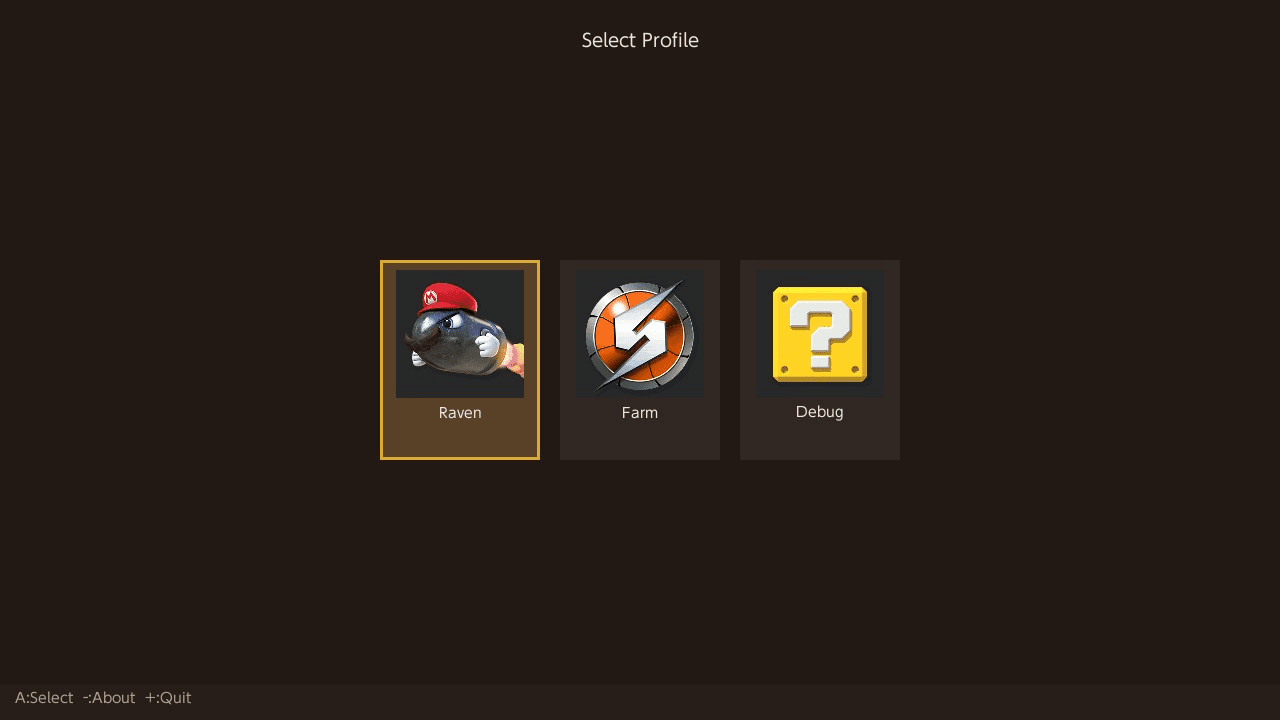
- Account-based profile selector - choose which Switch user's save to edit
- Automatic save backup before any modification (saved to
backups/<profile>/<timestamp>/) - Pre-backup storage check - warns if SD card free space is low, with option to continue without backup
- Graceful backup failure handling - prompts to continue or abort if backup fails
- In-place file writing (
r+b) to avoid Switch filesystem journal corruption - Round-trip verification after load
- Donut data accessed via SCBlock key
0xBE007476
Donut Editing
Each donut is 72 bytes, with up to 999 donuts per save. The following fields are editable:
| Field | Description |
|---|---|
| Berry 1–8 | 8 berry ingredients (66 valid berries) |
| Flavor 1–3 | Flavor effects (284 valid flavors, FNV-1a hashes) |
The following fields are auto-calculated from the berry ingredients:
| Field | Formula |
|---|---|
| Stars | Derived from total flavor score of all berries (0–5) |
| Calories | Sum of berry calories × star multiplier (10 + stars) / 10
|
| Level Boost | Sum of berry boosts × star multiplier (10 + stars) / 10
|
| Berry Name | Set to Berry 1 |
| Sprite ID | Derived from berry donut index and dominant flavor variant |
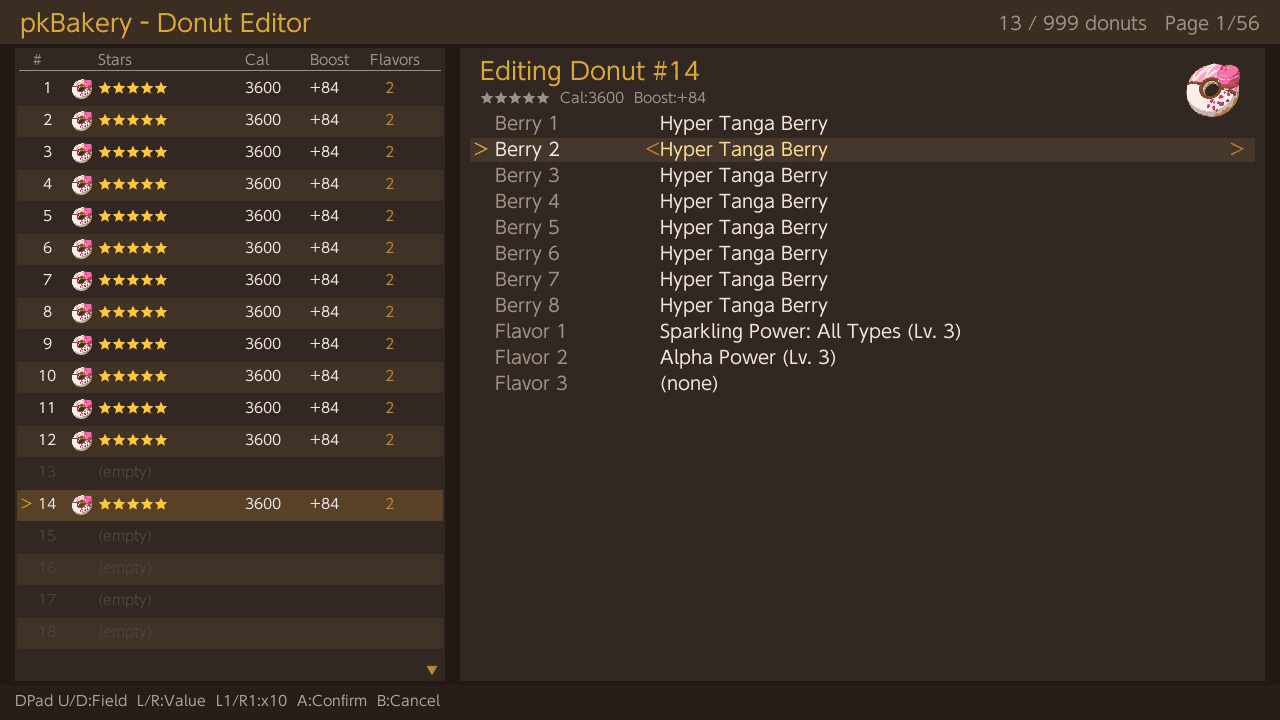
Berry and flavor fields cycle through all valid values with L/R, or jump by 10 with L1/R1. Empty slots auto-fill with a template donut (Sparkling Power: All Types Lv. 3 + Alpha Power Lv. 3) when entering edit mode.
Donut Legality
All derived stats (Stars, Calories, Level Boost, Berry Name, Sprite) are enforced to match in-game calculations. The star-based multiplier formula stat = sum * (10 + stars) / 10 was verified against in-game data across multiple berry combinations.
Export / Import
- Export a donut to a
.donutfile in the app'sdonuts/folder- Filename is customizable via the Switch software keyboard, with a default based on berry name and star rating
- Unsafe characters are stripped automatically
- Import a
.donutfile from thedonuts/folder into the selected slot- Scrollable file picker with alphabetical sorting
- Validates berry IDs, flavor hashes, and star rating before importing
- Applies a fresh timestamp and recalculates stats after import
- Delete
.donutfiles directly from the import file picker (X button)
Multi-Select
- ZR toggles selection on the current slot
- Hold ZR + D-pad to select a range of slots while scrolling
- Hold ZR + L/R to select an entire page at once
- ZL clears all selections
- When editing a donut with slots selected, you are prompted to apply the edited donut to all selected slots on exit
- Batch operations apply to all selected slots when multi-select is active
- Selected slots are highlighted with a
*marker and orange-tinted background - Selection count is shown in the header bar
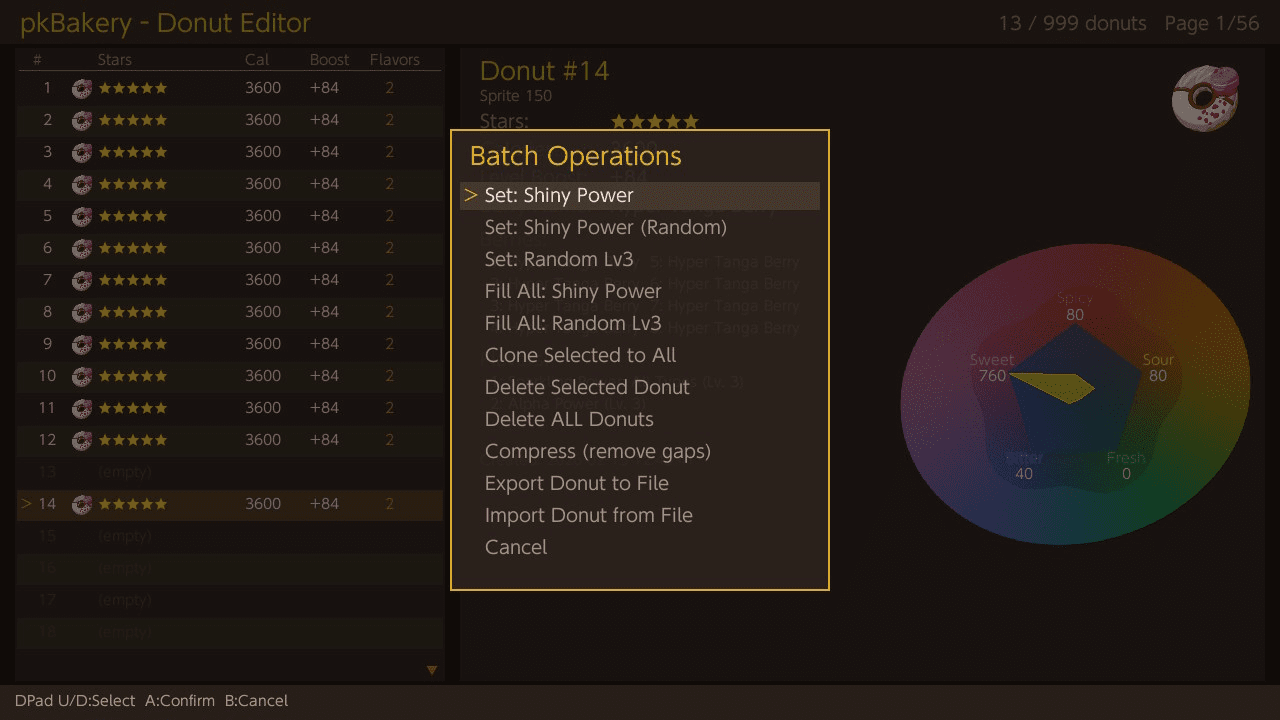
Batch Operations
- Set: Shiny Power - Fill the current slot (or all selected slots) with a 5-star shiny donut (Sparkling Power: All Types Lv. 3 + Alpha Power Lv. 3)
- Set: Shiny Power (Random) - Fill with a 5-star shiny donut with randomized Sparkling Power, size effects, and Catch Power flavors
- Set: Random Lv3 - Fill with random berries and 3 distinct random level-3 flavors
- Fill All: Shiny Power - Fill all 999 slots with 5-star shiny donuts with randomized flavors
- Fill All: Random Lv3 - Fill all 999 slots with random berries and 3 distinct random level-3 flavors each
- Clone Selected to All - Copy the current donut to all 999 slots with unique timestamps
- Delete Selected Donut - Clear the current slot (or all selected slots)
- Delete ALL Donuts - Wipe all 999 slots
- Compress - Remove gaps by packing non-empty donuts to the front
- Export Donut to File - Export the selected donut
- Import Donut from File - Import a donut from file
Controller LED Feedback
- Controller LEDs blink during save writes and backup operations
- Supports Joy-Con, Pro Controller, and Switch Lite built-in LED
- Can be disabled by placing a
noled.cfgfile in the app directory
Flavor Radar Chart
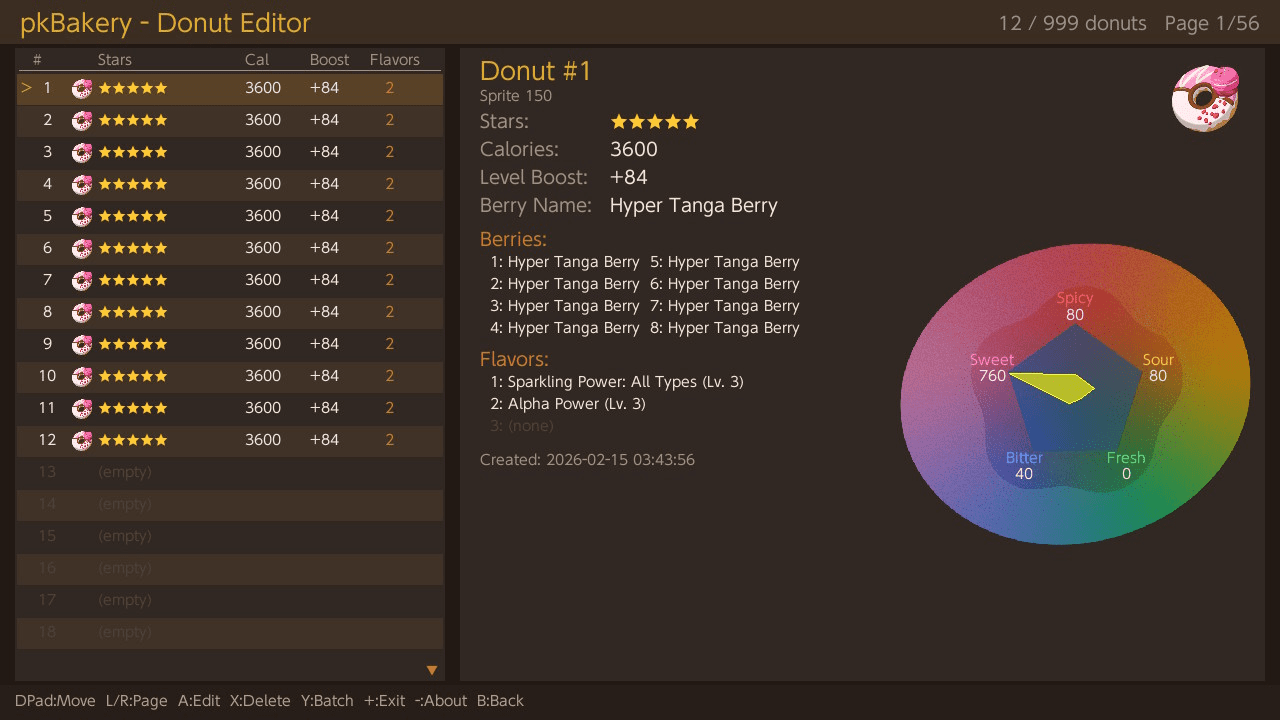
The detail panel displays a radar chart showing the donut's flavor profile (Spicy, Fresh, Sweet, Bitter, Sour) with per-vertex scaling matching the game's rendering.
Installation
Build requires devkitPro with libnx, SDL2, SDL2_ttf, SDL2_image, and dmntcht.
Place the compiled pkBakery.nro in sdmc:/switch/pkBakery/ on your SD card.
Launch via a homebrew launcher in title takeover mode. Applet mode is not supported due to memory constraints.
If you need to restore a backup, use a save manager such as Checkpoint or JKSV to import the backup files back onto your Switch.
Controls
Profile Selector
D-Pad Left/Right - Navigate profiles
A - Select profile
Minus - About
Plus - Quit
Donut List
D-Pad Up/Down - Move cursor
L/R - Page up/down
A - Edit selected donut
X - Delete selected donut
Y - Batch operations menu
ZR - Toggle multi-select on current slot
ZR+D-Pad/L/R - Select range while navigating
ZL - Clear all selections
Plus - Exit menu
Minus - About
B - Back to profile selector (with confirmation)
Edit Mode
D-Pad Up/Down - Select field
D-Pad Left/Right - Adjust value +/−1
L/R - Adjust value +/−10
A or B - Return to list
Import File Picker
D-Pad Up/Down - Select file
A - Import selected file
X - Delete selected file
B - Cancel
Exit Menu Options
- Save & Quit - Save changes and exit to home
- Save & Back to Profiles - Save changes and return to profile selector
- Quit without Saving - Exit without saving
- Cancel - Return to editor
Screenshots
|
|
Changelog
v1.1.0
- New: Multi-Select
- Select multiple donut slots using ZR (right trigger) to toggle individual slots
- Hold ZR + D-pad to select a range of slots as you scroll
- Hold ZR + L/R to select an entire page at once
- ZL (left trigger) clears all selections
- Edit a donut then apply it to all selected slots on exit
- Batch operations (Set Shiny, Set Random Lv3, Delete) apply to all selected slots when active
- Visual indicators: * marker and orange highlight on selected rows, selection count in header
- New: Controller LED Feedback
- Controller LEDs blink during save writes and backup operations
- Supports Joy-Con, Pro Controller, and Switch Lite built-in LED
- Can be disabled by placing a noled.cfg file in the app directory
- Edit Cancel
- Pressing B in edit mode now properly cancels - restores the slot to its original state
- Creating a new donut on an empty slot and pressing B returns the slot to empty
- UI Improvements
- Current profile name displayed in the status bar
- Improved hint bar readability with spacing after colons
- Better text contrast for empty slots when multi-selected
- Performance
- Text rendering is now cached - eliminates ~100 texture create/destroy cycles per frame
- Donut count is cached and only recalculated when data changes
- Significantly reduced CPU usage and improved responsiveness
v1.0.1
- Before backing up your save data, the app now checks if your SD card has enough free space (requires 2x the save file size).
- If space is low, a warning dialog shows how much space is available vs. needed, with the option to continue without a backup or cancel.
- If a backup fails for any other reason, you'll get a similar prompt before proceeding - no more silent failures.
v1.0
- First Release.
Credits
External links
- GitHub - https://github.com/Insektaure/pkBakery
- GBAtemp - https://gbatemp.net/threads/pkbakery-donut-editor-for-pokemon-legends-z-a.679740/
- Homebrew App Store - https://hb-app.store/switch/pkBakeryDonutEditor