
DowngradeFixer Switch: Difference between revisions
More actions
Created page with "{{Infobox Switch Homebrews |title=DowngradeFixer |image=DowngradeFixerSwitch.png |description=A payload designed to fix issues encountered when downgrading Nintendo Switch firmware. |author=sthetix |lastupdated=2025/11/20 |type=Payloads |version=1.0.0 |license=GPL-2.0 |download=https://dlhb.gamebrew.org/switchhomebrews/DowngradeFixerSwitch.7z |website=https://github.com/sthetix/DowngradeFixer |source=https://github.com/sthetix/DowngradeFixer |donation=https://www.buymeac..." |
No edit summary |
||
| Line 4: | Line 4: | ||
|description=A payload designed to fix issues encountered when downgrading Nintendo Switch firmware. | |description=A payload designed to fix issues encountered when downgrading Nintendo Switch firmware. | ||
|author=sthetix | |author=sthetix | ||
|lastupdated= | |lastupdated=2026/04/25 | ||
|type=Payloads | |type=Payloads | ||
|version=1.0. | |version=1.0.1 | ||
|license=GPL-2.0 | |license=GPL-2.0 | ||
|download=https://dlhb.gamebrew.org/switchhomebrews/DowngradeFixerSwitch.7z | |download=https://dlhb.gamebrew.org/switchhomebrews/DowngradeFixerSwitch.7z | ||
| Line 83: | Line 83: | ||
https://dlhb.gamebrew.org/switchhomebrews/images/DowngradeFixerSwitch-01.png | https://dlhb.gamebrew.org/switchhomebrews/images/DowngradeFixerSwitch-01.png | ||
==Changelog== | ==Changelog== | ||
'''v1.0.1''' | |||
* Changed the UI orientation to landscape. | |||
* Applied cosmetic enhancements using the same color nuance as TegraExplorer-Ext and Lockpick_RCM_Pro. | |||
* No new features added. | |||
'''v1.0''' | '''v1.0''' | ||
* First Release. | * First Release. | ||
Revision as of 00:50, 26 April 2026
| DowngradeFixer | |
|---|---|
 | |
| General | |
| Author | sthetix |
| Type | Payloads |
| Version | 1.0.1 |
| License | GPL-2.0 |
| Last Updated | 2026/04/25 |
| Links | |
| Download | |
| Website | |
| Source | |
| Support Author | |
DowngradeFixer is a Nintendo Switch RCM payload by sthetix that repairs common issues caused by downgrading firmware (e.g. broken Wi‑Fi/BT, NAND mismatch), intended to be launched via Hekate or a payload injector.
Features
- Automated Fix - Performs both key dumping and file deletion in one operation
- Silent Key Derivation - Keys are derived and saved without verbose output
- Flexible NAND Selection - Choose to fix SysNAND, EmuNAND, or both
- Safe Operation - Validates each step and reports status
- No Horizon OS Required - Runs as a bare-metal payload for maximum compatibility
- Multiple Reboot Options - Launch Hekate, custom payload, or power off
Important Notes
- Backup First: Always keep backups of your NAND and important files
- One Purpose: This tool is specifically designed for the downgrade fix process
- Clean Operation: Only performs the two essential operations - no extras
What It Does
DowngradeFixer automates two essential steps needed after downgrading your Nintendo Switch firmware:
- Dumps prod.keys - Extracts encryption keys required for various homebrew tools
- Deletes file
8000000000000073- Removes the problematic save file from the SYSTEM partition that can cause issues after downgrading
Usage
Recommended: Place Minerva on your SD card for optimal performance. You can get it from the latest Hekate release:
/bootloader/sys/libsys_minerva.bso
Launch
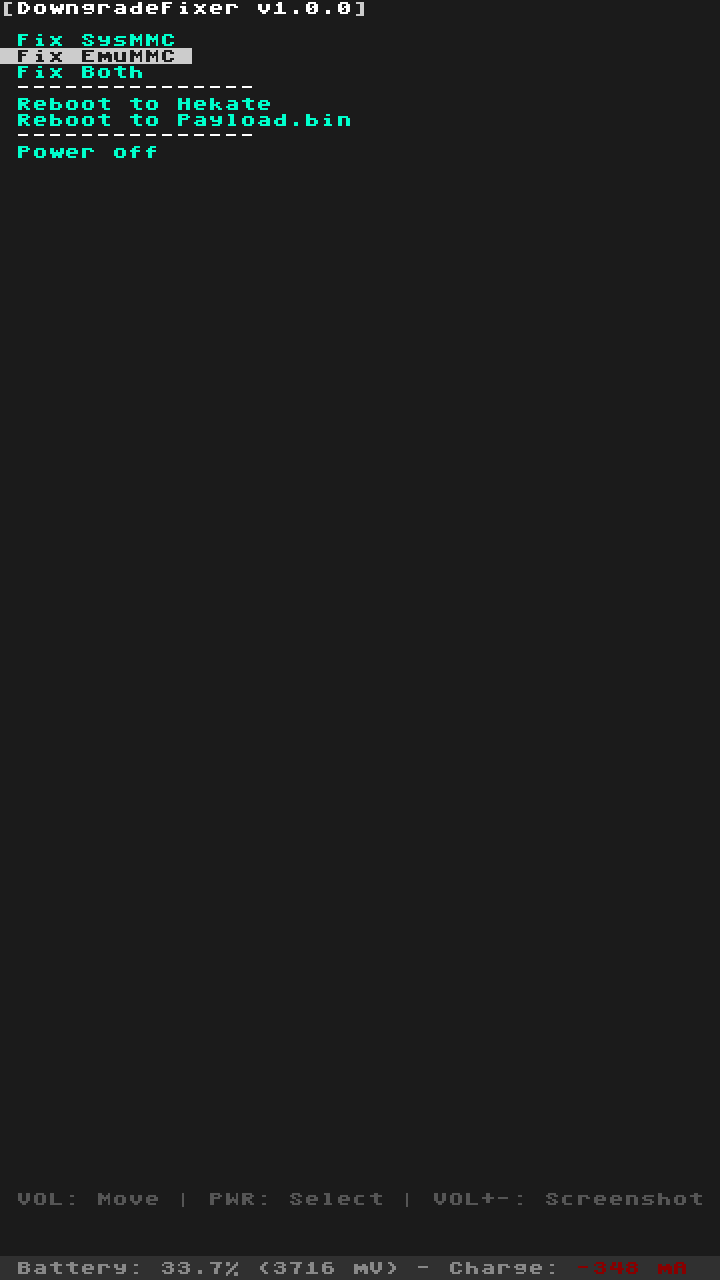
DowngradeFixer.binusing your preferred payload injector or chainloader.Select "Fix Downgrade" from the main menu, then choose:
- Fix SysNAND only - Process only the system NAND
- Fix EmuNAND only - Process only the emulated NAND (if available)
- Fix Both - Process both SysNAND and EmuNAND
The payload will silently:
- Derive encryption keys and save prod.keys to
/switch/prod.keys - Use those keys to access the encrypted SYSTEM partition
- Delete the file
8000000000000073from the SYSTEM/save partition - Display the results for each step
- Derive encryption keys and save prod.keys to
Reboot using one of the menu options:
- Reboot to Hekate - Boots
bootloader/update.binif present - Reboot to Payload.bin - Boots
payload.binfrom SD root if present - Power off - Safely powers down the console
- Reboot to Hekate - Boots
When to Use This
Use DowngradeFixer when:
- You've downgraded your Nintendo Switch firmware
- You're experiencing boot issues or system instability after downgrade
- You need to extract prod.keys and remove the problematic save file
Mariko-Specific Keys
Mariko units (V2 and Lite models) contain unique keys in protected keyslots. For these keys, you'll need to:
- Use
/switch/partialaes.keysfile - Use a brute-forcing tool like PartialAesKeyCrack
See the original Lockpick_RCM documentation for detailed instructions on Mariko key extraction.
Screenshots
Changelog
v1.0.1
- Changed the UI orientation to landscape.
- Applied cosmetic enhancements using the same color nuance as TegraExplorer-Ext and Lockpick_RCM_Pro.
- No new features added.
v1.0
- First Release.
Credits
This project is a streamlined version built upon:
- sthetix - Lockpick_RCM_Pro
- THZoria - Lockpick_RCMaster base
- shchmue - Original Lockpick_RCM
- CTCaer - Hekate bootloader and libraries
- Atmosphere-NX - Falcon keygen
- ReSwitched community - Development support