
NDSbible: Difference between revisions
From GameBrew
More actions
No edit summary |
|||
| Line 12: | Line 12: | ||
|source= | |source= | ||
}} | }} | ||
Bible reading software | Bible reading software with 5 versions of the Bible for the DS, including: | ||
* KJV | * KJV | ||
* ASV | * ASV | ||
Latest revision as of 10:39, 2 April 2026
| NDSbible | |
|---|---|
 | |
| General | |
| Author | dh2050 |
| Type | Other Apps |
| Version | 0.07c beta2 |
| License | Mixed |
| Last Updated | 2009/02/04 |
| Links | |
| Download | |
| Website | |
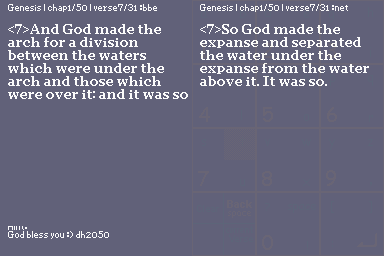
Bible reading software with 5 versions of the Bible for the DS, including:
- KJV
- ASV
- BBE
- WEB
- NET
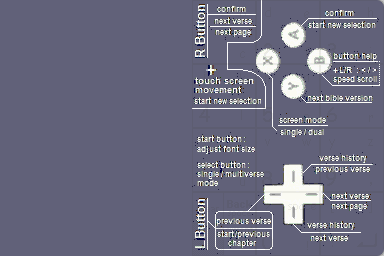
Controls
A - Confirm, Start new selection
B - Help
B+L/R - Speed scroll
X - Screen mode (single/dual)
Y - Next bible version
Up or L - Previous verse
Down - Next verse
Left/Right - Verse history
R - Confirm, Next verse
R+Touchscreen - Start new selection
Start - Font size
Select - Single/Multiverse mode
Screenshots
Changelog
net version fixed
- The net version conversion has missing spaces and maybe missing text that were lost along the conversion process
- Thanks to the people who translated the net bible link
- Just unzip & replace the net.ver in the ndsbibledh folder
v0.07c beta2
- Screen background has been brightened for the old ds users (et me know if the configuration is difficult to see)
- Search function included (the blank button is now for searching. might be frustrating though , but wont interfere with note taking after title is set)
- Nook selection menu is now easier to scroll , old on left,new on right. just scroll on the portion which you want to select
v0.07c beta
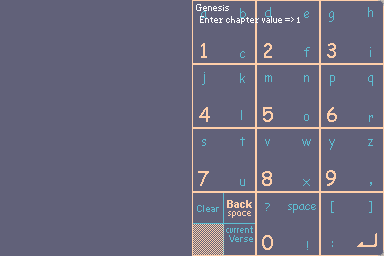
- (NDtex keypad system [notepad function]) - beta stage:
- This keypad system and character arrangements is unique to the ndsbible , so do give some feedback on the keypad system
- The system works like writing on a piece of paper[auto saves on every character input and deletion]
- Touch the touch screen when you can see the verse and the keypad will appear [keypad is faint behind the verse when not in use]
- Enter the letters you want by releasing the stylus of the touch screen
- The clear button clears the whole screen but doesn't clear the data that has been entered so you can start a new file
- The current verse button adds the current verse/chapter that you are at into the notepad
- You can access your notes as text via your sd card
- (Adjust screen brightness) !!! only use this if you are using NDS lite !!!
- To change the brightness, follow these steps
- 1st - close NDS-lite lid
- 2nd- hold R button
- 3rd - open NDS-lite lid for the next brightness mode
- Repeat until desired brightness is reached
v0.07b
- Added
- Graphical button layout on functions of buttons : do let me know if it can be improved in a practical way "press 'b' to find out"
- The long awaited enter button when selecting chapter and verse
- Modified
- Number button orientation has been set upright for our not so graphically inclined users
v0.07a
- An improved chapter and verse selection format (numpad style) just remember to press "R" or "A" to confirm your selection
- This numpad style is new so please comment on any way to improve the layout thks
- Note(remember to use dldi to patch the this file b4 using)
v0.07
- Major bug fix
- Data alignment fixed when changing of verse (hopefully no more confusion)
- New!
- Verse history
- Enhanced
- Better instruction section
- Previous chapter enabled in storymode and multiverse mode
External links
- DeviantArt - https://www.deviantart.com/dh2050