
OpenSupaplex Wii: Difference between revisions
More actions
No edit summary |
No edit summary |
||
| Line 4: | Line 4: | ||
|description=An open source 1:1 reimplementation of Supaplex for Nintendo Wii. | |description=An open source 1:1 reimplementation of Supaplex for Nintendo Wii. | ||
|author=sergiou87 | |author=sergiou87 | ||
|lastupdated= | |lastupdated=2026/03/23 | ||
|type=Puzzle | |type=Puzzle | ||
|version=7 | |version=7.2 | ||
|license=GPL-3.0 | |license=GPL-3.0 | ||
|download=https://dlhb.gamebrew.org/wiihomebrews/opensupaplexwii.7z | |download=https://dlhb.gamebrew.org/wiihomebrews/opensupaplexwii.7z | ||
| Line 59: | Line 59: | ||
==Changelog== | ==Changelog== | ||
'''v7.2''' | |||
* NEW: | |||
** Added support for Nintendo DS, RISC OS and PS2. | |||
** Switched music from OGG to MOD files, which are lighter and require less CPU usage, which means better performance! Thanks [https://github.com/mills32 @mills32] for this contribution! | |||
** Improved renderer for PSP, getting 60fps most of the time! Thanks [https://github.com/mills32 @mills32] for this contribution! | |||
** Thanks to the new renderer, audio quality in PSP has been also bumped. | |||
** Switched sound effects from OGG to WAV. They require less CPU usage, which is another increase in performance and simpler packaging! | |||
** Now there is only one build for both Old and New Nintendo 3DS. | |||
* FIXED: | |||
** Switch: Virtual keyboard wouldn't work when the game is running in Applet mode. Instead, now it will just autogenerate a player name. Thanks [https://github.com/rjimenezda @rjimenezda] for this fix! | |||
'''v7.1.1''' | '''v7.1.1''' | ||
*FIXED: | |||
FIXED: | **LB/L1/L and RB/R1/R buttons won't change the game speed anymore when used in the main menu. | ||
*LB/L1/L and RB/R1/R buttons won't change the game speed anymore when used in the main menu. | **Wii and Wii U ports had the wrong title in the Homebrew Channel. | ||
*Wii and Wii U ports had the wrong title in the Homebrew Channel. | **Fixed game panel behavior when you restart a level with it hidden. Now it will be shown when you restart a level. | ||
*Fixed game panel behavior when you restart a level with it hidden. Now it will be shown when you restart a level. | |||
'''v7.1''' | '''v7.1''' | ||
*NEW: | |||
NEW: | **Added support for PSP, Nintendo 3DS, Windows 64bit, macOS, PS3, Wii and Wii U. | ||
*Added support for PSP, Nintendo 3DS, Windows 64bit, macOS, PS3, Wii and Wii U. | **Added Music and Sound Effects. | ||
*Added Music and Sound Effects. | **Added support for saving and loading game states. | ||
*Added support for saving and loading game states. | **Bumped the default game speed from 5 to 10 (maximum). | ||
*Bumped the default game speed from 5 to 10 (maximum). | **Added different scaling modes. | ||
*Added different scaling modes. | **Improved gamepad controls: | ||
*Improved gamepad controls: | ***LB/L1/L and RB/R1/R buttons can be used in the main menu to select a different level set. | ||
**LB/L1/L and RB/R1/R buttons can be used in the main menu to select a different level set. | ***LB/L1/L and RB/R1/R buttons can be used in during the game to change the game speed. | ||
**LB/L1/L and RB/R1/R buttons can be used in during the game to change the game speed. | ***Y/Triangle button (X on Nintendo consoles) shows/hides the bottom panel during the game. | ||
**Y/Triangle button (X on Nintendo consoles) shows/hides the bottom panel during the game. | ***B/Circle button (A on Nintendo consoles) displays, for a few seconds, the number of red disks you have. | ||
**B/Circle button (A on Nintendo consoles) displays, for a few seconds, the number of red disks you have. | ***Back/Select/Minus during a game will exit the level immediately. | ||
**Back/Select/Minus during a game will exit the level immediately. | ***Start/Plus during a game will pause the game. | ||
**Start/Plus during a game will pause the game. | **Added advanced menu giving access to many options that were only available with a keyboard before, or not available at all: | ||
*Added advanced menu giving access to many options that were only available with a keyboard before, or not available at all: | ***Restart the level. | ||
**Restart the level. | ***Sound and music volume. | ||
**Sound and music volume. | ***Change the scaling mode. | ||
**Change the scaling mode. | ***Game speed. | ||
**Game speed. | ***Play/record demos. | ||
**Play/record demos. | ***Debug options (show FPS, load/save state, remove Zonks/Snik Snaks…). If you use these, your progress won't count. | ||
**Debug options (show FPS, load/save state, remove Zonks/Snik Snaks…). If you use these, your progress won't count. | ***And more things. | ||
**And more things. | **Added command line options in platforms that support this. Just run the game with --help for more info. | ||
*Added command line options in platforms that support this. Just run the game with --help for more info. | *FIXED: | ||
**Fixed many MANY bugs. Now the game should behave exactly as the original, validated by almost 7000 pre-recorded demos. | |||
FIXED: | |||
*Fixed many MANY bugs. Now the game should behave exactly as the original, validated by almost 7000 pre-recorded demos. | |||
'''v7.0''' | '''v7.0''' | ||
Revision as of 02:54, 27 March 2026
| OpenSupaplex | |
|---|---|
 | |
| General | |
| Author | sergiou87 |
| Type | Puzzle |
| Version | 7.2 |
| License | GPL-3.0 |
| Last Updated | 2026/03/23 |
| Links | |
| Download | |
| Website | |
| Source | |
Supaplex is a video game created by Philip Jespersen and Michael Stopp, two Swiss students, and published by Digital Integration in 1991.
Since then the source code has been lost. Some enthusiasts have disassembled the game, fixed many bugs, and added many features. Today the game and the so-called speed fix can be downloaded free from here. The source code for the speed fix is likewise, unavailable.
OpenSupaplex is a 1:1 reimplementation of the original game in C and SDL, with just a few changes to make it easy to use with game controllers, and also easy to port to any platform.
User guide
About Supaplex
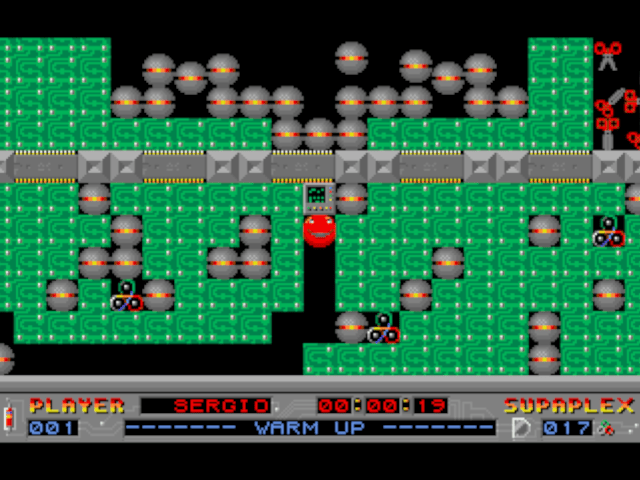
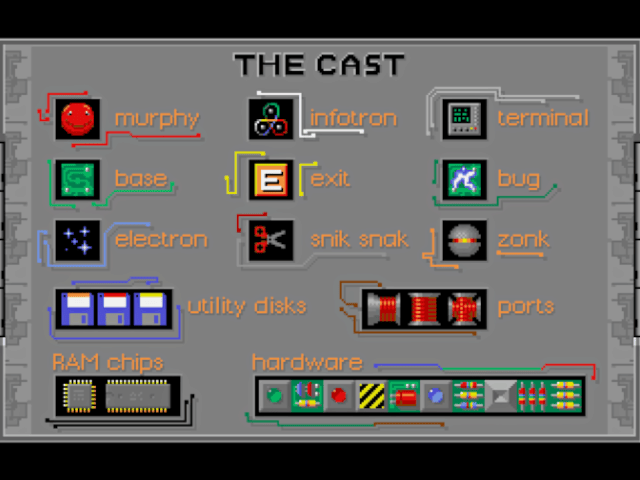
Supaplex is an extended clone of Boulder Dash, but it introduces a number of new elements that were not present in Boulder Dash, including bugs, pieces of base that randomly cause a life-threatening electrostatic discharges, Ports, which limit Murphy's movement to specific directions, and terminals, which set off yellow Utility Disks.
Utility Disks are explosive floppy disks and come in three different colors: Orange Disks work like Zonks, but explode when hit or when falling. Yellow Disks do not fall yet may be pushed in any direction, but not pulled (which allows creating Sokoban-like puzzles), and explode when the Terminal is used. Red Disks can be carried and dropped when convenient, exploding seconds after.
Supaplex is the first Boulder Dash-like game that is not fully grid-based: while the playing field is an obvious grid, the objects do not "snap" from one grid position to another, but can be halfway or "in between" grid positions while moving or falling. This behavior has led to a number of well-known bugs that can be turned to the player's advantage, many of which need to be exploited to complete fan-made levels. For instance, by turning around quickly, the player can cause an enemy or rock to 'bounce' off Murphy.
The game also applies "gravity" on some levels, which means that Murphy will fall down empty spaces and will be unable to go back up, unless he climbs up by using bases. Gravity is not actually designated - the player can only notice via trial-and-error.
Controls
Note: Only the Wiimote sideways is supported. Other controllers are not supported.
Pointer - Cursor
D-Pad - Move up/down/left/right
1+D-Pad - Removing bases/infotrons next to Murphy
1 - Hold to detonate red disk
2 - Show/hide bottom game panel
Minus - Exit/back
Plus - Pause
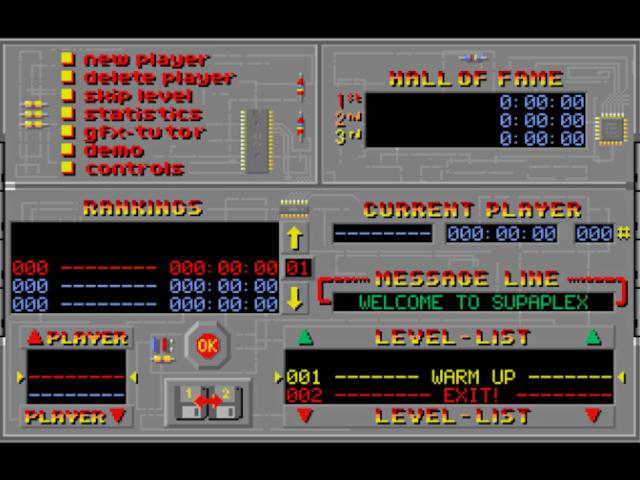
Screenshots
Known issues
- Music is not "clean": it sounds a bit choppy and "gets stuck" when loading a level.
- 240p mode is not supported.
- Widescreen mode is not supported.
- Only the Wiimote sideways is supported. Other controllers are either not supported, or the digital pad is "rotated".
Changelog
v7.2
- NEW:
- Added support for Nintendo DS, RISC OS and PS2.
- Switched music from OGG to MOD files, which are lighter and require less CPU usage, which means better performance! Thanks @mills32 for this contribution!
- Improved renderer for PSP, getting 60fps most of the time! Thanks @mills32 for this contribution!
- Thanks to the new renderer, audio quality in PSP has been also bumped.
- Switched sound effects from OGG to WAV. They require less CPU usage, which is another increase in performance and simpler packaging!
- Now there is only one build for both Old and New Nintendo 3DS.
- FIXED:
- Switch: Virtual keyboard wouldn't work when the game is running in Applet mode. Instead, now it will just autogenerate a player name. Thanks @rjimenezda for this fix!
v7.1.1
- FIXED:
- LB/L1/L and RB/R1/R buttons won't change the game speed anymore when used in the main menu.
- Wii and Wii U ports had the wrong title in the Homebrew Channel.
- Fixed game panel behavior when you restart a level with it hidden. Now it will be shown when you restart a level.
v7.1
- NEW:
- Added support for PSP, Nintendo 3DS, Windows 64bit, macOS, PS3, Wii and Wii U.
- Added Music and Sound Effects.
- Added support for saving and loading game states.
- Bumped the default game speed from 5 to 10 (maximum).
- Added different scaling modes.
- Improved gamepad controls:
- LB/L1/L and RB/R1/R buttons can be used in the main menu to select a different level set.
- LB/L1/L and RB/R1/R buttons can be used in during the game to change the game speed.
- Y/Triangle button (X on Nintendo consoles) shows/hides the bottom panel during the game.
- B/Circle button (A on Nintendo consoles) displays, for a few seconds, the number of red disks you have.
- Back/Select/Minus during a game will exit the level immediately.
- Start/Plus during a game will pause the game.
- Added advanced menu giving access to many options that were only available with a keyboard before, or not available at all:
- Restart the level.
- Sound and music volume.
- Change the scaling mode.
- Game speed.
- Play/record demos.
- Debug options (show FPS, load/save state, remove Zonks/Snik Snaks…). If you use these, your progress won't count.
- And more things.
- Added command line options in platforms that support this. Just run the game with --help for more info.
- FIXED:
- Fixed many MANY bugs. Now the game should behave exactly as the original, validated by almost 7000 pre-recorded demos.
v7.0
- This is the initial version for Nintendo Switch and PS Vita. I chose version 7.0 because the original game and its subsequent updates went up to 6.3.