
KeyX Switch: Difference between revisions
From GameBrew
More actions
1.3.1 |
No edit summary |
||
| Line 4: | Line 4: | ||
|description=Nintendo Switch Key Helper - Supports Turbo and Button Remapping. | |description=Nintendo Switch Key Helper - Supports Turbo and Button Remapping. | ||
|author=TOM-BadEN | |author=TOM-BadEN | ||
|lastupdated=2025/12/ | |lastupdated=2025/12/16 | ||
|type=Overlays | |type=Overlays | ||
|version=1.3 | |version=1.4.3 | ||
|license=Mixed | |license=Mixed | ||
|download=https://dlhb.gamebrew.org/switchhomebrews/KeyXSwitch.7z | |download=https://dlhb.gamebrew.org/switchhomebrews/KeyXSwitch.7z | ||
| Line 23: | Line 23: | ||
== Features == | == Features == | ||
* General: | * General: | ||
** | ** Beautiful and modern UI design. | ||
** Dynamically modify turbo and mapping settings. | ** Dynamically modify turbo and mapping settings. | ||
** Optional | ** Record macros directly using Tesla overlay with comprehensive guidance. | ||
** Optional notification popups. | |||
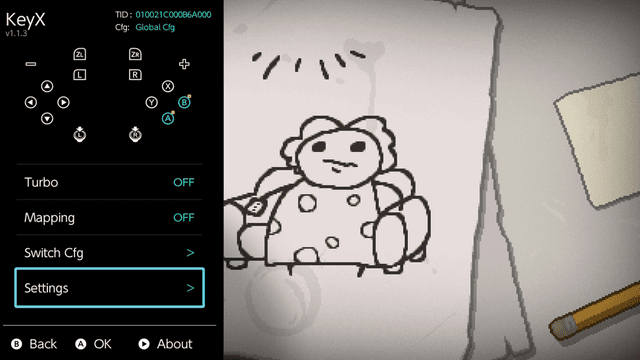
** Blue icons on home page indicate remapped buttons. | |||
** Yellow badges indicate turbo-enabled buttons. | |||
** Red badges indicate macro-bound buttons. | |||
* Key Mapping: | * Key Mapping: | ||
** Remap 16 buttons (A/B/X/Y/L/R/ZL/ZR/D-pad/SELECT/START/L3/R3). | ** Remap 16 buttons (A/B/X/Y/L/R/ZL/ZR/D-pad/SELECT/START/L3/R3). | ||
| Line 39: | Line 43: | ||
** Global and per-game configuration. | ** Global and per-game configuration. | ||
** Auto-remembers on/off state. | ** Auto-remembers on/off state. | ||
* Macro: | |||
** Auto-remembers macro function on/off state. | |||
** Both stick and button states are recorded. | |||
** Maximum recording duration: 30 seconds. | |||
** Recording frame rate: 120 FPS. | |||
** Press shortcut key once for single playback. | |||
** Hold shortcut key for loop playback. | |||
** Press shortcut key again during playback to cancel. | |||
** beautiful macro editor. | |||
** Online macro download supported, contributions welcome. | |||
* Memory Usage: | * Memory Usage: | ||
** System module: only | ** System module: only 343 KB. | ||
** Notification popup: extra 688 KB. | ** Notification popup: extra 688 KB. | ||
** Popup only uses memory when triggered. | ** Popup only uses memory when triggered. | ||
| Line 149: | Line 163: | ||
==Changelog== | ==Changelog== | ||
'''v1.4.3''' | |||
* To fix the crash issue introduced in version 1.4.2, this version has been released | |||
* In version 1.4.2, the newly added network functionality can cause a crash if Tesla’s ovlloader memory is set to 4MB. | |||
* Updated the libultrahand library to the latest version. | |||
* Made minor UI adjustments to the script settings screen. | |||
* Thanks to [https://github.com/ppkantorski @ppkantorski] for providing the fix | |||
'''v1.4.2''' | |||
* Added a check-for-updates feature. You can press the + button in the settings menu to update online. | |||
* A brand-new macro recording, playback, and editing algorithm. Old version macros (V1) remain compatible. | |||
* The macro (V2) recording sampling rate has been upgraded from 60 FPS to 120 FPS. | |||
* Improved the recording and playback accuracy of macros (V2). | |||
* Significantly reduced the file size of macros (V2). Reduced by 20%–50% compared to V1. | |||
* Fixed the gaps between timeline color blocks in the macro editor. | |||
'''v1.4.1''' | |||
* Added Macro Editor in OVL | |||
** Modern and polished UI design | |||
** Supports creating, deleting, and resetting actions | |||
** Supports batch editing actions (batch only supports reset or delete) | |||
** Supports undoing changes (cannot undo after saving) | |||
* Added Whitelist Feature | |||
** When the whitelist is enabled, all features of this project can be used in non-game applications (such as emulators) | |||
** The whitelist can be configured directly in the OVL menu | |||
* Added Ultra-Fast Mode for Turbo Speed | |||
** Due to underlying limitations, the turbo frequency cannot remain stable. It works, but precise timing control is not possible | |||
* Optimized Popup Notification Text Logic | |||
** Now supports accurate notifications for specific feature states | |||
** Includes built-in multilingual support | |||
* Redesigned Macro Hotkey Settings Interface | |||
** More intuitive and convenient | |||
* Optimized OVL Macro Code Structure, Decoupling UI and Data Processing | |||
'''v1.3.1''' | '''v1.3.1''' | ||
* Fixed an BUG with JoyCon and Pro Controllers, where enabling both Turbo and Mapping at the same time could cause incorrect button behavior | * Fixed an BUG with JoyCon and Pro Controllers, where enabling both Turbo and Mapping at the same time could cause incorrect button behavior | ||
Revision as of 02:49, 19 December 2025
| KeyX | |
|---|---|
 | |
| General | |
| Author | TOM-BadEN |
| Type | Overlays |
| Version | 1.4.3 |
| License | Mixed |
| Last Updated | 2025/12/16 |
| Links | |
| Download | |
| Website | |
| Source | |
KeyX (formerly AutoKeyLoop) is a button assistant homebrew with turbo and key remapping support. Features global or per-game configuration with auto-start memory. Consists of Tesla overlay and system module.
Features
- General:
- Beautiful and modern UI design.
- Dynamically modify turbo and mapping settings.
- Record macros directly using Tesla overlay with comprehensive guidance.
- Optional notification popups.
- Blue icons on home page indicate remapped buttons.
- Yellow badges indicate turbo-enabled buttons.
- Red badges indicate macro-bound buttons.
- Key Mapping:
- Remap 16 buttons (A/B/X/Y/L/R/ZL/ZR/D-pad/SELECT/START/L3/R3).
- Works together with turbo without conflicts.
- Perfectly avoids system warning popups about button changes.
- Global and per-game configuration.
- Auto-remembers on/off state.
- Turbo:
- Turbo for 12 buttons (A/B/X/Y/L/R/ZL/ZR/D-pad).
- Multiple buttons can turbo simultaneously.
- Non-turbo buttons work normally during turbo.
- Customizable press and release duration.
- Global and per-game configuration.
- Auto-remembers on/off state.
- Macro:
- Auto-remembers macro function on/off state.
- Both stick and button states are recorded.
- Maximum recording duration: 30 seconds.
- Recording frame rate: 120 FPS.
- Press shortcut key once for single playback.
- Hold shortcut key for loop playback.
- Press shortcut key again during playback to cancel.
- beautiful macro editor.
- Online macro download supported, contributions welcome.
- Memory Usage:
- System module: only 343 KB.
- Notification popup: extra 688 KB.
- Popup only uses memory when triggered.
Installation
The CN and EN versions differ only in the Tesla overlay title; everything else is identical.
Copy files to SD card root:
- /atmosphere/contents/4100000002025924/
- /atmosphere/contents/0100000000251020
- /switch/.overlays/ovl-KeyX.ovl
Supported languages:
- en.json (English)
- zh-cn.json (No need to add, already hardcoded)
- zh-tw.json (Traditional Chinese)
- ja.json (Japanese)
- ko.json (Korean)
- fr.json (French)
- de.json (German)
- it.json (Italian)
- es.json (Spanish)
- pt.json (Portuguese)
- ru.json (Russian)
- nl.json (Dutch)
Current function performance issues:
| Function | Joycon | 3rd-Party Split (MoPai Twin Star Gen2) | JC(Bluetooth) | LITE | 3rd-Party Regular (Octopus 4) | PRO |
|---|---|---|---|---|---|---|
| Turbo | Perfect ① | Perfect ① | Not Available | Perfect | Available ② | Not Tested ③ |
| Key Mapping | Perfect | Perfect | Perfect | Perfect | Perfect | Perfect |
| Macro | Available ④ | Available ④ | Not Available | Perfect | Available ④ | Not Tested ③ |
| Combined Functions | Joycon | 3rd-Party Split (MoPai Twin Star Gen2) | JC(Bluetooth) | LITE | 3rd-Party Regular (Octopus 4) | PRO |
|---|---|---|---|---|---|---|
| Turbo + Mapping | Perfect ① | Perfect ① | Not Available | Perfect | Available ② | Not Tested ③ |
| Turbo + Macro | Turbo function temporarily disabled during macro playback | |||||
| Mapping + Macro | If the keys being played have been remapped, incorrect input may occur |
Notes:
- ① Only the right Joy-Con supports turbo. For unknown reasons, if both sides support turbo, the joystick may fail to auto-reset after completely stopping button presses, requiring manual touch to restore.
- ② Low probability that after completely stopping button presses, the joystick may fail to auto-reset, requiring manual touch to restore.
- ③ Theoretically the same effect as Octopus, but I don't have a PRO controller, so it's just theoretical.
- ④ After macro ends, there's a probability the joystick may fail to auto-reset, requiring manual touch to restore.
Screenshots
Changelog
v1.4.3
- To fix the crash issue introduced in version 1.4.2, this version has been released
- In version 1.4.2, the newly added network functionality can cause a crash if Tesla’s ovlloader memory is set to 4MB.
- Updated the libultrahand library to the latest version.
- Made minor UI adjustments to the script settings screen.
- Thanks to @ppkantorski for providing the fix
v1.4.2
- Added a check-for-updates feature. You can press the + button in the settings menu to update online.
- A brand-new macro recording, playback, and editing algorithm. Old version macros (V1) remain compatible.
- The macro (V2) recording sampling rate has been upgraded from 60 FPS to 120 FPS.
- Improved the recording and playback accuracy of macros (V2).
- Significantly reduced the file size of macros (V2). Reduced by 20%–50% compared to V1.
- Fixed the gaps between timeline color blocks in the macro editor.
v1.4.1
- Added Macro Editor in OVL
- Modern and polished UI design
- Supports creating, deleting, and resetting actions
- Supports batch editing actions (batch only supports reset or delete)
- Supports undoing changes (cannot undo after saving)
- Added Whitelist Feature
- When the whitelist is enabled, all features of this project can be used in non-game applications (such as emulators)
- The whitelist can be configured directly in the OVL menu
- Added Ultra-Fast Mode for Turbo Speed
- Due to underlying limitations, the turbo frequency cannot remain stable. It works, but precise timing control is not possible
- Optimized Popup Notification Text Logic
- Now supports accurate notifications for specific feature states
- Includes built-in multilingual support
- Redesigned Macro Hotkey Settings Interface
- More intuitive and convenient
- Optimized OVL Macro Code Structure, Decoupling UI and Data Processing
v1.3.1
- Fixed an BUG with JoyCon and Pro Controllers, where enabling both Turbo and Mapping at the same time could cause incorrect button behavior
- Fixed an BUG where the Mapping feature was not properly reset in certain cases, when switching between Global and Per-game configuration modes
- Fixed incorrect state memory logic for Global / Per-game configuration modes
- The updated logic is as follows:
- The Auto Turbo and Auto Mapping switches apply only to Global configuration mode
- When you launch a game, if the current configuration is Global, the system checks the Auto Turbo / Auto Mapping switches. If the switches are enabled, the corresponding features will be automatically turned on.
- Note: These Auto switches only take effect when launching a game and only in Global configuration mode.
- When you launch a game, if the configuration is set to Per-game, the system decides whether features should auto-start based on their toggle states when you last exited that game.
- For example, if Turbo was enabled in game A when you exited it, Turbo will automatically be enabled again the next time you launch game A.
v1.3.0
- Adjusted some UI text.
- Added joystick press options to the macro hotkey selection list.
- Merged the Tubro speed selection options into a single option.
- The Tubro delayed start feature can now be turned off manually.
v1.2.9
- Added Japanese translation.
- Thanks to @yyoossk for providing it.
- Added Traditional Chinese.
- Thanks to @david082321 for providing it.
v1.2.8
- Redesigned the macro hotkey configuration, allowing free customization of 1 key, 2 key, or 3 key combinations, for example hotkey A or ZL + A.
- Turbo on Joy-Con is now limited to the right Joy-Con only, fixing the issue where stuck buttons or analog sticks could occur.
- Improved controller detection and handling, now supports using the Joy-Con attached to the console together with a Bluetooth Pro Controller.
- Optimized the page navigation logic in the ovl plugin.
- Fixed a crash bug caused by a specific macro setting in the ovl plugin.
- Fixed an issue where the game focus system failed to correctly identify the TID for some DLC or titles after an update.
- Current feature support status for different controllers in the project.
v1.2.7
- Fixed a bug where requesting the pdmqry service could cause the system service session count to overflow, leading to a crash.
- Currently, this bug has only been observed in the game Taiko no Tatsujin Rhythm Festival (01002460135A4000), causing it to crash.
- Thanks to @masagrator for providing the solution.
v1.2.6
- Added key macro functionality.
- The red badge on the home page indicates that the key has a macro bound.
- Macros can be recorded directly using the Tesla plugin, and the recording guide is complete and visually refined.
- Added keyboard input module, allowing file renaming through Tesla.
- Both stick and button states will be recorded.
- Maximum recording duration is 30 seconds.
- Recording frame rate is 60 FPS.
- Pressing the corresponding shortcut key plays once.
- Holding the corresponding shortcut key loops playback.
- Pressing the shortcut key again during playback cancels playback.
- Fixes:
- Fixed a bug where an IPC call could cause Tesla to freeze.
- Fixed an issue where using turbo and remapping simultaneously could cause key confusion.
- Fixed some bugs that I already forgot what they were.
- Others:
- Compiled with the latest libnx, it now supports HOS21.
- Refactored the refresh mechanism of the ovl plugin.
- Completely refactored the automatic key (turbo and macro) module in the system module.
- Memory usage increased from 297 KB to 343 KB.
v1.1.6
- Added turbo activation delay detection to prevent accidental triggering of the turbo function.
- The turbo function now supports all models.
- Optimized the smoothness of the turbo function on LITE models.
- Note: Due to underlying system limitations, multi-button turbo on JC controllers performs only moderately. I’ve tried my best. It works perfectly on LITE models.
- Fixes
- Fixed a BUG where a buffer overflow could cause a crash.
- Fixed a BUG where, in some cases, Tesla plugin IPC calls could cause a freeze.
v1.1.5
- Fixed a bug where the mapping feature could not work properly on non-LITE models in some cases.
- Changed the plugin’s configuration file path from /config/AutoKeyLoop to /config/KeyX.
- If you have been using this plugin before, you can manually update the configuration path to avoid losing your settings.
- Note
- Remapping function works on all models
- Turbo function still only works on LITE models
- The CN and EN versions differ only in the Tesla overlay title; everything else is identical.
v1.1.4
- Tesla Ovl
- Fixed a bug, where IPC communication failed when switching configurations, if both mapping and Turbo functions were disabled.
- Note
- Remapping function works on all models
- Turbo function still only works on LITE models
- The CN and EN versions differ only in the Tesla overlay title; everything else is identical.
v1.1.3
- Added Button Remapping Feature
- Supports remapping between 16 buttons (A/B/X/Y/L/R/ZL/ZR/D-Pad/SELECT/START/L3/R3)
- Can be enabled simultaneously with turbo function without conflicts
- Perfectly bypasses system warning popups about button modifications
- Global configuration and per-game configuration
- Automatically remembers on/off state
- Optimizations
- Turbo threads merged from 2 into 1
- Significant code optimization throughout the entire project
- System module now only uses 297 KB of RAM
- Turbo and remapping functions pause when game is switched to background
- Tesla Overlay
- Tesla overlay has been significantly redesigned to accommodate the new remapping feature
- Added reset function to turbo button settings
- Note
- Remapping function works on all models
- Turbo function still only works on LITE models
- The CN and EN versions differ only in the Tesla overlay title; everything else is identical
v1.0.3
- Added multi-language support (currently only EN)
- Users who require other languages can provide their own translations
- See the README for how to add them
- Please note that only Switch Lite is currently supported
- The CN and EN versions are completely identical, except for the plugin title
v1.0.2
- First Release
Credits
- libnx - Switch development library
- libultrahand - Tesla Overlay framework
- minIni-nx - INI config parser library