
Fallout CE Switch: Difference between revisions
More actions
Created page with ""{{Infobox Switch Homebrews |title=Fallout CE Switch |image=FalloutCESwitch.png |description=Fallout for the Nintendo Switch. Homebrew port. |author=ryandeering |lastupdated=2024/12/12 |type=Role Playing |version=1.0.0 |license=Mixed |download=https://dlhb.gamebrew.org/switchhomebrews/FalloutCESwitch.7z |website= |source=https://github.com/ryandeering/fallout-ce-switch |donation= }} {{#seo: |title=Switch Homebrew Games (Role Playing) - GameBrew |title_mode=append |image=..." |
No edit summary |
||
| Line 1: | Line 1: | ||
{{Infobox Switch Homebrews | |||
|title=Fallout CE Switch | |title=Fallout CE Switch | ||
|image=FalloutCESwitch.png | |image=FalloutCESwitch.png | ||
Revision as of 12:03, 25 October 2025
| Fallout CE Switch | |
|---|---|
 | |
| General | |
| Author | ryandeering |
| Type | Role Playing |
| Version | 1.0.0 |
| License | Mixed |
| Last Updated | 2024/12/12 |
| Links | |
| Download | |
| Source | |
Fallout Community Edition (Switch) is a homebrew port of the original Fallout for the Nintendo Switch, developed by ryandeering as a fork of alexbatalov/fallout1-ce. This version allows the classic post-apocalyptic RPG to run natively on the Switch through custom firmware, providing a faithful experience with added support for modern controls and scaling.
You must own the game to play and have a Switch capable of running unsigned code, so you need a Switch running on custom firmware to run the port. Needless to say, this is not an official effort from Interplay or Bethesda.
Installation
- Purchase your copy on GOG or Steam. The files need to be from a Windows installation (I think.)
- Download the latest release or build from the source. See YAML pipelines for reference.
- Drag the installation files into a new folder called
fallout1in yourswitchfolder on the root of your SD card. - Create a file named
fallout1_nx.iniin yourfallout1folder - In the fallout1_nx.ini file, paste the following content:
[MAIN]
SCR_WIDTH=1708
SCR_HEIGHT=960
SCALE_2X=1
; Change resolution and determine scaling. SCALE_2X=1 will turn 2x scaling on. SCALE_2X=0 will turn it off.
Note: Failure to create the fallout1_nx.ini and required content in it will cause the game to immediately crash upon launch.
- Put the necessary executable in your
switchfolder on the root of your SD card, either.nroor.nso.
Note: I would not expect your original Fallout 1 saves/non-CE saves to work. And keep multiple saves! Quick save/quick loading currently save/load twice. This will be fixed... eventually.
Controls
|
|
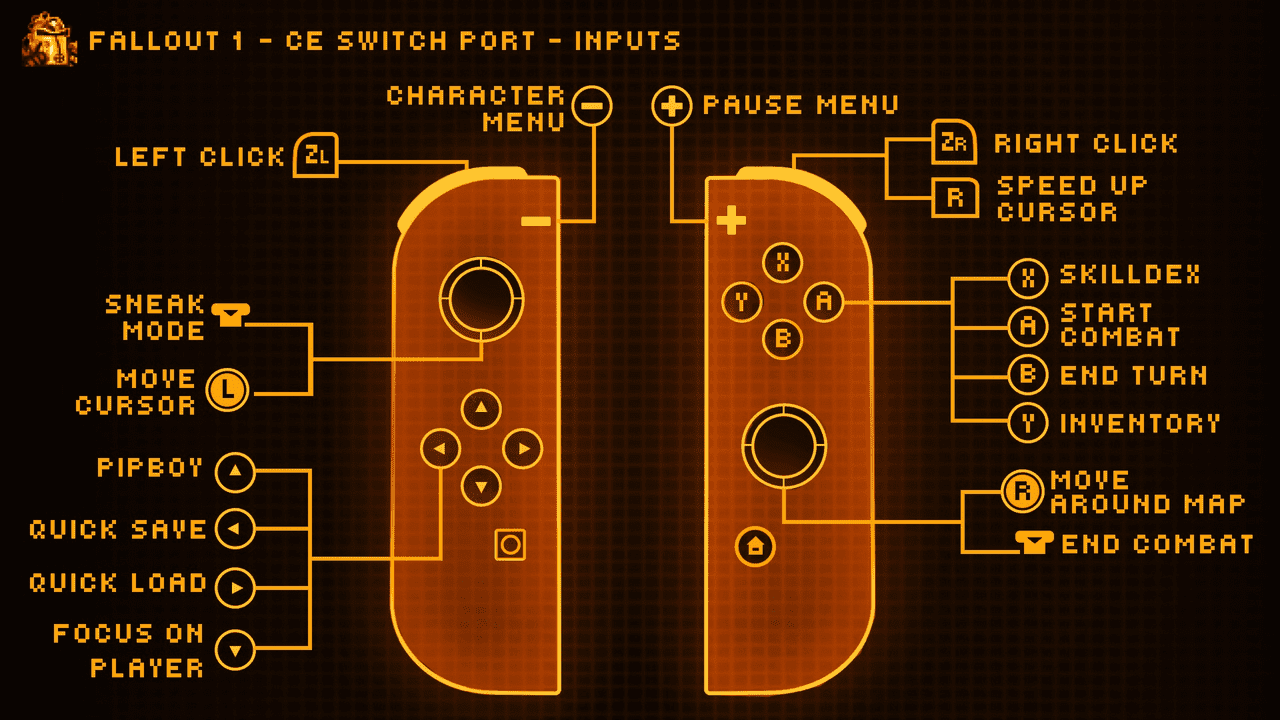
- Basic touchscreen support is implemented.
- On-screen keyboard support implemented for names and saves.
Configuration
- Cursor Sensitivity: Adjustable in options via mouse sensitivity. Note this will affect cursor speedup as well.
- Resolution: You can configure resolution and scaling through a config file. Create a file in your
fallout1folder calledfallout1_nx.ini- It needs to follow the following structure:
Media
New Native Switch Ports | Fallout 1+2 ( No Emulation ) How to Install, Tips + Tricks (Son of a Zet)
Changelog
v1.0
- First Release.
Credits
- Interplay: For developing and publishing the original game.
- alexbatalov and fallout-ce Contributors: For their excellent work in keeping this game modern.
- Romane: For the graphics.