
FrogGBA PSP: Difference between revisions
From GameBrew
More actions
No edit summary |
No edit summary |
||
| Line 7: | Line 7: | ||
|type=Handheld | |type=Handheld | ||
|version=0.1.0 | |version=0.1.0 | ||
|license= | |license=GPL-2.0 | ||
|download=https://dlhb.gamebrew.org/psphomebrew/FrogGBAPSP.7z | |download=https://dlhb.gamebrew.org/psphomebrew/FrogGBAPSP.7z | ||
|website=https://www.reddit.com/r/PSP/comments/1mj4dmo/froggba_v010_fast_psp_gba_emulator_built_for/ | |website=https://www.reddit.com/r/PSP/comments/1mj4dmo/froggba_v010_fast_psp_gba_emulator_built_for/ | ||
| Line 24: | Line 24: | ||
==Features== | ==Features== | ||
* ''' | * '''Overlay System:''' | ||
** | ** Custom Overlays/Borders - Render PNG overlays above the game window for bezels, borders, and custom frames. | ||
** | ** X/Y Offset Controls - Position the game window anywhere on screen. | ||
** | ** Online Overlay Generator - Convert PNG images to OVL format at [https://froggba.onrender.com/ froggba.onrender.com]. | ||
** FPS Display | ** Multiple Overlay Slots - Store up to 10 different overlays and switch between them. | ||
** Dynamic Memory Management - Overlays only use memory when loaded. | |||
* ''' | * '''Display Options:''' | ||
** PSP | ** Aspect Ratio Modes: | ||
** Memory Waitstate Optimization | *** Core Provided (3:2) - Original GBA aspect ratio with proper scaling. | ||
** Sprite Rendering | *** Zoom (Fill Screen) - Fills screen vertically, crops sides slightly. | ||
** Cache Invalidation Reduction | *** Stretch (Full PSP) - Stretches to fill entire 480×272 screen. | ||
** Timer Prescaling Optimization | ** Color Correction: | ||
** | *** GPSP mode with optimized lookup tables. | ||
*** Retro mode for authentic GBA colors. | |||
*** Off for raw output. | |||
** FPS Display - SELECT + Square to toggle performance counter. | |||
* ''' Performance Optimizations:''' | |||
** Volatile Memory Support - Uses additional 4MB of PSP RAM for 100% speed on demanding games. | |||
*** Metroid Zero Mission - 45 FPS → 60 FPS (100% speed achieved!). | |||
*** Works on all PSP models (1000/2000/3000/Go). | |||
** Partial Flush for MIPS32 - Optimized cache invalidation for better performance. | |||
** Color Correction via LUTs - 10x faster than real-time calculation. | |||
** Memory Waitstate Optimization - ~50% reduced memory access delays. | |||
** Sprite Rendering Pipeline - Unrolled loops and early culling for sprite-heavy games. | |||
** Block Coalescing - Better instruction cache usage. | |||
* '''Save State Improvements:''' | |||
** Auto Menu Exit - Menu automatically closes after loading/saving states. | |||
** Better Memory Management - Temporarily frees overlay memory during save/load operations. | |||
** File Validation - Prevents crashes from corrupted or empty save states. | |||
** Persistent Settings - All new options are saved in config. | |||
* '''Quality of Life:''' | |||
** Fast Forward - SELECT + R toggles 2x/3x speed modes. | |||
** Turbo Buttons - Triangle and Square as dedicated turbo buttons. | |||
** ROM Validation - Prevents crashes when loading invalid files. | |||
** Improved Error Messages - Clear feedback for file and memory issues. | |||
* '''Technical Improvements:''' | |||
** PSP Cycle Batching - Reduces dynamic recompiler overhead. | |||
** Cache Invalidation Reduction - Conservative cache management. | |||
** Timer Prescaling Optimization - Better audio/video sync. | |||
** Smart Memory Allocation - Dynamic allocation reduces static memory usage by ~550KB. | |||
* '''Performance Impact:''' | * '''Performance Impact:''' | ||
** Metroid Zero Mission | ** Metroid Zero Mission - 45 FPS -> 60 FPS (33% improvement, now 100% speed!) | ||
** Sprite-heavy games | ** Sprite-heavy games - 20-30% performance boost. | ||
** General gameplay | ** General gameplay - Consistent 60 FPS on most games with volatile memory enabled. | ||
* '''Original TempGBA Features:''' | * '''Original TempGBA Features:''' | ||
** Added gpsp kai's cheats function. | ** Added gpsp kai's cheats function. | ||
| Line 58: | Line 85: | ||
Launch the emulator on the console. | Launch the emulator on the console. | ||
==User guide== | |||
===Overlays=== | |||
Creating Overlays: | |||
* Go to [https://froggba.render.com/ froggba.render.com] and upload your PNG. | |||
** Image must be exactly 480×272 pixels (PSP screen size). | |||
** Transparent areas will show the game. | |||
** Opaque areas will be the border/bezel. | |||
* Click convert and download the generated .ovl file. | |||
* Copy the .ovl file to <code>/PSP/GAME/FrogGBA/overlays/</code> on your Memory Stick. | |||
* Files will appear in the Overlay menu in-game. | |||
Using Overlays in FrogGBA: | |||
* Press HOME during gameplay to open the menu. | |||
* Navigate to "Overlay Settings". | |||
* Select your overlay from the list. | |||
* Adjust X/Y offset if needed to position the game window. | |||
* Enable/disable overlays with the toggle option. | |||
=== Tips for Best Results === | |||
* Design overlays with a transparent center area for the game (240×160 minimum). | |||
* Use PNG transparency for see-through areas. | |||
* Keep border designs simple to avoid hitting the 30,000 pixel limit. | |||
* Test different aspect ratios with your overlays (Core/Zoom/Stretch). | |||
==Controls== | ==Controls== | ||
| Line 68: | Line 119: | ||
https://dlhb.gamebrew.org/psphomebrew/images/FrogGBAPSP-02.png | https://dlhb.gamebrew.org/psphomebrew/images/FrogGBAPSP-02.png | ||
==Compatibility== | |||
Works on all PSP models (1000/2000/3000/Go). | |||
==Changelog== | ==Changelog== | ||
Revision as of 07:55, 16 August 2025
| FrogGBA | |
|---|---|
 | |
| General | |
| Author | tzubertowski |
| Type | Handheld |
| Version | 0.1.0 |
| License | GPL-2.0 |
| Last Updated | 2025/08/06 |
| Links | |
| Download | |
| Website | |
| Source | |
FrogGBA is an modernised TempGBA (GBA emulator) with improved compatibility, based on:
- TempGBA by Nebuleon, Normmatt, and BassAceGold
- TempGBA4PSP-mod (TempGBA4PSP-26731020)
Features
- Overlay System:
- Custom Overlays/Borders - Render PNG overlays above the game window for bezels, borders, and custom frames.
- X/Y Offset Controls - Position the game window anywhere on screen.
- Online Overlay Generator - Convert PNG images to OVL format at froggba.onrender.com.
- Multiple Overlay Slots - Store up to 10 different overlays and switch between them.
- Dynamic Memory Management - Overlays only use memory when loaded.
- Display Options:
- Aspect Ratio Modes:
- Core Provided (3:2) - Original GBA aspect ratio with proper scaling.
- Zoom (Fill Screen) - Fills screen vertically, crops sides slightly.
- Stretch (Full PSP) - Stretches to fill entire 480×272 screen.
- Color Correction:
- GPSP mode with optimized lookup tables.
- Retro mode for authentic GBA colors.
- Off for raw output.
- FPS Display - SELECT + Square to toggle performance counter.
- Aspect Ratio Modes:
- Performance Optimizations:
- Volatile Memory Support - Uses additional 4MB of PSP RAM for 100% speed on demanding games.
- Metroid Zero Mission - 45 FPS → 60 FPS (100% speed achieved!).
- Works on all PSP models (1000/2000/3000/Go).
- Partial Flush for MIPS32 - Optimized cache invalidation for better performance.
- Color Correction via LUTs - 10x faster than real-time calculation.
- Memory Waitstate Optimization - ~50% reduced memory access delays.
- Sprite Rendering Pipeline - Unrolled loops and early culling for sprite-heavy games.
- Block Coalescing - Better instruction cache usage.
- Volatile Memory Support - Uses additional 4MB of PSP RAM for 100% speed on demanding games.
- Save State Improvements:
- Auto Menu Exit - Menu automatically closes after loading/saving states.
- Better Memory Management - Temporarily frees overlay memory during save/load operations.
- File Validation - Prevents crashes from corrupted or empty save states.
- Persistent Settings - All new options are saved in config.
- Quality of Life:
- Fast Forward - SELECT + R toggles 2x/3x speed modes.
- Turbo Buttons - Triangle and Square as dedicated turbo buttons.
- ROM Validation - Prevents crashes when loading invalid files.
- Improved Error Messages - Clear feedback for file and memory issues.
- Technical Improvements:
- PSP Cycle Batching - Reduces dynamic recompiler overhead.
- Cache Invalidation Reduction - Conservative cache management.
- Timer Prescaling Optimization - Better audio/video sync.
- Smart Memory Allocation - Dynamic allocation reduces static memory usage by ~550KB.
- Performance Impact:
- Metroid Zero Mission - 45 FPS -> 60 FPS (33% improvement, now 100% speed!)
- Sprite-heavy games - 20-30% performance boost.
- General gameplay - Consistent 60 FPS on most games with volatile memory enabled.
- Original TempGBA Features:
- Added gpsp kai's cheats function.
- Added Chinese language support.
- Added restore function.
- New menu icon.
- Imported code from TempGBA-mod-dstwo-26750220.
- Modern PSP SDK compatibility.
- Docker-based build system.
Installation
You need to have a CFW installed on your PSP.
Download and extract the latest release, copy the unzipped PSP folder into root of your PSP SD card.
Acquire and copy GBA bios file into PSP/GAME/FrogGBA/gba_bios.bin file.
Launch the emulator on the console.
User guide
Overlays
Creating Overlays:
- Go to froggba.render.com and upload your PNG.
- Image must be exactly 480×272 pixels (PSP screen size).
- Transparent areas will show the game.
- Opaque areas will be the border/bezel.
- Click convert and download the generated .ovl file.
- Copy the .ovl file to
/PSP/GAME/FrogGBA/overlays/on your Memory Stick. - Files will appear in the Overlay menu in-game.
Using Overlays in FrogGBA:
- Press HOME during gameplay to open the menu.
- Navigate to "Overlay Settings".
- Select your overlay from the list.
- Adjust X/Y offset if needed to position the game window.
- Enable/disable overlays with the toggle option.
Tips for Best Results
- Design overlays with a transparent center area for the game (240×160 minimum).
- Use PNG transparency for see-through areas.
- Keep border designs simple to avoid hitting the 30,000 pixel limit.
- Test different aspect ratios with your overlays (Core/Zoom/Stretch).
Controls
Select+R - Fast forward toggle (2x/3x speed)
Select+Square - FPS counter toggle
Screenshots
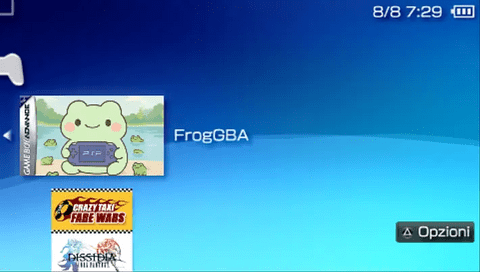
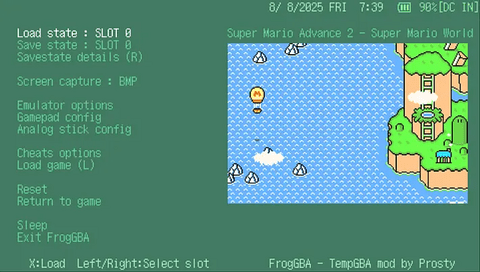
Compatibility
Works on all PSP models (1000/2000/3000/Go).
Changelog
v0.1.0
- First Release.