
LineageOS Switch: Difference between revisions
From GameBrew
More actions
Created page with "{{Infobox Switch Homebrews |title=LineageOS |image=LineageOSSwitch.png |description=LineageOS (Android OS) for Nintendo Switch. |author=LineageOS Team |lastupdated= |type=Operating systems |version=22.5 |license=Mixed |download=https://wiki.lineageos.org/devices/#nintendo |website=https://wiki.lineageos.org/ |source=https://github.com/lineageos |donation=https://patreon.com/LineageOS }} {{#seo: |title=Switch Homebrew Apps (Operating systems) - GameBrew |title_mode=append..." |
No edit summary |
||
| Line 19: | Line 19: | ||
|image_alt=LineageOS | |image_alt=LineageOS | ||
}} | }} | ||
<!--https://dlhb.gamebrew.org/switchhomebrews/LineageOSSwitch.7z- | <!-- not download yet-https://dlhb.gamebrew.org/switchhomebrews/LineageOSSwitch.7z--> | ||
LineageOS, the open-source Android-based operating system, now officially supports the Nintendo Switch, including v1, v2, Lite, and OLED models. This development allows users to run Android 14 (LineageOS 21) or Android 15 (LineageOS 22.2) on their consoles, offering a tablet-style interface or an Android TV experience optimized for docked use. | LineageOS, the open-source Android-based operating system, now officially supports the Nintendo Switch, including v1, v2, Lite, and OLED models. This development allows users to run Android 14 (LineageOS 21) or Android 15 (LineageOS 22.2) on their consoles, offering a tablet-style interface or an Android TV experience optimized for docked use. | ||
Revision as of 04:58, 8 June 2025
| LineageOS | |
|---|---|
 | |
| General | |
| Author | LineageOS Team |
| Type | Operating systems |
| Version | 22.5 |
| License | Mixed |
| Links | |
| Download | |
| Website | |
| Source | |
| Support Author | |
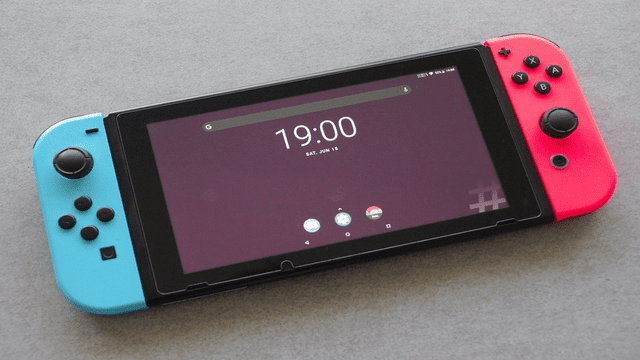
LineageOS, the open-source Android-based operating system, now officially supports the Nintendo Switch, including v1, v2, Lite, and OLED models. This development allows users to run Android 14 (LineageOS 21) or Android 15 (LineageOS 22.2) on their consoles, offering a tablet-style interface or an Android TV experience optimized for docked use.
Installation
To install LineageOS on your Nintendo Switch OLED (codename: nx_tab), please refer to the official installation guide provided by LineageOS:
This guide includes detailed steps on:
- Pre-installation requirements, including necessary tools like adb and fastboot.
- System partitioning using Hekate.
- Preparing the SD card with required files.
- Installing LineageOS from recovery mode.
- Installing add-ons, such as Google Apps.
Media
How to Install Android 15 on Modded Nintendo Switch // Lineage OS (IDX3)
INSTALLING LINEAGE OS 21 (ANDROID 14) TO THE N-X V2 CONSOLE (sthetix)
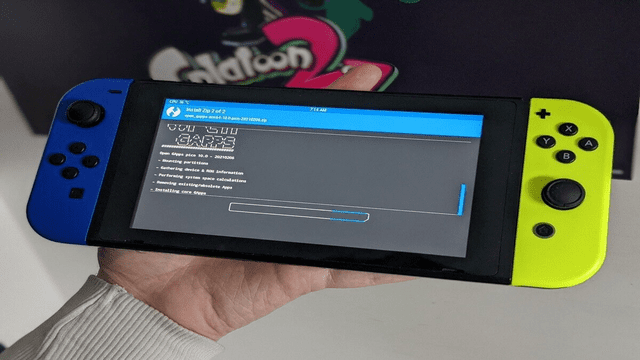
Screenshots
External links
- Official Site - https://www.lineageos.org/
- Gbatemp - https://gbatemp.net/threads/lineageos-21-android-14-released.657245/