
Plumbers Don't Wear Ties Wii: Difference between revisions
More actions
Created page with "{{Infobox Wii Homebrews |title=Plumbers Don't Wear Ties |image=PlumbersDontWearTiesWii.png |description=Plumbers Don't Wear Ties is an adult-oriented ""romantic comedy"" video game. |author=MaikelChan |lastupdated=2022/01/11 |type=Other Games |version=0.2 |license=MIT |download=https://dlhb.gamebrew.org/wiihomebrews/PlumbersDontWearTiesWii.7z |website=https://github.com/MaikelChan/PlumbersDontWearTies-SDL/tree/wii |source=https://github.com/MaikelChan/PlumbersDontWearTie..." |
No edit summary |
||
| Line 32: | Line 32: | ||
'''Note:''' The game contains mature contents and is not appropriate for all ages. Viewer discretion advised. | '''Note:''' The game contains mature contents and is not appropriate for all ages. Viewer discretion advised. | ||
== | == Installation == | ||
=== Wii with homebrew channel === | === Wii with homebrew channel === | ||
# Rename <code>PlumbersDontWearTies-SDL.dol</code> to <code>boot.dol</code>. | # Rename <code>PlumbersDontWearTies-SDL.dol</code> to <code>boot.dol</code>. | ||
# Go to the <code>sd</code> folder in this repository, and copy its contents to the root of the SD card you use for loading apps for the Hombrew channel. | # Go to the <code>sd</code> folder in this repository, and copy its contents to the root of the SD card you use for loading apps for the Hombrew channel. | ||
# Copy <code>boot.dol</code> to <code>apps/PlumbersDontWearTies/</code> in your SD card. | # Copy <code>boot.dol</code> to <code>apps/PlumbersDontWearTies/</code> in your SD card. | ||
# For legal reasons, you will need to get the original PC game on your own to obtain the assets like graphics and sound effects. Those are not | # For legal reasons, you will need to get the original PC game on your own to obtain the assets like graphics and sound effects. Those are not provided. | ||
# Copy all PC game's assets to <code>apps/PlumbersDontWearTies/Data/</code> in your SD card. | # Copy all PC game's assets to <code>apps/PlumbersDontWearTies/Data/</code> in your SD card. | ||
# If everything went fine, you should be able to see the game in your homebrew channel and run it. | # If everything went fine, you should be able to see the game in your homebrew channel and run it. | ||
| Line 53: | Line 52: | ||
# If everything went fine, you should be able to run the game. | # If everything went fine, you should be able to run the game. | ||
== | == Controls == | ||
'''Wiimote:''' | |||
D-Pad - Select options in a choice selection screen | |||
A - Skip to the next picture, Confirm choice | |||
'''GameCube Controller:''' | |||
''' | |||
D-Pad - Select options in a choice selection screen | |||
A - Skip to the next picture, Confirm choice | |||
Z - Exit the game | |||
==Screenshots== | ==Screenshots== | ||
| Line 85: | Line 75: | ||
https://dlhb.gamebrew.org/wiihomebrews/images/PlumbersDontWearTiesWii-04.png | https://dlhb.gamebrew.org/wiihomebrews/images/PlumbersDontWearTiesWii-04.png | ||
==Media== | |||
'''Plumbers Don't Wear Ties (Panasonic 3DO) - Angry Video Game Nerd (AVGN)''' ([https://www.youtube.com/watch?v=DyaF_gCKWsI Cinemassacre]) <br> | |||
<youtube width="640">DyaF_gCKWsI</youtube> | |||
==Changelog== | ==Changelog== | ||
| Line 93: | Line 87: | ||
== External links == | == External links == | ||
* | * GitHub - https://github.com/MaikelChan/PlumbersDontWearTies-SDL/tree/wii | ||
Latest revision as of 03:30, 1 June 2025
| Plumbers Don't Wear Ties | |
|---|---|
 | |
| General | |
| Author | MaikelChan |
| Type | Other Games |
| Version | 0.2 |
| License | MIT License |
| Last Updated | 2022/01/11 |
| Links | |
| Download | |
| Website | |
| Source | |
This is a SDL2 implementation of the PC game Plumbers Don't Wear Ties, written from scratch by MaikelChan on PC and ported to the Nintendo Wii.
The game is infamous for being considered one of the worst games ever made. The 3DO version is much more known (relatively speaking), but there was also a very rare Windows version released in 1993. Due to being 16bit, it cannot be run on modern PCs.
This is a port for the Wii based on my SDL2 PC version of the game. This is the current state of the project:
- It can be played with a Wii remote and a GameCube pad.
- Rendering and audio are implemented with SDL.
- It is possible to advance to the next picture to progress quickly through the game.
- It could still contain some small bugs here and there that I haven't catched up yet.
Note: The game contains mature contents and is not appropriate for all ages. Viewer discretion advised.
Installation
Wii with homebrew channel
- Rename
PlumbersDontWearTies-SDL.doltoboot.dol. - Go to the
sdfolder in this repository, and copy its contents to the root of the SD card you use for loading apps for the Hombrew channel. - Copy
boot.doltoapps/PlumbersDontWearTies/in your SD card. - For legal reasons, you will need to get the original PC game on your own to obtain the assets like graphics and sound effects. Those are not provided.
- Copy all PC game's assets to
apps/PlumbersDontWearTies/Data/in your SD card. - If everything went fine, you should be able to see the game in your homebrew channel and run it.
Dolphin
- Get the Dolphin emulator if you don't have it.
- Create and edit a virtual SD card following these instructions.
- Mount that virtual card.
- Follow the steps 4 and 5 in
Wii with homebrew channelsection. - Unmount the SD card, as Dolphin won't be able to access its contents while it's mounted.
- Open Dolphin, go to
Config, then to theAudiotab, and selectDSP LLE REcompiler (slow). Audio won't work without that. - Go to the menu
Fileand thenOpen.... - Locate and open
PlumbersDontWearTies-SDL.dol(orboot.dolin case you renamed it for the homebrew channel). - If everything went fine, you should be able to run the game.
Controls
Wiimote:
D-Pad - Select options in a choice selection screen
A - Skip to the next picture, Confirm choice
GameCube Controller:
D-Pad - Select options in a choice selection screen
A - Skip to the next picture, Confirm choice
Z - Exit the game
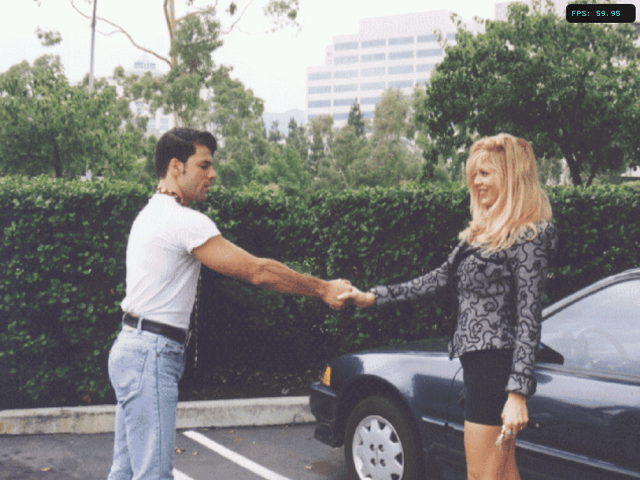
Screenshots



Media
Plumbers Don't Wear Ties (Panasonic 3DO) - Angry Video Game Nerd (AVGN) (Cinemassacre)
Changelog
v0.2
- Changes based on PC version 0.2.
v0.1
- First Release.