
RPS Advanced PSP: Difference between revisions
From GameBrew
More actions
Created page with "{{Infobox PSP Homebrews |title=RPS Advanced |image=rspapsp.png |description=A rock paper scissors game. |author=SpiritBeast |lastupdated=2006/04/03 |type=Strategy |format= |version=0.2 |license=Mixed |download=https://dlhb.gamebrew.org/psphomebrew/rspapsp.7z |website=http://forums.qj.net/psp-development-forum/45781-rps-rock-paper-scissors-beta-release.html |source=https://dlhb.gamebrew.org/psphomebrew/rspapsp.7z }} RPS Advanced is a rock paper scissors is a battle game w..." |
No edit summary |
||
| Line 13: | Line 13: | ||
|source=https://dlhb.gamebrew.org/psphomebrew/rspapsp.7z | |source=https://dlhb.gamebrew.org/psphomebrew/rspapsp.7z | ||
}} | }} | ||
RPS Advanced is a rock paper scissors | RPS Advanced is a rock paper scissors game written in Lua in which you battle against an AI player. | ||
== User guide == | == User guide == | ||
Revision as of 06:16, 6 February 2025
| RPS Advanced | |
|---|---|
 | |
| General | |
| Author | SpiritBeast |
| Type | Strategy |
| Version | 0.2 |
| License | Mixed |
| Last Updated | 2006/04/03 |
| Links | |
| Download | |
| Website | |
| Source | |
RPS Advanced is a rock paper scissors game written in Lua in which you battle against an AI player.
User guide
Battle Mode:
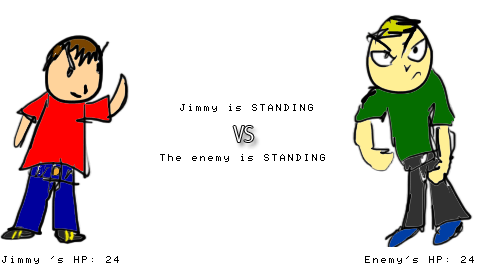
- The player and enemy start out with 24 HP. Each succesful attack takes away 4 HP from who is hit.
- When the player or enemy reaches 0 HP, the game is over.
Infinite Mode:
- In Infinite Mode, there is no HP. When the player or enemy hits their opponent, a "win" is added to their counter.
- When you are done playing this mode, press Select to go to the RPS main menu.
Controls
In game:
Up - Paper
Right - Rock
Sown - Scissors
Title screen:
Start - Battle Mode
Select - Infinite Mode
Screenshots
Credits
Thanks to c5cha7 and califrag for the help.
Thanks to PSPMillionare, whos great tutorials helped me to learn Lua. C
Also thanks to pauldude550 who created the background song for this game.
External links
- QuickJump - http://forums.qj.net/psp-development-forum/45781-rps-rock-paper-scissors-beta-release.html
- PlayStation Portable Library - https://archive.org/details/rpsav-02.7z