
Taiko no Kuruto for PSP: Difference between revisions
More actions
No edit summary |
No edit summary |
||
| Line 22: | Line 22: | ||
(You can try using the [[TJAPlayer PSP#Installation|TPSConverter]] to convert TJA files to TPS files.) | (You can try using the [[TJAPlayer PSP#Installation|TPSConverter]] to convert TJA files to TPS files.) | ||
Put the music files in the /taikopsp/bgm/ folder. The file extension should be .bgm. | |||
* Use the w.exe tool to convert .wav files to .bgm. (Usage: <code>w filename.wav filename.bgm</code>) | * Use the w.exe tool to convert .wav files to .bgm. (Usage: <code>w filename.wav filename.bgm</code>) | ||
Latest revision as of 14:25, 31 January 2025
| Taiko no Kuruto for PSP | |
|---|---|
 | |
| General | |
| Author | Requar |
| Type | Music Games |
| Version | 0.8.4 |
| License | Mixed |
| Last Updated | 2009/08/02 |
| Links | |
| Download | |
| Website | |
Taiko no Kuruto for PSP (太鼓の玄人 for PSP) is a rhythm game similar to Taiko No Tatsujin.
Installation
Copy the taikopsp folder and place it in the directory ms0:/PSP/GAME/.
Place the chart files in the /taikopsp/score/ folder. The file extension should be .tps.
(You can try using the TPSConverter to convert TJA files to TPS files.)
Put the music files in the /taikopsp/bgm/ folder. The file extension should be .bgm.
- Use the w.exe tool to convert .wav files to .bgm. (Usage:
w filename.wav filename.bgm) - Only mono .wav files can be used, so convert them beforehand.
Note: Avoid using numbers in the music file name (.bgm) as it could cause issues.
Controls
Song selection screen
When the software is launched, you'll be on the screen to select a chart file.
L - Random
R - Toggle Hidden/Sudden/Doron
Up/Down - Move one song up/down
Left/Right - Move five songs up/down
Square - Preview the song
Circle/Cross - Confirm selection
Start - Toggle Auto
Select - Exit
BPM and chart start timing adjustments
Triangle (press once) - Adjust BPM
Triangle (press twice) - Adjust the start time (use left/right to adjust)
Gameplay screen
When the notes appear in the judgment area and overlap, press the corresponding button.
Right/Down/Square/Cross - Red note
Left/Up/Triangle/Circle/L/R - Blue note
All buttons - Yellow note
Start - Force quit
Result screen
Circle - Return to the song selection screen
Screenshots
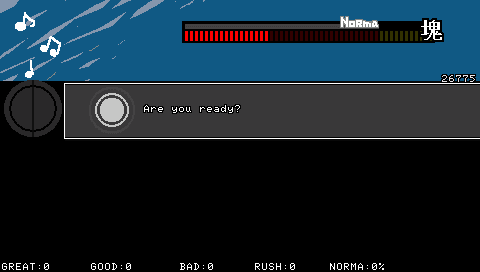
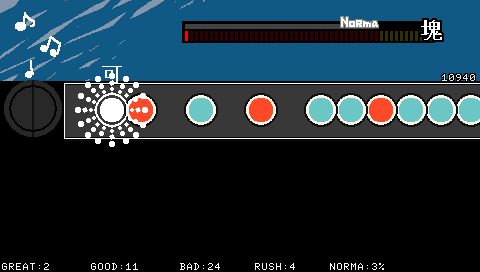
Compatibility
Developed for 1.50.
Changelog
Ver.0.8.4 2009/08/02
- Further delay before the song starts, adding about 1 second of wait time.
Ver.0.8.3 2009/08/02
- Changed to delay the start of the song.
Ver.0.8.2 2009/08/01
- Fixed Go-Go Time score; it may still be a little off.
Ver.0.8.1 2009/07/31
- Fixed an issue where fireworks for large notes looked strange when "Good" judgment was displayed.
Ver.0.8.0 2009/07/31
- Added Go-Go Time, large note fireworks, and made some processing changes.
Ver.0.7.1 2009/07/29
- Made it yellow (likely some visual adjustment).
Ver.0.7.0 2009/07/29
- Added fireworks, allowed fine adjustments to BPM and song start timing.
Ver.0.6.4 2009/07/28
- Added "meat" feature.
Ver.0.6.3 2009/07/28
- Fixed a bug where balloons would pop even when hitting "Ka" and made some minor changes.
Ver.0.6.2 2009/07/20
- Fixed a bug where pressing a blue note with "Good" judgment didn't add points.
Ver.0.6.1 2009/07/12
- Fixed a bug where score accumulation behaved weirdly.
Ver.0.6.0 2009/07/12
- Added norm gauge, revised visuals, and allowed more detailed scoring options.
Ver.0.5.0 2009/07/11
- Made various visual changes and experimented with the norm gauge.
Ver.0.4.3 2009/06/27
- Fixed a bug where consecutive button mashing resulted in weird behavior.
Ver.0.4.2 2009/06/27
- Fixed a bug where more than one balloon couldn't be placed consecutively.
Ver.0.4.1 2009/06/27
- Used images for judgment display and reviewed the judgment system.
Ver.0.4.0 2009/06/25
- Added balloons, and I forgot what else.
Ver.0.3.3 2009/06/23
- Fixed bugs with tempo changes.
Ver.0.3.2 2009/06/22
- Fixed a bug where the display of streaks would become strange due to changes in processing.
Ver.0.3.1 2009/06/22
- Internal processing review and added S(n) command.
Ver.0.3.0 2009/06/21
- Implemented Wait command. I can't remember what else.
Ver.0.2.2 2009/06/21
- Added display of speed per second, design revisions, and fixed some bugs.
Ver.0.2.1 2009/06/20
- Fixed BPM bugs, reworked judgment system, and worked on Auto mode and the button mashing feature.
Ver.0.2.0 2009/06/20
- Added Auto mode.
Ver.0.1.1 2009/06/19
- Fixed issues with large note streaks and bugs at the end of the song.
Ver.0.1.0 2009/06/18
- Added ability to play any chart.
Demo Version 2009/06/12
External links
- Official website - http://requar.web.fc2.com/ (archived)
- 1katsu.bat - https://sites.google.com/site/waraiotoko2501k/ (archived)