
Balatro Steamodded Mod Switch: Difference between revisions
From GameBrew
More actions
No edit summary |
|||
| Line 2: | Line 2: | ||
|title=Balatro Steamodded Mod | |title=Balatro Steamodded Mod | ||
|image=BalatroSteamoddedModSwitch.png | |image=BalatroSteamoddedModSwitch.png | ||
|description=Balatro ModLoader ported to the Nintendo Switch | |description=Balatro ModLoader ported to the Nintendo Switch. | ||
|author=JonJaded | |author=JonJaded | ||
|lastupdated=2024/09/12 | |lastupdated=2024/09/12 | ||
| Line 20: | Line 20: | ||
}} | }} | ||
<!--https://dlhb.gamebrew.org/switchhomebrews/BalatroSteamoddedModSwitch.7z--> | <!--https://dlhb.gamebrew.org/switchhomebrews/BalatroSteamoddedModSwitch.7z--> | ||
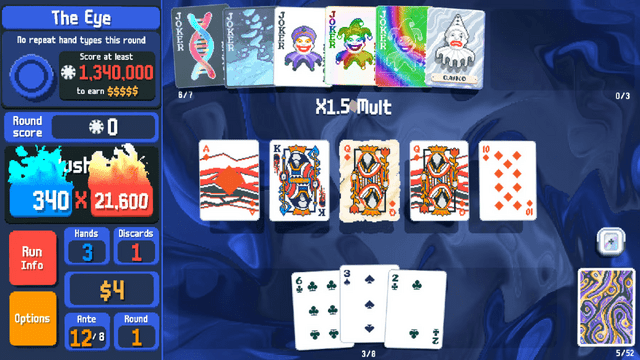
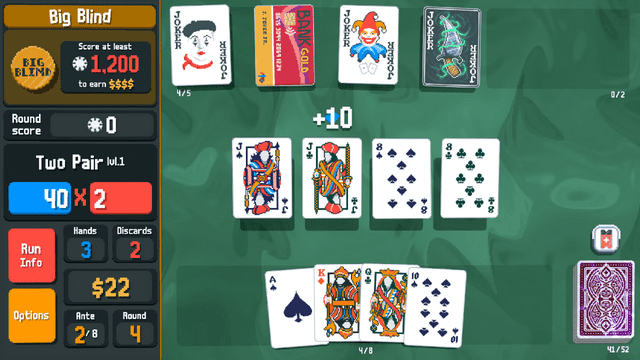
[https://github.com/Steamopollys/Steamodded Steamodded] for the the Switch version of Balatro. | |||
Steamodded is a mod loader and injector for the game Balatro. Much like the [https://love2d.org/wiki/Main_Page LÖVE2D engine] itself, it is built using [https://www.lua.org/ Lua]. It is made with modularity and extensibility in mind, providing a large selection of APIs and other features to facilitate bringing your ideas to life. | |||
== Installation == | == Installation == | ||
| Line 28: | Line 30: | ||
* A valid python install | * A valid python install | ||
=== | === Instructions === | ||
* Download | Step 1: | ||
* | * Download the repository as a ZIP file, and extract it somewhere safe. | ||
* | * Use your favorite NX dump tool to dump your current "update" of Balatro in NCA FS or romFS format. | ||
* Copy | |||
* Drag the ZIP | Step 2: | ||
* Connect your SD card to your computer and go to the location where you dumped the update. | |||
* Copy the "Patch RomFS" folder to inside your repo extraction folder. | |||
* Now enter the "Patch RomFS" folder and ZIP its contents into a standard ZIP. Make sure the dumped files are at the root of the ZIP file, not NOT nested inside another folder. | |||
Step 3: | |||
* Copy the ZIP file into where you extracted the repo on your computer. | |||
* Drag the ZIP file onto <code>SteamoddedNX_injector.py</code> and wait for the process to finish. | |||
* If you see "Process completed successfully. Press any key to exit...", then you're good to go. If not, check your ZIP file structure. | |||
* Extract the contents of the modded ZIP into the included <code>\atmosphere\contents\0100CD801CE5E000\romfs</code> directory. | * Extract the contents of the modded ZIP into the included <code>\atmosphere\contents\0100CD801CE5E000\romfs</code> directory. | ||
* This step is not needed but if you would like to see exact crash errors from your mods: | * (Optional) This step is not needed but if you would like to see exact crash errors from your mods: | ||
** While in your romfs folder, open <code>globals.lua</code> and jump to line 62 <code>self.F_NO_ERROR_HAND =</code>, now replace <code>true</code> with <code>false</code> | |||
== How to | Step 4: | ||
* Copy your prepped <code>atmosphere</code> folder to your switch SD card and ensure Balatro launches and functions with the included example mods. | |||
=== How to install a mod === | |||
* Find and download a sMOD 0.9.8 compatible mod (see Limitations.) | * Find and download a sMOD 0.9.8 compatible mod (see Limitations.) | ||
* Navigate to your Mods directory (see the installation instructions.) | * Navigate to your Mods directory (see the installation instructions.) | ||
* Put the mod into that directory (the mod can be a single file if there is only one file provided, or it can be a whole folder.) | * Put the mod into that directory (the mod can be a single file if there is only one file provided, or it can be a whole folder.) | ||
* Launch the game and enjoy | * Launch the game and enjoy. | ||
=== Where to | === Where to find mods === | ||
* [https://mega.nz/folder/fQ1zlAra#CduiyoPXT3_KFJWUx0Lqkw | * [https://mega.nz/folder/fQ1zlAra#CduiyoPXT3_KFJWUx0Lqkw Jaded's 0.9.8 Mod Collection] | ||
* [https://github.com/jie65535/awesome-balatro | * [https://github.com/jie65535/awesome-balatro Awesome Balatro repo by jie65535] | ||
* [https://www.nexusmods.com/balatro/mods/ | * [https://www.nexusmods.com/balatro/mods/ Nexus Mods Balatro page] | ||
* [https://discord.com/channels/1116389027176787968/1209506514763522108 | * [https://discord.com/channels/1116389027176787968/1209506514763522108 Balatro Discord Mods thread] [https://discord.com/invite/balatro Click here to join the server.] | ||
=== Limitations === | === Limitations === | ||
| Line 54: | Line 67: | ||
* Limited to mods that function on 0.9.8 version of sMOD. You may need to find an older version of a mod to use it. | * Limited to mods that function on 0.9.8 version of sMOD. You may need to find an older version of a mod to use it. | ||
* Card suit customization introduced in version 1.0.1g (Friends of Jimbo) will not work. | * Card suit customization introduced in version 1.0.1g (Friends of Jimbo) will not work. | ||
==Screenshots== | ==Screenshots== | ||
| Line 64: | Line 73: | ||
https://dlhb.gamebrew.org/switchhomebrews/images/BalatroSteamoddedModSwitch-02.png | https://dlhb.gamebrew.org/switchhomebrews/images/BalatroSteamoddedModSwitch-02.png | ||
== | ==Media== | ||
'''Balatro - Official Release Date Trailer''' ([https://www.youtube.com/watch?v=Ebsx27Hlxek GameTrailers]) <br> | |||
<youtube width="640">Ebsx27Hlxek</youtube> | |||
== Credits == | |||
Thanks to Steamo and co for helping develop such a versatile tool that ''literally'' works on any platform. I only needed to make a couple of minor adjustments and patches to make it launch on Switch. Thank you to the mod community that make amazing add-ons and of course thanks to localthunk for making such an amazing, addictive game. | Thanks to Steamo and co for helping develop such a versatile tool that ''literally'' works on any platform. I only needed to make a couple of minor adjustments and patches to make it launch on Switch. Thank you to the mod community that make amazing add-ons and of course thanks to localthunk for making such an amazing, addictive game. | ||
== External links == | == External links == | ||
* | * GitHub - https://github.com/JonJaded/SteamoddedNX | ||
* GBAtemp - https://gbatemp.net/threads/balatro-steamodded-mod-installation-guide.660736/ | |||
Revision as of 06:28, 16 September 2024
| Balatro Steamodded Mod | |
|---|---|
 | |
| General | |
| Author | JonJaded |
| Type | Game Hacks |
| Version | 2024 |
| License | GPL-3.0 |
| Last Updated | 2024/09/12 |
| Links | |
| Download | |
| Website | |
| Source | |
Steamodded for the the Switch version of Balatro.
Steamodded is a mod loader and injector for the game Balatro. Much like the LÖVE2D engine itself, it is built using Lua. It is made with modularity and extensibility in mind, providing a large selection of APIs and other features to facilitate bringing your ideas to life.
Installation
Requirements
- A modded switch
- A legal copy of Balatro for the switch, with the latest update
- A valid python install
Instructions
Step 1:
- Download the repository as a ZIP file, and extract it somewhere safe.
- Use your favorite NX dump tool to dump your current "update" of Balatro in NCA FS or romFS format.
Step 2:
- Connect your SD card to your computer and go to the location where you dumped the update.
- Copy the "Patch RomFS" folder to inside your repo extraction folder.
- Now enter the "Patch RomFS" folder and ZIP its contents into a standard ZIP. Make sure the dumped files are at the root of the ZIP file, not NOT nested inside another folder.
Step 3:
- Copy the ZIP file into where you extracted the repo on your computer.
- Drag the ZIP file onto
SteamoddedNX_injector.pyand wait for the process to finish. - If you see "Process completed successfully. Press any key to exit...", then you're good to go. If not, check your ZIP file structure.
- Extract the contents of the modded ZIP into the included
\atmosphere\contents\0100CD801CE5E000\romfsdirectory. - (Optional) This step is not needed but if you would like to see exact crash errors from your mods:
- While in your romfs folder, open
globals.luaand jump to line 62self.F_NO_ERROR_HAND =, now replacetruewithfalse
- While in your romfs folder, open
Step 4:
- Copy your prepped
atmospherefolder to your switch SD card and ensure Balatro launches and functions with the included example mods.
How to install a mod
- Find and download a sMOD 0.9.8 compatible mod (see Limitations.)
- Navigate to your Mods directory (see the installation instructions.)
- Put the mod into that directory (the mod can be a single file if there is only one file provided, or it can be a whole folder.)
- Launch the game and enjoy.
Where to find mods
- Jaded's 0.9.8 Mod Collection
- Awesome Balatro repo by jie65535
- Nexus Mods Balatro page
- Balatro Discord Mods thread Click here to join the server.
Limitations
- Lovely is not supported on the Switch, so mods that require it will NOT work.
- Limited to mods that function on 0.9.8 version of sMOD. You may need to find an older version of a mod to use it.
- Card suit customization introduced in version 1.0.1g (Friends of Jimbo) will not work.
Screenshots
Media
Balatro - Official Release Date Trailer (GameTrailers)
Credits
Thanks to Steamo and co for helping develop such a versatile tool that literally works on any platform. I only needed to make a couple of minor adjustments and patches to make it launch on Switch. Thank you to the mod community that make amazing add-ons and of course thanks to localthunk for making such an amazing, addictive game.