
Completely Unrealistic Landing Simulation DS: Difference between revisions
From GameBrew
More actions
m Text replacement - "Category:Simulation Games on DS" to "" |
No edit summary |
||
| Line 30: | Line 30: | ||
https://dlhb.gamebrew.org/dshomebrew/culsimulation3.png | https://dlhb.gamebrew.org/dshomebrew/culsimulation3.png | ||
<!--BEGIN Online Emulator Section--> | <!--BEGIN Online Emulator Section--> | ||
==Online | ==Online emulator== | ||
{{ | {{EmulatorJS Main | ||
|width=515px | |||
|height=384px | |||
|EJS_backgroundImage=https://www.gamebrew.org/images/5/57/Culsimulation2.png | |||
EJS_core = | |EJS_core=desmume2015 | ||
EJS_gameName = | |EJS_gameName=Completely Unrealistic Landing Simulation | ||
EJS_gameUrl = | |EJS_gameUrl=https://dlhb.gamebrew.org/onlineemulators/nds/culsimulation.7z | ||
}} | }} | ||
{{DS Control Settings}} | {{DS Control Settings}} | ||
Revision as of 07:52, 14 August 2024
| Completely Unrealistic Landing Simulation | |
|---|---|
 | |
| General | |
| Author | MasterDje |
| Type | Simulation |
| Version | 0.1 |
| License | Mixed |
| Last Updated | 2008/03/18 |
| Links | |
| Download | |
| Website | |
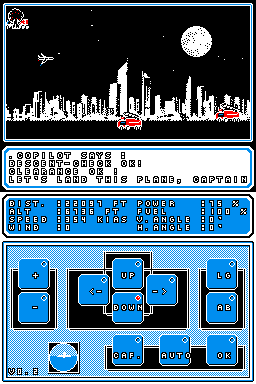
A simple flight landing simulation homebrew, based on a similar game on Casio.
It was entered into the PDRoms Coding Competition #3.99.
User guide
Your goal is to land the plane safely.
Control panel:
- Up/Down/Left/Right - Direction.
- +/- - Adjust power.
- LG - Landing gears.
- CAF - Coffee.
- OK - You must validate your choice.
Beware of the experimental autopilot.
Screenshots
Online emulator
| Nintendo DS | Keyboard |
|---|---|

|

|

|

|

|

|

|

|

|

|

|

|

|

|

|

|

|

|