
NX Archive Browser Switch: Difference between revisions
More actions
Created page with "{{Infobox Switch Homebrews |title=NX Archive Browser |image=nxarchivebrowserswitch.png |description=Browse and download archives from archive.org on your Nintendo Switch! |author=mklan |lastupdated=2024/01/28 |type=Other Apps |version=0.1.2 |license=Mixed |download=https://dlhb.gamebrew.org/switchhomebrews/nxarchivebrowserswitch.7z |website=https://gbatemp.net/threads/nx-archive-browser.646951/ |source=https://github.com/mklan/nx-archive-browser |donation= }} {{#seo: |ti..." |
No edit summary |
||
| Line 19: | Line 19: | ||
|image_alt=NX Archive Browser | |image_alt=NX Archive Browser | ||
}} | }} | ||
A Switch homebrew that allows users to browse and download archives from [https://archive.org/ archive.org]. | |||
== | == Installation == | ||
Copy <code>nx-archive-browser.nro</code> to <code>/switch</code>. The app will appear on the Homebrew Menu. | |||
Configure your archive collections and root download folder in <code>config/nx-archive-browser/config.json</code>. The keys represent collection folders inside your download folder. The values are archive.org identifier of collections. | |||
Example: | |||
<pre>{ | <pre>{ | ||
| Line 37: | Line 38: | ||
The archives will be downloaded to <code>sdmc:/roms/N64</code> and <code>sdmc:/roms/SNES</code>. | The archives will be downloaded to <code>sdmc:/roms/N64</code> and <code>sdmc:/roms/SNES</code>. | ||
Read the [https://archive.org/about/terms.php legal terms] of archive.org. | '''Note:''' Read the [https://archive.org/about/terms.php legal terms] of archive.org. It is advised to only download licence free archives, archives you developed on your own or in some cases own a copy of the original product (depends where you are located). | ||
==Screenshots== | ==Screenshots== | ||
| Line 43: | Line 44: | ||
https://dlhb.gamebrew.org/switchhomebrews/nxarchivebrowserswitch-02.png | https://dlhb.gamebrew.org/switchhomebrews/nxarchivebrowserswitch-02.png | ||
==Changelog== | ==Changelog== | ||
'''v0.1.2''' | '''v0.1.2''' | ||
* | * Fix: clearing cache a second time lead to crash. | ||
'''v0.1.1''' | '''v0.1.1''' | ||
* | * Fix: error when deleting unavailable file. | ||
'''v0.1.0''' | '''v0.1.0''' | ||
* First Release. | * First Release. | ||
== Credits == | == Credits == | ||
[https://www.gamebrew.org/wiki/Nx.js_Switch TooTallNate - nxjs] - JS runtime for the Switch | [https://www.gamebrew.org/wiki/Nx.js_Switch TooTallNate - nxjs] - JS runtime for the Switch. | ||
== External links == | == External links == | ||
* | * GitHub - https://github.com/mklan/nx-archive-browser | ||
* | * GBAtemp - https://gbatemp.net/threads/nx-archive-browser.646951/ | ||
Revision as of 07:11, 24 March 2024
| NX Archive Browser | |
|---|---|
 | |
| General | |
| Author | mklan |
| Type | Other Apps |
| Version | 0.1.2 |
| License | Mixed |
| Last Updated | 2024/01/28 |
| Links | |
| Download | |
| Website | |
| Source | |
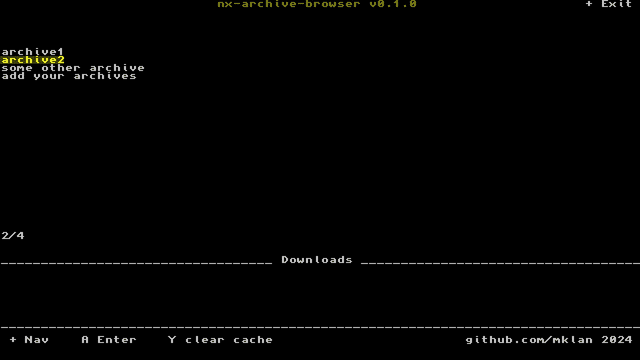
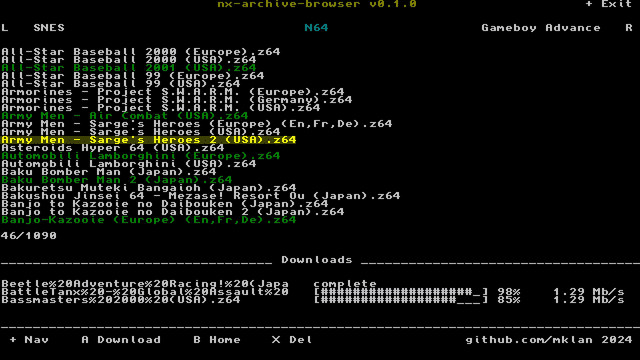
A Switch homebrew that allows users to browse and download archives from archive.org.
Installation
Copy nx-archive-browser.nro to /switch. The app will appear on the Homebrew Menu.
Configure your archive collections and root download folder in config/nx-archive-browser/config.json. The keys represent collection folders inside your download folder. The values are archive.org identifier of collections.
Example:
{
  "folder": "roms",
  "collections": {
    "N64": "SomeCollectionByGhostw***",
    "SNES": "SomeOtherCollectionByGhostw***"
  }
}
The archives will be downloaded to sdmc:/roms/N64 and sdmc:/roms/SNES.
Note: Read the legal terms of archive.org. It is advised to only download licence free archives, archives you developed on your own or in some cases own a copy of the original product (depends where you are located).
Screenshots
Changelog
v0.1.2
- Fix: clearing cache a second time lead to crash.
v0.1.1
- Fix: error when deleting unavailable file.
v0.1.0
- First Release.
Credits
TooTallNate - nxjs - JS runtime for the Switch.