
NAX0-Cryptor Switch: Difference between revisions
From GameBrew
More actions
No edit summary |
|||
| Line 17: | Line 17: | ||
==Features== | ==Features== | ||
*Adds/removes NAX0 encryption from an input NCA. | *Adds/removes NAX0 encryption from an input NCA. | ||
*Lightweight (<8KB compressed) | *Lightweight (<8KB compressed). | ||
==User guide== | ==User guide== | ||
Latest revision as of 00:27, 7 June 2023
| NAX0-Cryptor | |
|---|---|
 | |
| General | |
| Author | SimonMKWii |
| Type | PC Utilities |
| Version | 2018 |
| License | MIT License |
| Last Updated | 2018/08/25 |
| Links | |
| Download | |
| Website | |
| Source | |
Encrypt and decrypt NAX0-encrypted Switch NCA files.
Features
- Adds/removes NAX0 encryption from an input NCA.
- Lightweight (<8KB compressed).
User guide
Instructions
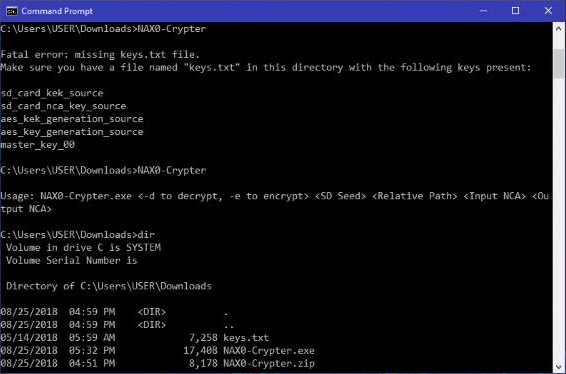
Add a keys.txt file to the directory.
Open command prompt, then type in:
NAX0-Crypter.exe- Use the
-eflag for encryption, and the-dflag for decryption. - Your unique SD seed.
- The directory relative to
/Nintendo/Contents/(i.e. "/Registered/00000000/aaaaaaaaaaaaaaaaaaaaaaaaaaaaaaaa.nca"). - The input NCA file.
- The output NCA file.
Press Enter.
Screenshots
Known issues
Does not support NCA file splitting yet, so NCAs with a total size of >4GB are not supported yet.