
Tencent Switcher GUI Switch: Difference between revisions
From GameBrew
More actions
No edit summary |
No edit summary |
||
| Line 19: | Line 19: | ||
==User guide== | ==User guide== | ||
Please launch .nro with Title Takeover Mode (launch any game while pressing R button, by default) instead of Applet Mode ("Album") to prevent potential crash. | Please launch .nro with Title Takeover Mode (launch any game while pressing R button, by default) instead of Applet Mode ("Album") to prevent potential crash. | ||
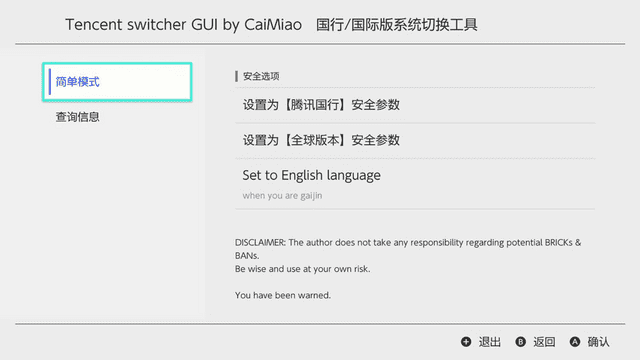
==Screenshots== | |||
https://dlhb.gamebrew.org/switchhomebrews/tencentswitcherguinx.png | |||
==Media== | ==Media== | ||
Revision as of 11:52, 2 May 2023
| Tencent Switcher GUI | |
|---|---|
 | |
| General | |
| Author | CaiMiao |
| Type | Utilities |
| Version | 0.1.2 |
| License | GPL-3.0 |
| Last Updated | 2022/08/20 |
| Links | |
| Download | |
| Website | |
| Source | |
TencentSwitcherGUI is a tool that could switch a Switch between Tencent mode and International Mode without the hassle of modding prodinfo.
So for those who own a Tencent Switch, they could use this tool to disable region lock for eShop and user interface (still very risky to go online though). For those who own a regular Switch, they could use this to have a peek into a totally isolated region.
User guide
Please launch .nro with Title Takeover Mode (launch any game while pressing R button, by default) instead of Applet Mode ("Album") to prevent potential crash.
Screenshots
Media
Switch大陸騰訊國行硬破機改區國際版教學,遊戲能顯示繁體中文了! (carcaschoi)
Changelog
v0.1.2 2022/08/20
- No expected changes.
v0.1.1 2021/01/21
- Please prefer use with title takeover to prevent potential crash.