
ScreenTester-NX Switch: Difference between revisions
From GameBrew
More actions
| Line 34: | Line 34: | ||
Up - Black | Up - Black | ||
Down - Rapid color cycle mode (Press | Down - Rapid color cycle mode (Press Down again to toggle off) | ||
Minus - Menu screen | Minus - Menu screen | ||
Latest revision as of 01:13, 27 April 2023
 |
Photosensitive warning: The application may trigger seizures in people sensitive to flashing lights. If you have a seizure disorder, have somebody else run the program for you. |
| ScreenTester-NX | |
|---|---|
 | |
| General | |
| Author | Marice |
| Type | Utilities |
| Version | 0.2 |
| License | Mixed |
| Last Updated | 2018/05/20 |
| Links | |
| Download | |
| Website | |
| Source | |
This program displays different colors to detect dead/stuck pixels on your Nintendo-Switch screen.
It can cycle colors on your Switch screen very rapidly to try and repair stuck/dead pixels.
Installation
Just unpack the zip to the root of your SD-Card (make sure to keep folder structure intact).
Controls
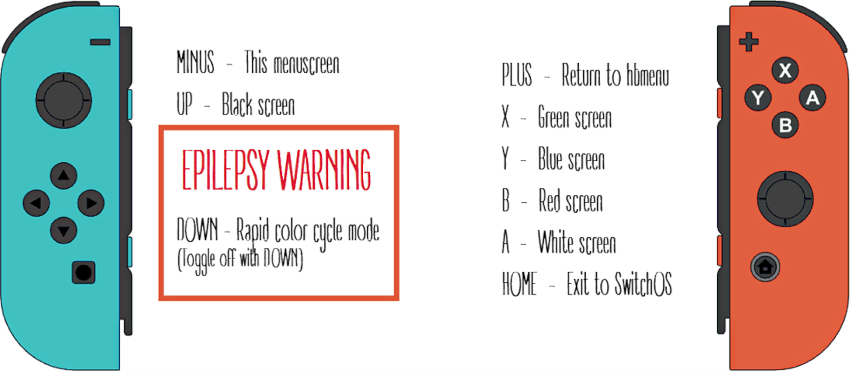
A - White
B - Red
X - Green
Y - Blue
Up - Black
Down - Rapid color cycle mode (Press Down again to toggle off)
Minus - Menu screen
Plus - Return to hbmenu
Screenshots
Changelog
v0.2 2018/03/20
- Added Menuscreen.
- Added rapid color cycle mode (to repair stuck/dead pixels).
- Few minor changes.
v0.1 2018/05/19
- This program displays different colors to detect dead/stuck pixels on your Nintendo-Switch screen.
- Press A for White
- Press B for Red
- Press X for Green
- Press Y for Blue
- Press + to return to hb-menu.
- Press HOME to return to Switch-OS