
Map Maker Wii: Difference between revisions
From GameBrew
More actions
No edit summary |
No edit summary |
||
| Line 1: | Line 1: | ||
{{Infobox Wii Homebrews | {{Infobox Wii Homebrews | ||
|title=Map Maker | |title=Map Maker | ||
|image= | |image=mapmakerwii2.png | ||
|description=Generates cool-looking terrain you can edit on-the-fly with the Wiimote | |description=Generates cool-looking terrain you can edit on-the-fly with the Wiimote | ||
|author=Jesse Dubay (adb) | |author=Jesse Dubay (adb) | ||
| Line 15: | Line 9: | ||
|license=GPL | |license=GPL | ||
|download=https://dlhb.gamebrew.org/wiihomebrews/mapmakerwii.7z | |download=https://dlhb.gamebrew.org/wiihomebrews/mapmakerwii.7z | ||
|website= | |website=https://wiibrew.org/wiki/Map_Maker | ||
|source= | |source= | ||
}} | }} | ||
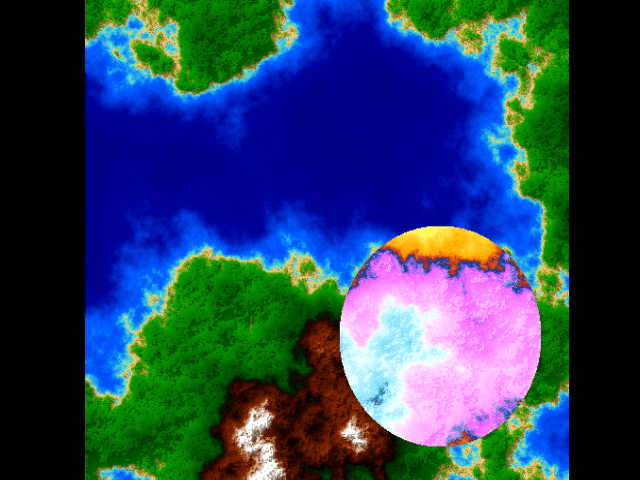
Map Maker is a demo that allows users to generate and edit visually appealing terrain in real-time using the Wiimote. | |||
== Controls == | == Controls == | ||
A - Generate new map | |||
B - Hold and drag to pan | |||
D-Pad Up/Down - Adjust terrain height | |||
Home - Show Menu and options | |||
Plus/Minus - Adjust brush size (*) | |||
1 - Re-center map | |||
2 - Invert land height | |||
(*) By default, these buttons have no effect because brush size is based on distance from the screen. You can enable manual mode in the Menu. | |||
== | ==Screenshots== | ||
https://dlhb.gamebrew.org/wiihomebrews/mapmakerwii3.png | |||
== Changelog== | == Changelog== | ||
'''v0.1 | '''v0.1 2008/09/15''' | ||
* Initial release. | * Initial release. | ||
== | ==Credits== | ||
These people did all the hard work: | These people did all the hard work: | ||
* Thanks to | * Thanks to para for the Wiiuse library. | ||
* Thanks to | * Thanks to Paul Martz, who wrote a very helpful article about the diamond-square algorithm. | ||
* Thanks to | * Thanks to Max Russell, who is much better at math than I. | ||
* Thanks to | * Thanks to Team Twiizers for their contributions to the homebrew community -- without you guys I'd never have even tried. | ||
* Thanks to | * Thanks to TheBlasphemer, whose nifty RGB to YUY2 routine I blatantly lifted from the [[WiiRayTracer]] demo. | ||
* Thanks to | * Thanks to WinterMute for the extremely enlightening How to use the Wiimote tutorial. | ||
* And thanks to | * And thanks to River for being my alpha tester <3. | ||
==External Links== | ==External Links== | ||
* WiiBrew - https://wiibrew.org/wiki/Map_Maker | * WiiBrew - https://wiibrew.org/wiki/Map_Maker | ||
Latest revision as of 04:24, 26 February 2023
| Map Maker | |
|---|---|
 | |
| General | |
| Author | Jesse Dubay (adb) |
| Type | Demos |
| Version | 0.1 |
| License | GPL |
| Last Updated | 2008/09/15 |
| Links | |
| Download | |
| Website | |
Map Maker is a demo that allows users to generate and edit visually appealing terrain in real-time using the Wiimote.
Controls
A - Generate new map
B - Hold and drag to pan
D-Pad Up/Down - Adjust terrain height
Home - Show Menu and options
Plus/Minus - Adjust brush size (*)
1 - Re-center map
2 - Invert land height
(*) By default, these buttons have no effect because brush size is based on distance from the screen. You can enable manual mode in the Menu.
Screenshots
Changelog
v0.1 2008/09/15
- Initial release.
Credits
These people did all the hard work:
- Thanks to para for the Wiiuse library.
- Thanks to Paul Martz, who wrote a very helpful article about the diamond-square algorithm.
- Thanks to Max Russell, who is much better at math than I.
- Thanks to Team Twiizers for their contributions to the homebrew community -- without you guys I'd never have even tried.
- Thanks to TheBlasphemer, whose nifty RGB to YUY2 routine I blatantly lifted from the WiiRayTracer demo.
- Thanks to WinterMute for the extremely enlightening How to use the Wiimote tutorial.
- And thanks to River for being my alpha tester <3.
External Links
- WiiBrew - https://wiibrew.org/wiki/Map_Maker