
VitaDock Lite: Difference between revisions
More actions
m HydeWing moved page VitaDock Lite Vita to VitaDock Lite without leaving a redirect |
No edit summary |
||
| Line 43: | Line 43: | ||
==Screenshots== | ==Screenshots== | ||
vitadocklite3.png | https://dlhb.gamebrew.org/vitahomebrews/vitadocklite3.png | ||
==Known issues== | ==Known issues== | ||
Revision as of 11:10, 15 December 2022
| VitaDock Lite | |
|---|---|
 | |
| General | |
| Author | NekoMimi |
| Type | PC Utilities |
| Version | 1.0 |
| License | Apache-2.0 |
| Last Updated | 2022/10/31 |
| Links | |
| Download | |
| Website | |
| Source | |
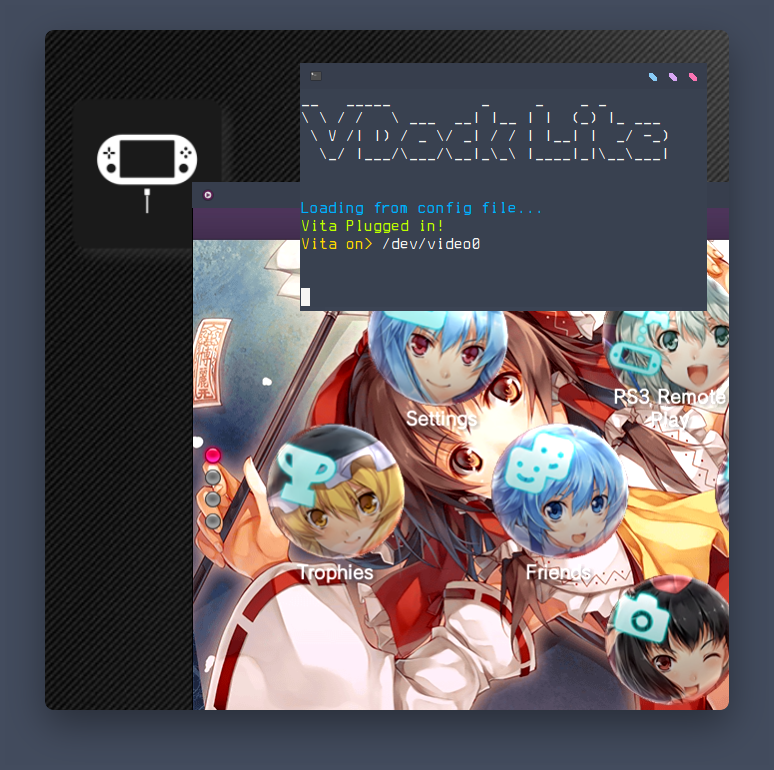
VitaDock Lite (VDlite for short) is Yet another Vita Dock, but instead of an entire Linux distro or a Docker container its a standalone utility.
VDlite uses mpv to display the video output of the vita which we get via the udcd_uvc.skprx plugin (it is recommended not using autoplugin/2).
Although its still in development you can use the current version of VDlite just fine (the app atleast since it makes the core) available in bin/ (add it to path).
Features
- It has all the features you need to turn your PC into a dock to stream your PlayStation Vita's display.
- VDlite doesn't force the user to install a new OS on their raspberry pi nor does it require docker.
- Works on x-org Window Managers (works on Wayland and DEs but some features may be limited).
- Has theme support and background music for that dock feel.
Installation
Clone the repo in ~/.local or any localtion then add $HOME/.local/VitaDockLite/bin/ to your $PATH.
Run chmod +x install.sh then ./install.sh which will install dependencies and set VDlite as executable.
Run VDockLite. That's it.
User guide
By default mpv won't open in fullscreen to eliminate the dropped frames caused by the PC.
This can be changed from the configuration file located in $HOME/.config/VDockLite/options.conf
Screenshots
Known issues
Audio support is not implemented but as most people would do anyways using a Bluetooth speaker or a speaker through an AUX cable is just fine.