
NGPAdvance GBA: Difference between revisions
From GameBrew
More actions
No edit summary |
|||
| Line 23: | Line 23: | ||
* Can play most games. | * Can play most games. | ||
== | ==Installation== | ||
Run NGPAdvance.exe to add roms to the emulator, you can also add a real bios. | Run NGPAdvance.exe to add roms to the emulator, you can also add a real bios. | ||
Do | Do not overwrite the original .gba file. | ||
==User guide== | |||
===Menu=== | ===Menu=== | ||
Controller: | Controller: | ||
Revision as of 08:47, 8 September 2022
| NGPAdvance | |
|---|---|
| File:Ngpadvance2.png | |
| General | |
| Author | FluBBa (Fredrik Olsson) |
| Type | Handheld |
| Version | 0.3 |
| License | Mixed |
| Last Updated | 2008/10/01 |
| Links | |
| Download | |
| Website | |

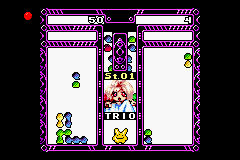
NGPAdvance is a SNK NeoGeo Pocket Color emulator for the GBA.
Features
- Can play most games.
Installation
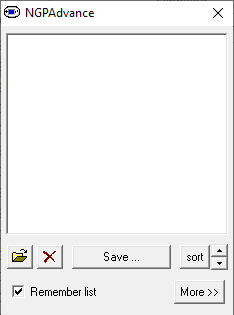
Run NGPAdvance.exe to add roms to the emulator, you can also add a real bios.
Do not overwrite the original .gba file.
User guide
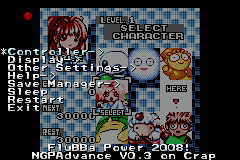
Menu
Controller:
- Autofire - Select if you want autofire.
- Controller - 2P control player 2, Link is used to linkup 2 GBAs.
- Swap A/B - Swap which GBA button is mapped to which NGP button.
Display:
- Gamma - Lets you change the gamma ("brightness").
- Border - doesn't work yet.
- Palette - Choose which palette to use for mono games.
- Disable foreground - Turn on/off foreground rendering.
- Disable background: -Turn on/off background rendering.
- Disable sprites - Turn on/off sprite rendering.
Other Settings:
- VSync - Switch between speed modes, can also be toggled with L+START.
- On - Will wait for the next vsync if needed, best for most games.
- Force - Can help with graphics in some games, often slow.
- Off - Can speed up some games if they don't allready use all cpu time.
- Slowmo - Good for beating that extra fast game.
- FPS-Meter - Toggle fps meter.
- Autosleep - Change the autosleep time, also see Sleep.
- EWRAM Speed - Use with caution.
- Machine - NeoGeoPocketColor should work for most games.
- Language - Switch language settings for the NeoGeo Pocket.
- Speedhacks - Turn on/off speedhacks.
- Z80 - Turn the emulation of the Z80 on/off.
- Change batteries - Change batteries in the NGP.
- Change sub battery - Change the clock battery in the NGP.
- Use BIOS - doesn't work yet.
- CPU speed - Set the CPU speed of the NeoGeo Pocket, this doesn't lock the cpu speed, the games can still change it.
Save Manager:
- Save SRAM - Save the SRAM for the current game (it's automaticly loaded).
- Manage savememory - Lets you erase SRAM (for now).
Others:
- Sleep - Put the GBA into sleepmode (activated from this menu or from 5/10/30 minutes of inactivity).
- Restart - Lets you select a new game.
- Exit - Let's you exit the emulator back to Pogo or the FA/F2A menu.
Make sure your flashing software allocates 64kByte/512kbit SRAM for NGPAdvance.
Advanced
EWRAM speed:
- This changes the waitstate on EWRAM between 2 and 1.
- This can probably damage your GBA and definitly uses more power, around 10% speedgain.
- Use at your own risk.
Pogoshell:
- Copy ngpadvance.gba to the plugin folder (or compress it to mbz before you copy it).
- Rename it to ngpadvance.bin and add either one of the following line to the pogo.cfg file:
- ngp 1 ngpadvance.bin 2
- ngp 1 ngpadvance.mbz 2
Controls
Menu:
Up/Dow - Select game
B/A - Start the selected game
In game:
L+R - Open the menu
A - Choose
B or L+R - Cancel
Start+Select - Wake up from Sleep mode
NeoGeo Pocket:
A - B
B - A
Screenshots
Changelog
V0.3 2008/10/01
- Fixed copy protection in "Metal Slug 2" (SNK logo in VRAM).
- Fixed control problem in "Rockman Battle & Fighters" (MIRR opcode).
- Fixed background glitch in "Memories of Pure" (HCount register).
- Fixed problems with DMA probably affecting many games.
V0.2 2008/09/04
- Added speedhacks for a lot of games.
- Added emulation of batteries & sub battery.
- Added RTC alarm.
- Added power button (SELECT).
- Added D button (R) (check "Doko Demo Mahjong").
- Fixed a couple of cpu bugs affecting "Metal Slug 1" and a couple of other games.
V0.1 2008/07/04
- Initial release.
V0.0 2008/04/02
- Started Coding.
Credits
Huge thanks to Loopy for the incredible PocketNES and the builder.
Thanks to:
- The crew at PocketHeaven for their support.
- All the people involved in developing other NGP emulators.
- Flavor for some ideas on NGP emulation and support.
External links
- Author's website - http://hem.passagen.se/flubba/gba.html (archived)
- GBARetro.com - http://www.ndsretro.com/gbadown.html