
Paint Master GBA: Difference between revisions
From GameBrew
More actions
No edit summary |
No edit summary |
||
| Line 1: | Line 1: | ||
{{Infobox GBA Homebrews | {{Infobox GBA Homebrews | ||
|title=Paint Master | |title=Paint Master | ||
|image= | |image=paintmaster02.png | ||
|description=A Mario Paint style program. | |description=A Mario Paint style program. | ||
|author=Snug | |author=Snug | ||
| Line 16: | Line 10: | ||
|download=https://dlhb.gamebrew.org/gbahomebrews/paintmaster.7z | |download=https://dlhb.gamebrew.org/gbahomebrews/paintmaster.7z | ||
|website=https://gbax.gp2x.de/gbax2003.html | |website=https://gbax.gp2x.de/gbax2003.html | ||
}} | }} | ||
{{#seo: | |||
|title= (Other Apps) - GameBrew | |||
|title_mode=append | |||
|image=paintmaster2.png | |||
|image_alt=Paint Master | |||
}} | |||
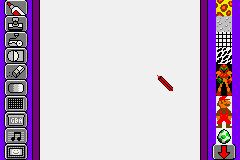
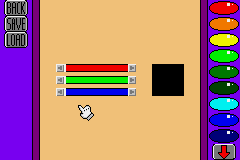
Paint Master is a Mario Paint style program, geared towards art creation on the GBA. It is a follow up to an earlier demo called Cool Paint. Although the user interface is similar, Paint Master is a truely superior program. | Paint Master is a Mario Paint style program, geared towards art creation on the GBA. It is a follow up to an earlier demo called Cool Paint. Although the user interface is similar, Paint Master is a truely superior program. | ||
Revision as of 09:03, 11 September 2022
| Paint Master | |
|---|---|
 | |
| General | |
| Author | Snug |
| Type | Other Apps |
| Version | 2003 |
| License | Mixed |
| Last Updated | 2003/03/16 |
| Links | |
| Download | |
| Website | |
Paint Master is a Mario Paint style program, geared towards art creation on the GBA. It is a follow up to an earlier demo called Cool Paint. Although the user interface is similar, Paint Master is a truely superior program.
The homebrew was presented in the GBAX 2003 Coding Competition.
Features
- Pen tool.
- Stamp.
- Paint Roller.
- Shapes.
- Eraser.
- Colour Editor.
- Stamp Editor.
- Save Feature.
- Music Selector.
- Gallery.
User guide
Each tool has a unique function that can be activated by selecting the tool with the A button.
When using the pen tool, for instance, the user can draw a thin line by pressing A, and a thick line by pressing B.
Screenshots
Media
GBA - Homebrew - Paint Master (Superguy890)
Credits
Music by Snug.
Code & GFX by Jason Haffner.
External links
- GBAX 2003 Coding Competition - https://gbax.gp2x.de/gbax2003.html