
TWLSaveTool 3DS: Difference between revisions
From GameBrew
More actions
No edit summary |
No edit summary |
||
| Line 18: | Line 18: | ||
===Installing=== | ===Installing=== | ||
Available in CIA and 3DSX/SMDH formats. | Available in CIA and 3DSX/SMDH formats. | ||
* CIA - Requires an access to CFWs. Recommended option. | * CIA - Requires an access to CFWs. Recommended option (and you get to see the banner made by Apache Thunder). | ||
* 3DSX - Must have either PokéTransporter or Pokémon Dream Radar installed on your 3DS. In both cases you'll need to pay to be able to download them. | * 3DSX - Must have either PokéTransporter or Pokémon Dream Radar installed on your 3DS. In both cases you'll need to pay to be able to download them. | ||
| Line 25: | Line 25: | ||
==User guide== | ==User guide== | ||
===Game compatibility=== | |||
All NDS games should be supported except: | All NDS games should be supported except: | ||
* WarioWare D.I.Y. | * WarioWare D.I.Y. | ||
| Line 31: | Line 32: | ||
* Pokémon Typing Adventure. | * Pokémon Typing Adventure. | ||
===Notes=== | |||
* After creating a backup save file, it is always recommended to keep a backup of this file before importing or editing it with any save editors. | |||
* Make sure the new save is in the TWLSaveTool folder on the root of your SD card (not in /3ds/TWLSaveTool), and it has the exact name showed on screen. Otherwise it will not reconize your save file. | |||
==Controls== | ==Controls== | ||
| Line 66: | Line 69: | ||
* Fixed glitched text issues, as well as other bugs. | * Fixed glitched text issues, as well as other bugs. | ||
* Simplified the build system. You just have to run make now (pull request [https://github.com/TuxSH/TWLSaveTool/pull/6 #6], thanks @WinterMute). | * Simplified the build system. You just have to run make now (pull request [https://github.com/TuxSH/TWLSaveTool/pull/6 #6], thanks @WinterMute). | ||
'''v1.0 2016/01/31''' | '''v1.0 2016/01/31''' | ||
Revision as of 02:41, 3 December 2021
| TWLSaveTool | |
|---|---|
| File:TWLSaveTool.png | |
| General | |
| Author | TuxSH |
| Type | Utilities |
| Version | 1.2 |
| License | GPL-2.0 |
| Last Updated | 2016/08/28 |
| Links | |
| Download | |
| Website | |
| Source | |

TWLSaveTool is a 3DS homebrew that allows you to read, write, and erase save files from NDS cartridges (just like savegame-manager).
Installation
Installing
Available in CIA and 3DSX/SMDH formats.
- CIA - Requires an access to CFWs. Recommended option (and you get to see the banner made by Apache Thunder).
- 3DSX - Must have either PokéTransporter or Pokémon Dream Radar installed on your 3DS. In both cases you'll need to pay to be able to download them.
Building
Have libctru and devkitARM correctly installed and set up, as well as makerom and bannertool in an accessible path, then run: make
User guide
Game compatibility
All NDS games should be supported except:
- WarioWare D.I.Y.
- Band Brothers DX.
- Art Academy DS.
- Pokémon Typing Adventure.
Notes
- After creating a backup save file, it is always recommended to keep a backup of this file before importing or editing it with any save editors.
- Make sure the new save is in the TWLSaveTool folder on the root of your SD card (not in /3ds/TWLSaveTool), and it has the exact name showed on screen. Otherwise it will not reconize your save file.
Controls
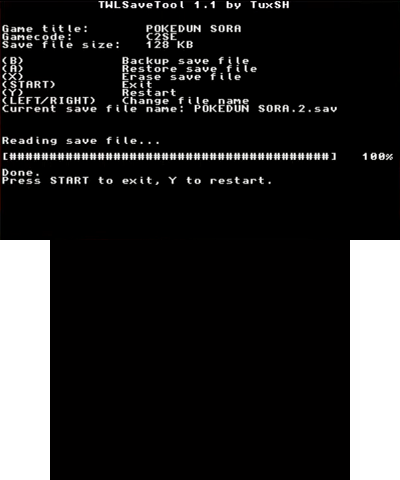
B - Backup save file
A - Restore save file
X - Erase save file
Start - Exit
Y - Restart
Left/Right - Change filename
Screenshots
Media
Backup your nintendo ds game saves on CFW 3ds (GTS 2018)
How To Backup 3DS/DS Saves and Cartridge Roms (The Boolean Gemini)
Changelog
v1.2 2016/08/28
- Fix Pokémon Mystery Dungeon: Explorers of Sky (thanks to @Steveice10).
v1.1 2016/02/07
- Doesn't work with PMD EoS.
- Added a (very simplistic) file selector.
- Changed the key layout (pull request #5, thanks @lavanoid).
- Fixed glitched text issues, as well as other bugs.
- Simplified the build system. You just have to run make now (pull request #6, thanks @WinterMute).
v1.0 2016/01/31
- First release.
Credits
Sprcial thanks to:
- Current contributors.
- Apache Thunder, for making the amazing banner and icon used by this homebrew.
- Steveice10, for having RE'd PXIDEV:SPIMultiWriteRead.
- idgrepthat, for pointing out that PokéTransporter was indeed using that function.
- Everyone else who helped.