
CC Creator: Difference between revisions
From GameBrew
More actions
No edit summary |
No edit summary |
||
| Line 2: | Line 2: | ||
|title=CC Creator | |title=CC Creator | ||
|image=cccreator.png | |image=cccreator.png | ||
|description=Create simple cartoons, using the famous | |description=Create simple cartoons, using the famous 'memes' circulating on the Internet. | ||
|author=Froskito | |author=Froskito | ||
|lastupdated=2011/07/30 | |lastupdated=2011/07/30 | ||
Revision as of 06:29, 22 January 2024
| CC Creator | |
|---|---|
 | |
| General | |
| Author | Froskito |
| Type | Other Apps |
| Version | 2.0 |
| License | Mixed |
| Last Updated | 2011/07/30 |
| Links | |
| Download | |
| Website | |
An application that lets user create simple cartoons, using the famous memes circulating on the Internet.
It was participated in the Scenery Beta 2011.
User guide
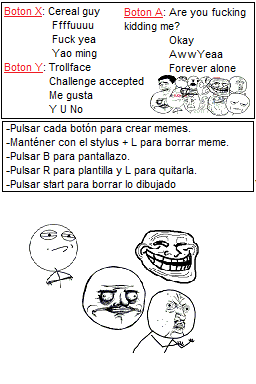
There are a total of 12 memes that you can add to your cartoons including Cereal Guy, Rage Guy (AKA Fffuuuu), F. Yeah, Yao Ming and Trollface. To create a vignette, put the template then draw your idea and add any of the aforementioned memes.
Once completed you can save your creations in BMP format.
Controls
Stylus - Draw
Stylus+L - Delete the selected meme
A - Insert F. Yeah and other memes
B - Save
Y - Insert Rage Guy and others memes
X - Insert Cereal Guy and other memes
L - Remove template
R - Insert template
Start - Clear screen
Screenshots
Compatibility
Tested on WoodR4 R4DS (firmware v1.28).
External links
- SceneBeta - http://nds.scenebeta.com/noticia/cc-creator