Fencing: Difference between revisions
From GameBrew
More actions
No edit summary |
No edit summary |
||
| Line 5: | Line 5: | ||
|author=Minty | |author=Minty | ||
|lastupdated=2008/09/09 | |lastupdated=2008/09/09 | ||
|type=Other | |type=Other Apps | ||
|version=9 Sept 2008 | |version=9 Sept 2008 | ||
|license=Mixed | |license=Mixed | ||
Revision as of 05:58, 31 October 2021
| FencingApp | |
|---|---|
 | |
| General | |
| Author | Minty |
| Type | Other Apps |
| Version | 9 Sept 2008 |
| License | Mixed |
| Last Updated | 2008/09/09 |
| Links | |
| Download | |
| Website | |
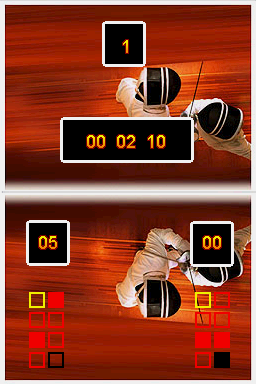
FencingApp is an application created for fencers, referees, directors and coaches. It is an all in one timer-scorekeeper-cardcounter-coinflipper (for overtime priority).
User guide
First you select a mode:
- Pools - 5 points, one period.
- DEs - 15 points, three periods.
- Free - unlimited points and periods.
If a fencer gets a card (e.g. Yellow). Then click on the yellow card in the touchscreen.
Reset time when period is finished. A triple beep will sound when a period is over. The number above the timer is the period you are in.
When the bout is over a results screen will pop up and you may have each fencer signs.
Controls
A - Start the timer, Pause
L/R - Record Fencers' scores (when paused)
Select - Reset time
Screenshots