Nintellivision: Difference between revisions
From GameBrew
More actions
No edit summary |
No edit summary |
||
| Line 11: | Line 11: | ||
}} | }} | ||
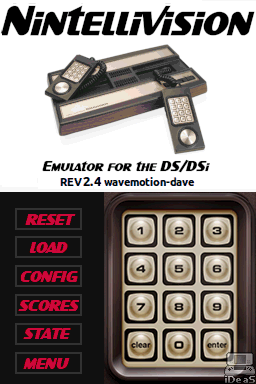
NINTV-DS is an Intellivision console emulator running on the DS/DSi. | Nintellivision, also known as NINTV-DS, is an Intellivision console emulator running on the DS/DSi. | ||
==Features== | ==Features== | ||
| Line 31: | Line 31: | ||
==User guide== | ==User guide== | ||
When you load the emulator, select LOAD to select a cartridge/game to play. The emulator supports two types of files, raw binary files (BIN or INT) and intellicart ROM files (where the .ROM contains the loading information, popular among newer homebrew games). | When you load the emulator, select LOAD to select a cartridge/game to play. The emulator supports two types of files, raw binary files (BIN or INT) and intellicart ROM files (where the .ROM contains the loading information, popular among newer [http://www.reddit.com/r/intellivision/comments/5nlhvg/download_intellivision_homebrews_rom_files homebrew games]). | ||
Once loaded, the configuration (or default settings) is loaded with the game. You can pick your overlay, and tweak key mappings and other settings in configuration. | Once loaded, the configuration (or default settings) is loaded with the game. You can pick your overlay, and tweak key mappings and other settings in configuration. | ||
| Line 40: | Line 40: | ||
You can find a number of remade overlays and manual from the discussion thread: | You can find a number of remade overlays and manual from the discussion thread: | ||
* [https://gbatemp.net/threads/introducing-nintellivision-an-emulator-for-the-ds-dsi.593786/page-6#post-9609657 Overlays] by MrioKartFan. | * [https://gbatemp.net/threads/introducing-nintellivision-an-emulator-for-the-ds-dsi.593786/page-6#post-9609657 Overlays] by MrioKartFan. | ||
* [https://gbatemp.net/threads/introducing-nintellivision-an-emulator-for-the-ds-dsi.593786/ | * [https://gbatemp.net/threads/introducing-nintellivision-an-emulator-for-the-ds-dsi.593786/post-9629867 Manuals] by ts-x. | ||
To use overlay, rename .txt to .ovl for your game, then copy it along with the .png file to your card or sd card. Note that the file names should be the same as your rom name and they can be placed together with the rom (can change to /roms/intv/ovl/ or /roms/ovl/ via Global Option). | To use overlay, rename .txt to .ovl for your game, then copy it along with the .png file to your card or sd card. Note that the file names should be the same as your rom name and they can be placed together with the rom (can change to /roms/intv/ovl/ or /roms/ovl/ via Global Option). | ||