MVSPSP: Difference between revisions
From GameBrew
More actions
No edit summary |
No edit summary Tag: visualeditor |
||
| Line 50: | Line 50: | ||
| |-cache/ | | |-cache/ | ||
| | |-Mslug_cache/ (e.g. Metal Slug) | | | |-Mslug_cache/ (e.g. Metal Slug) | ||
'''Note from developer:''' | '''Note from developer:''' | ||
| Line 59: | Line 58: | ||
This homebrew conforms to MAME (Multiple Arcade Machine Emulator) 0.120, the ZIP file name is the rom required by MAME 0.120 must match the set name. | This homebrew conforms to MAME (Multiple Arcade Machine Emulator) 0.120, the ZIP file name is the rom required by MAME 0.120 must match the set name. | ||
All rom files should be compressed into a ZIP file. It is exactly the same as MAME, except that it cannot handle the files expanded in the folder. Also, it does not support rom sets that MAME does not support. | * All rom files should be compressed into a ZIP file. It is exactly the same as MAME, except that it cannot handle the files expanded in the folder. | ||
* Also, it does not support rom sets that MAME does not support. | |||
The rom file name in the ZIP file can be any name, but CRC must match the CRC of the MAME 0.120 rom set. All games displayed in white on the file browser will work, games that are grayed out on the file browser cannot be started. | * The rom file name in the ZIP file can be any name, but CRC must match the CRC of the MAME 0.120 rom set. | ||
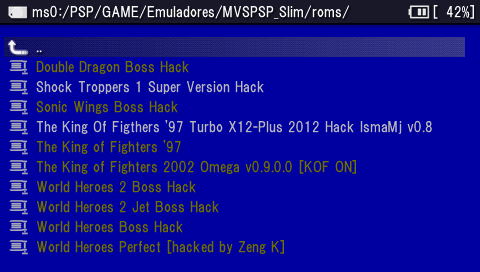
* All games displayed in white on the file browser will work, games that are grayed out on the file browser cannot be started. | |||
A list of supported games along with the rom names can be found in gamelist_mvs.txt. | * A list of supported games along with the rom names can be found in gamelist_mvs.txt. | ||
You may match MAME 0.120 and later rom sets using tools such as ClrMame Pro and [https://www.romcenter.com RomCenter]. | You may match MAME 0.120 and later rom sets using tools such as ClrMame Pro and [https://www.romcenter.com RomCenter]. | ||
| Line 78: | Line 77: | ||
===Create cache file=== | ===Create cache file=== | ||
Copy the original rom file to /PSP/GAMES/mvspsp/roms/ folder. You should now be able to run the game in the emulator. | * In order to run the game, you will need to use the the enclosed conversion tools on the PC to create cache files for each game. | ||
* Some rom sets only require the cache of the parent set; some clone sets shares the same cache file/data as the parent set which will be used instead. | |||
* Both rom lists are available in the readme file (note that bootleg roms only work in bootleg compatible version). | |||
* Use the conversion tool for your ZIP rom file, a GameName_cache folder will be created. | |||
** Place the GameName_cache folder to the /PSP/GAMES/mvspsp/cache/ directory. | |||
** Copy the original rom file to /PSP/GAMES/mvspsp/roms/ folder. You should now be able to run the game in the emulator. | |||
==Controls== | ==Controls== | ||