PSPAtari: Difference between revisions
From GameBrew
More actions
No edit summary |
No edit summary |
||
| Line 21: | Line 21: | ||
==User guide== | ==User guide== | ||
===Load ATARI Rom files (ZIP, ROM, ATR, BIN)=== | |||
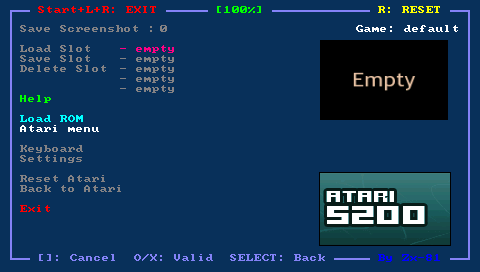
Put your rom file (with .zip, .rom, atr or .bin file extension) on your PSP Memory Stick in the roms directory, and use the file selector to choose the rom file in your emulator main menu. | Put your rom file (with .zip, .rom, atr or .bin file extension) on your PSP Memory Stick in the roms directory, and use the file selector to choose the rom file in your emulator main menu. | ||
| Line 29: | Line 29: | ||
For 5200 roms, use the original Atari800 menu, then select Cartridge Management> Insert Cartridge and specify your disk image file. Choose the cartridge type 5200, and go back to the emulator using L-Trigger. | For 5200 roms, use the original Atari800 menu, then select Cartridge Management> Insert Cartridge and specify your disk image file. Choose the cartridge type 5200, and go back to the emulator using L-Trigger. | ||
===Key mappings=== | |||
There are 3 different mappings in the emulator window (Normal, L-Trigger and R-Trigger mappings). You can toggle between while playing inside the emulator using the two PSP trigger keys. | There are 3 different mappings in the emulator window (Normal, L-Trigger and R-Trigger mappings). You can toggle between while playing inside the emulator using the two PSP trigger keys. | ||
| Line 37: | Line 37: | ||
You can save/load and edit your own KBD files in Keyboard menu; and if the keyboard filename is the same as the rom file (ZIP etc) then when you load this rom file, the corresponding keyboard file will be automatically loaded. | You can save/load and edit your own KBD files in Keyboard menu; and if the keyboard filename is the same as the rom file (ZIP etc) then when you load this rom file, the corresponding keyboard file will be automatically loaded. | ||
===Virtual keyboards=== | |||
You can use the Danzeff On-Screen Keyboard (by Danzel and Jeff Chen). Also in the emulator window you can use the IR keyboard for cursor keys (does not work well however). | You can use the Danzeff On-Screen Keyboard (by Danzel and Jeff Chen). Also in the emulator window you can use the IR keyboard for cursor keys (does not work well however). | ||