PSPColem: Difference between revisions
From GameBrew
More actions
Created page with "{{Infobox PSP homebrew | title = PSPColem | image = https://dlhb.gamebrew.org/psphomebrew/pspcolem.png|250px | type = Computer | version = 1.3.1 (23 Aug 2009) | licence = GNU..." |
No edit summary |
||
| Line 23: | Line 23: | ||
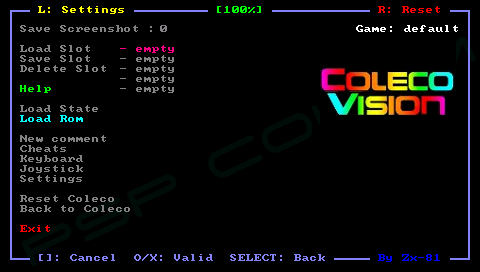
'''Load ColecVision Rom files (ZIP, ROM):''' | '''Load ColecVision Rom files (ZIP, ROM):''' | ||
Put your rom file (with .zip, or .rom file extension) on your PSP Memory Stick in the rom directory. | Put your rom file (with .zip, or .rom file extension) on your PSP Memory Stick in the rom directory. Go to the main menu, select your rom then go back to the emulator window to run the rom. | ||
Go to the main menu, select your rom then go back to the emulator window to run the rom. | |||
If you have multple roms the the same folder, you can swap between the two virtual keyboard panels (numbers & letters) and search fo the game in the file requester menu. | If you have multple roms the the same folder, you can swap between the two virtual keyboard panels (numbers & letters) and search fo the game in the file requester menu. | ||
| Line 31: | Line 29: | ||
'''Load Key Mapping files (KBD):''' | '''Load Key Mapping files (KBD):''' | ||
The default keyboard mapping between PSP Keys and ColecoVision keys, is not suitable for all games, and you can write your own mapping file to overcome the issue | The default keyboard mapping between PSP Keys and ColecoVision keys, is not suitable for all games, and you can write your own mapping file to overcome the issue (please see the sample mapping file default.kbd in the kdb directory). | ||
The keyboard mapping files, can then be loaded using the main menu inside the emulator. If the keyboard filename is the same as the rom (ZIP, ROM) then when you load this rom, the corresponding keyboard file is automatically loaded. | The keyboard mapping files, can then be loaded using the main menu inside the emulator. If the keyboard filename is the same as the rom (ZIP, ROM) then when you load this rom, the corresponding keyboard file is automatically loaded. | ||
| Line 40: | Line 36: | ||
'''Cheat Code (CHT):''' | '''Cheat Code (CHT):''' | ||
You can use the Cheat menu to search for modified bytes in RAM between current time and the last time you saved the RAM (monitoring for example life numbers). | Edit cheat.txt inside the cht directory and you can import the cheat codes in the Cheat menu. You can use the Cheat menu to search for modified bytes in RAM between current time and the last time you saved the RAM (monitoring for example life numbers). | ||
'''Comments:''' | '''Comments:''' | ||
The first line of your comments would then be displayed in the file requester menu while selecting the given file name (roms, keyboard, settings). | You can write your own comments for games using the Comment menu. The first line of your comments would then be displayed in the file requester menu while selecting the given file name (roms, keyboard, settings). | ||
'''Key mappings:''' | '''Key mappings:''' | ||