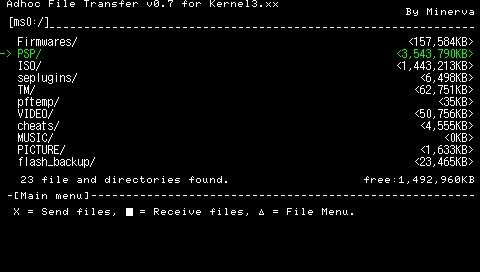
Adhoc File Transfer PSP: Difference between revisions
From GameBrew
More actions
No edit summary |
No edit summary |
||
| Line 23: | Line 23: | ||
==User guide== | ==User guide== | ||
Before transfering files/folders, please ensure both PSPs have: | Before transfering files/folders, please ensure both PSPs have: | ||
* Adhoc File Trasfer installed. | * Adhoc File Trasfer installed. | ||
| Line 30: | Line 29: | ||
* WLAN switch on/WiFi enabled. | * WLAN switch on/WiFi enabled. | ||
===One-to-one Communication mode=== | |||
This mode allows you to transfer file from one PSP to another. | |||
* Sender - Select folders/files that you would like to send (can select multiple files or folders). | * Sender - Select folders/files that you would like to send (can select multiple files or folders). | ||
* Recipient - Choose the location of where you would like to receive the files/folders and confirm. | * Recipient - Choose the location of where you would like to receive the files/folders and confirm. | ||
| Line 36: | Line 36: | ||
* The transmission/reception speed (for 3.51M33 and above) is about 300 to 400KByte/sec. | * The transmission/reception speed (for 3.51M33 and above) is about 300 to 400KByte/sec. | ||
===Distribution and Collection mode=== | |||
You can use this mode to share files/folders to multiple people at once. Note only CFW 3.51M33 or higher can use this mode for receiving files/folders. | |||
* Sender - Select the files/folders and press Start to enter Distribution mode. | * Sender - Select the files/folders and press Start to enter Distribution mode. | ||
* Recipients - Select where to receive file/folders, press Select to enter Collection mode. | * Recipients - Select where to receive file/folders, press Select to enter Collection mode. | ||
* Once the receving side detects the game console in Distribution mode, it will automatically collect the files/folders. | * Once the receving side detects the game console in Distribution mode, it will automatically collect the files/folders. | ||
===Additional notes=== | |||
The File Menu is able to copy, move, delete files/folders. You can also use OSK (on-screen keyboard) to create new folders and rename them. | |||
Please keep in mind if there is a file with the same name on the receiving side, it will be overwritten. However, if the file size and modified date are both the same, the program will be able to conclue that they are the same file and not to overwrite it. | Please keep in mind if there is a file with the same name on the receiving side, it will be overwritten. However, if the file size and modified date are both the same, the program will be able to conclue that they are the same file and not to overwrite it. | ||
You can cancel the transfer and resume later. There will a file saved on the receiving | You can cancel the transfer and resume later. There will be a file saved on the receiving side (the file name ends with _Incomplete_), which can be used to resume previous transfer. Otherwise you can simply delete it. | ||
Communication between consoles using Distrubution mode is less stable compare to one-to-one mode. For transferring data between 2 people it is recommended to use one-to-one mode (should take no longer than 10 seconds to establish connection). | Communication between consoles using Distrubution mode is less stable compare to one-to-one mode. For transferring data between 2 people it is recommended to use one-to-one mode (should take no longer than 10 seconds to establish connection). | ||