AlphaBase PSP: Difference between revisions
From GameBrew
More actions
No edit summary |
|||
| Line 21: | Line 21: | ||
==User guide== | ==User guide== | ||
===Basics=== | |||
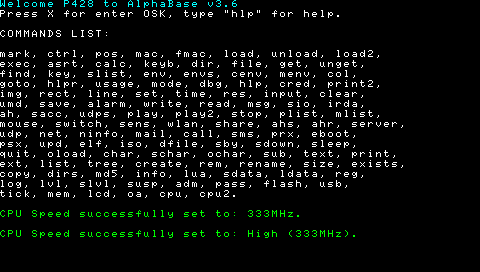
A-Base is a lua-well-coded PSP Bash, made just for debug almost all PSP Parts, even if initially it would be another PSP IDE. | A-Base is a lua-well-coded PSP Bash, made just for debug almost all PSP Parts, even if initially it would be another PSP IDE. | ||
The plist command is lua-readable. The P.S.E.R. parameters (Path Single Extension Requires) have the noextension proof system, which you can safely omit the extension; however, it's highly recommended to put it in any case to increase the execution speed. | The plist command is lua-readable. The P.S.E.R. parameters (Path Single Extension Requires) have the noextension proof system, which you can safely omit the extension; however, it's highly recommended to put it in any case to increase the execution speed. | ||
===Commands Helper=== | |||
If you forgot the usage of a command, just type it without parameters and A.B. will provide to display you the usageprint and more informations about the interested PSP parts; somehow just be careful that some commands have the shortcut system (pre-imposted parameters) so they can execute unappropriate code for you. | If you forgot the usage of a command, just type it without parameters and A.B. will provide to display you the usageprint and more informations about the interested PSP parts; somehow just be careful that some commands have the shortcut system (pre-imposted parameters) so they can execute unappropriate code for you. | ||
===Load/unload elements=== | |||
A-Base is an object-based environment, so you can load any element by typing "load [ELEMENT]", and use it for example fontprinting a string using the font loaded. | A-Base is an object-based environment, so you can load any element by typing "load [ELEMENT]", and use it for example fontprinting a string using the font loaded. | ||
| Line 43: | Line 42: | ||
* 5 for Timers. | * 5 for Timers. | ||
===Other commands and examples=== | |||
You can also delete an User Execution (did by imm, print... commands) by typing "res (ID) (ID2)" If command gets no param, it will provide to reset all the groups, else if it gets only one param, it will reset only the ID group (look up from the ID's list). | You can also delete an User Execution (did by imm, print... commands) by typing "res (ID) (ID2)" If command gets no param, it will provide to reset all the groups, else if it gets only one param, it will reset only the ID group (look up from the ID's list). | ||