LightMP3 PSP: Difference between revisions
From GameBrew
More actions
No edit summary |
No edit summary |
||
| Line 64: | Line 64: | ||
==User guide== | ==User guide== | ||
===Volume Boost=== | |||
Please note that by using volume boost (DPAD UP while listening to a track) to raise too much the volume you can damage the PSP speakers. Use it at your own risk. | Please note that by using volume boost (DPAD UP while listening to a track) to raise too much the volume you can damage the PSP speakers. Use it at your own risk. | ||
===Libmad Equalizers=== | |||
Equalizer works only with MP3s played through libMAD. If you want to add your own preset or change the standard ones you have to edit the file equalizers. | |||
Equalizer works only with MP3s played through libMAD | |||
* This file contains one row for each preset. | * This file contains one row for each preset. | ||
* Every row contains 34 columns separated by ";". | * Every row contains 34 columns separated by ";". | ||
| Line 78: | Line 76: | ||
** User EQ n.1;U1;0.0;0.0;0.0;0.0;0.0;0.0;0.0;0.0;0.0;0.0;0.0;0.0;0.0;0.0;0.0;0.0;0.0;0.0;0.0;0.0;0.0;0.0;0.0;0.0;0.0;0.0;0.0;0.0;0.0;0.0;0.0;0.0; | ** User EQ n.1;U1;0.0;0.0;0.0;0.0;0.0;0.0;0.0;0.0;0.0;0.0;0.0;0.0;0.0;0.0;0.0;0.0;0.0;0.0;0.0;0.0;0.0;0.0;0.0;0.0;0.0;0.0;0.0;0.0;0.0;0.0;0.0;0.0; | ||
===Audioscrobbler Log=== | |||
LightMP3 can save a .scrobbler.log file that you can then upload to your [http://www.last.fm last.fm] account. | LightMP3 can save a .scrobbler.log file that you can then upload to your [http://www.last.fm last.fm] account. | ||
This feature is disabled by default. To enable scrobbler go to the options screen. | This feature is disabled by default. To enable scrobbler go to the options screen. | ||
===Coverart=== | |||
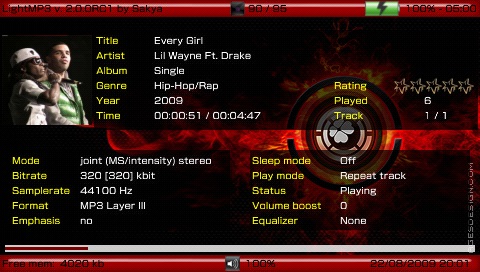
LightMP3 will look for cover with any of the following conditions. | LightMP3 will look for cover with any of the following conditions. | ||
* In ID3v2 info (only for MP3 files). | * In ID3v2 info (only for MP3 files). | ||
| Line 93: | Line 89: | ||
* For a file named cover.jpg in the same directory. | * For a file named cover.jpg in the same directory. | ||
===Media Library=== | |||
You can choose the media library root directory (the directory that will be scanned when you choose Scan MS for media). | You can choose the media library root directory (the directory that will be scanned when you choose Scan MS for media). | ||
| Line 103: | Line 98: | ||
ML_ROOT=ms0:/MUSIC/ | ML_ROOT=ms0:/MUSIC/ | ||
===Bookmarks=== | |||
You can create a bookmark while listening to a track. It also quits the application, the next time you start the player will ask if you want to load the saved bookmark. Once loaded, the bookmark will be deleted. | You can create a bookmark while listening to a track. It also quits the application, the next time you start the player will ask if you want to load the saved bookmark. Once loaded, the bookmark will be deleted. | ||
| Line 113: | Line 107: | ||
SHUTDOWN_AFTER_BOOKMARK=1 | SHUTDOWN_AFTER_BOOKMARK=1 | ||
===Starting Tab=== | |||
You can choose the starting tab by changing the setting START_TAB. There's no setting in the setting tab for this, so you'll have to manually modify the settings file. | You can choose the starting tab by changing the setting START_TAB. There's no setting in the setting tab for this, so you'll have to manually modify the settings file. | ||
| Line 124: | Line 117: | ||
4 = Settings | 4 = Settings | ||
===Skin and Language=== | |||
LightMP3 is totally skinnable. More skins are available from the [http://sakya.altervista.org/new/index.php?mod=none_lightmp3skins&view=list developer's webpage]. | LightMP3 is totally skinnable. More skins are available from the [http://sakya.altervista.org/new/index.php?mod=none_lightmp3skins&view=list developer's webpage]. | ||
Note for Korean or Japanese, you must have flash0:/font/kr0.pgf or flash0:/font/jpn0.pgf (not all PSP has these 2 fonts). Follow these steps to use. | Note for Korean or Japanese, you must have flash0:/font/kr0.pgf or flash0:/font/jpn0.pgf (not all PSP has these 2 fonts). Follow these steps to use. | ||