Pprefs PSP: Difference between revisions
From GameBrew
More actions
Created page with "{{Infobox PSP homebrew | title = pprefs | image = https://dlhb.gamebrew.org/psphomebrew/pprefs.jpg|250px | type = Utilities | version = v1131+lite v1031 | licence = Mixed | au..." |
No edit summary |
||
| Line 3: | Line 3: | ||
| image = https://dlhb.gamebrew.org/psphomebrew/pprefs.jpg|250px | | image = https://dlhb.gamebrew.org/psphomebrew/pprefs.jpg|250px | ||
| type = Utilities | | type = Utilities | ||
| version = | | version = 1131 + lite 1031 (19 Jul 2011) | ||
| licence = Mixed | | licence = Mixed | ||
| author = hiroi01 | | author = hiroi01 | ||
| Line 10: | Line 10: | ||
| source = http://code.google.com/p/pprefs-prx/source/checkout | | source = http://code.google.com/p/pprefs-prx/source/checkout | ||
}} | }} | ||
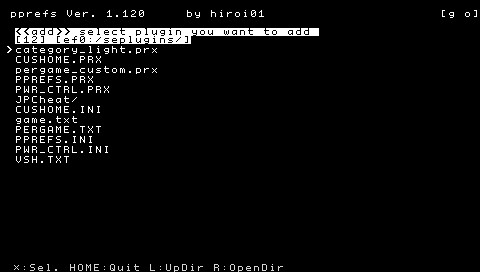
pprefs-prx is a plugin manager that can edit vsh.txt, game.txt, pops.txt and pergame.txt on VSH (change enable/disable, add new line, remove the line, sort the line, backup/restore). You can also use it to sort homebrew into different categories on VSH. | pprefs-prx is a plugin manager that can edit vsh.txt, game.txt, pops.txt and pergame.txt on VSH (change enable/disable, add new line, remove the line, sort the line, backup/restore). You can also use it to sort homebrew into different categories on VSH. | ||
| Line 18: | Line 17: | ||
This is an entry from the PSP Genesis Competition 2011. | This is an entry from the PSP Genesis Competition 2011. | ||
Features | ==Features== | ||
* Editor for Vsh.txt, game.txt, pops.txt in seplugins folder. | |||
* Editor for seplugins pergame.txt. | |||
* Homebrew sorting function. | |||
* Quick start on VSH. | |||
Installation | ==Installation== | ||
You can install the plugin with the installer or install it manually. | You can install the plugin with the installer or install it manually. | ||
Install using installer: | '''Install using installer:''' | ||
Copy the folder ppref_installer to /PSP/GAME/ on your Memory Stick. Run the application in XMB. | Copy the folder ppref_installer to /PSP/GAME/ on your Memory Stick. Run the application in XMB. | ||
Install manually: | '''Install manually:''' | ||
Devloper has included 2 languages options in the english and japanese folder. Both folders contain lite (pprefs_lite.prx) and full version (pprefs.prx). | Devloper has included 2 languages options in the english and japanese folder. Both folders contain lite (pprefs_lite.prx) and full version (pprefs.prx). | ||
| Line 38: | Line 39: | ||
For the full version, append this line to the text file | For the full version, append this line to the text file | ||
ms0:/seplugins/pprefs.prx 1 | ms0:/seplugins/pprefs.prx 1 | ||
For the lite version, use this line instead | For the lite version, use this line instead | ||
ms0:/seplugins/pprefs_lite.prx 1 | ms0:/seplugins/pprefs_lite.prx 1 | ||
Restart VSH to enable the plugin. | |||
==User guide== | |||
'''Configuration file:''' | |||
Go to the pprefs settings menu -> Save settings and the configuration file pprefs.ini will be created in the seplugins folder. | Go to the pprefs settings menu -> Save settings and the configuration file pprefs.ini will be created in the seplugins folder. | ||
You can customize some of the settings by editing pprefs.ini (using Notepad or Wordpad). | You can customize some of the settings by editing pprefs.ini (using Notepad or Wordpad). | ||
Customize color of pprefs: | '''Customize color of pprefs:''' | ||
Modifying the color codes in pprefs.ini will change the color scheme of pprefs. | Modifying the color codes in pprefs.ini will change the color scheme of pprefs. | ||
Color0 = ffffffff -> Foreground color. | Color0 = ffffffff -> Foreground color. | ||
Color1 = ff000000 -> Background color. | Color1 = ff000000 -> Background color. | ||
Color2 = ff0000ff -> Selected color. | Color2 = ff0000ff -> Selected color. | ||
Color3 = ffc0c0c0 -> Color of explanation on bottom of screen. | Color3 = ffc0c0c0 -> Color of explanation on bottom of screen. | ||
==Controls== | |||
Home - Start (be can changed at config in menu) | |||
Square (hold) - Move file/sort homebrew | Square (hold) - Move file/sort homebrew | ||
Cross - Activate, Deactivate, Add, Delete plugins | Cross - Activate, Deactivate, Add, Delete plugins | ||
Circle (hold) - Disable all plugins in a directory | Circle (hold) - Disable all plugins in a directory | ||
D-Pad - Navigate between plugins | D-Pad - Navigate between plugins | ||
L | |||
L/R - Toggle between directories (VSH, GAME, POPS) | |||
Triangle - Show menu | Triangle - Show menu | ||
Start - Save changes and restart VSH | Start - Save changes and restart VSH | ||
Select - Discard changes | Select - Discard changes | ||
Compatibility | L (while PSP is turned on) - The PSP is loaded with all plugins disabled | ||
Tested and works on the | |||
6.20 TN and PRO | ==Compatibility== | ||
6.35 PRO | Tested and works on the following Custom Firmwares: | ||
6.39 PRO | |||
6.60 ME and Updates | 6.20 TN and PRO <br> | ||
6.35 PRO <br> | |||
6.39 PRO <br> | |||
6.60 ME and Updates <br> | |||
Changelog | ==Changelog== | ||
v1.131 and Lite v1.031 | '''v1.131 and Lite v1.031''' | ||
* Fixed freeze bug in Options menu. | |||
* Fixed problems with the screen when displaying the menu. | |||
* No more need to restart VSH when accommodating icons in GAME. | |||
* Fixed problem with USB mode. | |||
* Added feature to disable all plugins at the start of the PSP (If you turn on the PSP with the L trigger held, it will turn on the PSP without plugins). | |||
* Fixed various bugs. | |||
* Added Lite and Normal versions. | |||
Credits | ==Credits== | ||
Thanks for following codes: | Thanks for following codes: | ||
"thread.c" and "mp3play.prx" and "RandomGameboot" by plum. | * "thread.c" and "mp3play.prx" and "RandomGameboot" by plum. | ||
"umd_dump.prx" and "iso tool" by takka. | * "umd_dump.prx" and "iso tool" by takka. | ||
"Libmenu Ver1.5" and "VLF library JPN Mod" by maxem. | * "Libmenu Ver1.5" and "VLF library JPN Mod" by maxem. | ||
"LightMP3 kai" by mascii. | * "LightMP3 kai" by mascii. | ||
"SMEMO" by STEAR. | * "SMEMO" by STEAR. | ||
"DX Library Portable" by yreeen. | * "DX Library Portable" by yreeen. | ||
==External links== | |||
* Official website - https://code.google.com/archive/p/pprefs-prx | |||
* Author's website - http://hiroi01.com | |||
* Wololo - https://wololo.net/talk/viewtopic.php?f=26&t=6580 | |||
[[Category:PSP homebrew applications]] | |||
[[Category:Homebrew utility applications on PSP]] | |||
[[Category:PSP homebrew plugins]] | |||