MMSplus PSP: Difference between revisions
From GameBrew
More actions
Created page with "{{Infobox PSP homebrew | title = MMSplus | image = https://dlhb.gamebrew.org/psphomebrew/MMSplus.jpg|250px | type = Console | version = v1.1 | licence = Mixed | author = Brunn..." |
No edit summary |
||
| Line 1: | Line 1: | ||
{{Infobox PSP homebrew | {{Infobox PSP homebrew | ||
| title = MMSplus | | title = MMSplus | ||
| image = https://dlhb.gamebrew.org/psphomebrew/ | | image = https://dlhb.gamebrew.org/psphomebrew/mmsplus.png|250px | ||
| type = Console | | type = Console | ||
| version = | | version = 1.1 (7 Oct 2006) | ||
| licence = Mixed | | licence = Mixed | ||
| author = Brunni | | author = Brunni | ||
| website = http://oslib.palib.info/mmsplus.htm | | website = http://oslib.palib.info/mmsplus.htm | ||
| download = https://dlhb.gamebrew.org/psphomebrew/ | | download = https://dlhb.gamebrew.org/psphomebrew/mmsplus.7z | ||
| source = http://oslib.palib.info/mmsplus.htm | | source = http://oslib.palib.info/mmsplus.htm | ||
}} | }} | ||
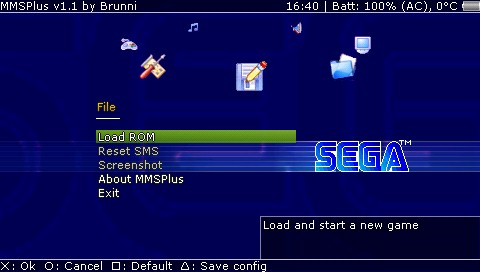
MMSPlus is a Sega Master System and Game Gear emulator. It's a port from SMSPlus, with improved compatibility, features a rich interface with simple effects and good usability. It is also fully skinnable. | MMSPlus is a Sega Master System and Game Gear emulator. It's a port from SMSPlus, with improved compatibility, features a rich interface with simple effects and good usability. It is also fully skinnable. | ||
| Line 16: | Line 15: | ||
It was one of the contest entries for the Neo Summer Coding Compo 2006 (PSP Applications, 3rd place). | It was one of the contest entries for the Neo Summer Coding Compo 2006 (PSP Applications, 3rd place). | ||
Features | ==Features== | ||
* Most SMS games run perfectly at 166 MHz and Game Gear at 133 MHz. | |||
* No more sound glitches. | |||
* Can play GYM music files (Files are placed in a ZIP file, used as a playlist. 6 sample are included in the emulator directory as music.zip). | |||
* Nice interface, skinnable and with a lot of options. | |||
* Save state images are generated in real time rather than being stored in the save file itself. | |||
* Can redefine all keys, including shortcuts (like state change/save/load, turbo mode, pause, reset). | |||
* Auto-repeat feature. | |||
* Can also set the in-game screen as a background, useful to continue at the heart of action. | |||
* Nice icons by Phoebius, backgrounds by Japi. | |||
Installation | ==Installation== | ||
Put the folders MMSPlus and MMSPlus% in the /PSP/GAME/ directory of your Memory Stick or install it like every other PSP application. | Put the folders MMSPlus and MMSPlus% in the /PSP/GAME/ directory of your Memory Stick or install it like every other PSP application. | ||
| Line 34: | Line 33: | ||
Start MMSPlus. It will display a menu where Load ROM is the first selected option. Select it with the Cross button. | Start MMSPlus. It will display a menu where Load ROM is the first selected option. Select it with the Cross button. | ||
User guide | ==User guide== | ||
===Loading ROM=== | |||
You will be brought to a list of the folders located in your ms0:/PSP/GAME/ directory. | You will be brought to a list of the folders located in your ms0:/PSP/GAME/ directory. | ||
When ROMs (GG, SMS, ZIP) are available, they're displayed just after the folders. Select a ROM and the game will be loaded and started automatically. | When ROMs (GG, SMS, ZIP) are available, they're displayed just after the folders. Select a ROM and the game will be loaded and started automatically. | ||
Controls | ==Controls== | ||
Cross - Select an article or rom | Cross - Select an article or rom | ||
Circle - Return | Circle - Return | ||
Square - Change configurations | Square - Change configurations | ||
Triangle - Back to parent folder, Save configurations | Triangle - Back to parent folder, Save configurations | ||
D-Pad/Analog - Navigate | D-Pad/Analog - Navigate | ||
Compatibility | ==Compatibility== | ||
MMSPlus doesn't support YM2413 (FM) chip emulation, found in some Mark 3 and japanese Master System models. | MMSPlus doesn't support YM2413 (FM) chip emulation, found in some Mark 3 and japanese Master System models. | ||
Changelog | ==Changelog== | ||
v1.1 | '''v1.1''' | ||
* Plays VGM files (Master System Music). | |||
* Supports ID3 for VGM. | |||
* Save screenshots. | |||
* Improved graphical environment. | |||
* Bug fixes. | |||
==Credits== | |||
Programming: Florian Brönnimann (Brunni). | |||
Backgrounds: Japi. | Backgrounds: Japi. | ||
Icons: Steeven Flores (Phoebius). | Icons: Steeven Flores (Phoebius). | ||
==External links== | |||
NeoFlash | * Author's website - http://www.mobile-dev.ch/old.php?page=home | ||
* NeoFlash - https://www.neoflash.com/forum/index.php?topic=3021.0 | |||
[[Category:PSP homebrew emulators]] | |||
[[Category:Homebrew console emulators on PSP]] | |||