
Ghostship Vita: Difference between revisions
From GameBrew
More actions
Created page with "{{Infobox Vita Homebrews |title=Ghostship Vita |image=GhostshipVita.png |description=Port of Ghostship for PSVita. |author=Rinnegatamante |lastupdated=2026/04/14 |type=Platform |version=1.1 |license=MIT |download=https://dlhb.gamebrew.org/vitahomebrews/GhostshipVita.7z |website=https://github.com/Rinnegatamante/Ghostship |source=https://github.com/Rinnegatamante/Ghostship |donation=https://www.patreon.com/Rinnegatamante }} {{#seo: |title=Vita Homebrew Games (Platform) -..." |
No edit summary |
||
| Line 2: | Line 2: | ||
|title=Ghostship Vita | |title=Ghostship Vita | ||
|image=GhostshipVita.png | |image=GhostshipVita.png | ||
|description=Port of Ghostship for | |description=Port of Ghostship for PS Vita. | ||
|author=Rinnegatamante | |author=Rinnegatamante | ||
|lastupdated=2026/ | |lastupdated=2026/05/07 | ||
|type=Platform | |type=Platform | ||
|version=1.1 | |version=1.1 | ||
| Line 19: | Line 19: | ||
|image_alt=Ghostship Vita | |image_alt=Ghostship Vita | ||
}} | }} | ||
Ghostship Vita is a port of Ghostship (v1.0.2 with some improvements from the develop branch) for the PlayStation Vita | Ghostship Vita is a port of Ghostship (v1.0.2 with some improvements from the develop branch) for the PlayStation Vita. | ||
Ghostship does not include any copyrighted assets. You are required to provide a supported copy of the game. | |||
Ghostship | |||
== Installation == | |||
Requirements: | |||
== | |||
* libshacccg.suprx | * libshacccg.suprx | ||
* Game | * Game data files: N64 (US/JP) | ||
** SHA-1 for a US ROM: <code>9bef1128717f958171a4afac3ed78ee2bb4e86ce</code> | |||
** SHA-1 for a JP ROM <code>8a20a5c83d6ceb0f0506cfc9fa20d8f438cafe51</code> | |||
Instructions: | |||
* Download [https://github.com/HarbourMasters/Ghostship/releases/tag/1.0.2 Ghostship v1.0.2] for PC. | |||
< | * Follow its instructions to generate <code>sm64.o2r</code>. | ||
* Extract <code>ghostship.zip</code> from the Release tab into <code>ux0:data</code>. | |||
* Place both <code>sm64.o2r</code> and <code>ghostship.o2r</code> into <code>ux0:data/ghostship</code>. | |||
* Install the <code>.vpk</code> from the Release tab. | |||
==Screenshots== | ==Screenshots== | ||
| Line 65: | Line 45: | ||
https://dlhb.gamebrew.org/vitahomebrews/images/GhostshipVita-04.png | https://dlhb.gamebrew.org/vitahomebrews/images/GhostshipVita-04.png | ||
==Media== | |||
'''Ghostship PSVita Port - Latest optimizations showcase''' ([https://www.youtube.com/watch?v=4rkWDT17Jhg Rinne4Fun]) <br> | |||
<youtube width="640">4rkWDT17Jhg</youtube> | |||
==Changelog== | ==Changelog== | ||
'''v1.1''' | '''v1.1''' | ||
* Fixed a bug causing the config file to corrupt after subsequent boots, resulting in wrong controls mapping. | * Increased available memory for handling mods. Now more complex mods can be used. | ||
* Restored alternative assets support: this will make all kind of mods working as with the PC build. | |||
* Optimized the Fast3D rendering pipeline with a 5-10% performance boost. | |||
* Moved the internal circular vertex buffer to vitaGL scratch memory usage, saving 32MBs of memory usage. | |||
* Updated to latest vitaGL. | |||
<!--* Fixed a bug causing the config file to corrupt after subsequent boots, resulting in wrong controls mapping. | |||
* Restored several missing windows/options in the settings menubar. | * Restored several missing windows/options in the settings menubar. | ||
* Disabled by default navigations through settings menubar with physical buttons (can still be enabled optionally). | * Disabled by default navigations through settings menubar with physical buttons (can still be enabled optionally). | ||
* Fixed an out of bounds bug resulting in memory corruption and leading to potential undefined behaviours. | * Fixed an out of bounds bug resulting in memory corruption and leading to potential undefined behaviours. | ||
* Fixed the motion blur effect causing a buggy cascade effect when the settings menubar was on screen. | * Fixed the motion blur effect causing a buggy cascade effect when the settings menubar was on screen. | ||
* Adjusted the default config settings to a better controls mapping scheme. | * Adjusted the default config settings to a better controls mapping scheme.--> | ||
'''v1.0''' | '''v1.0''' | ||
* First Release. | * First Release. | ||
== Credits == | == Credits == | ||
* | * Rinnegatamante - PSVita port | ||
* | * TheIronUniverse - Livearea assets | ||
* | * hatoving - Testing | ||
* | * Lywx - Lead developer of the original Ghostship project | ||
* | * HM64 Team - libultraship and various contributions | ||
* | * garrettjoecox - Fixes to the port | ||
* | * inspectredc - Asset extraction contributions | ||
* | * Malkierian - Asset extraction contributions | ||
== External links == | == External links == | ||
* | * GitHub - https://github.com/Rinnegatamante/Ghostship | ||
* VitaDB - https://www.rinnegatamante.eu/vitadb/#/info/1387 | * VitaDB - https://www.rinnegatamante.eu/vitadb/#/info/1387 | ||
Revision as of 04:16, 8 May 2026
| Ghostship Vita | |
|---|---|
 | |
| General | |
| Author | Rinnegatamante |
| Type | Platform |
| Version | 1.1 |
| License | MIT License |
| Last Updated | 2026/05/07 |
| Links | |
| Download | |
| Website | |
| Source | |
| Support Author | |
Ghostship Vita is a port of Ghostship (v1.0.2 with some improvements from the develop branch) for the PlayStation Vita.
Ghostship does not include any copyrighted assets. You are required to provide a supported copy of the game.
Installation
Requirements:
- libshacccg.suprx
- Game data files: N64 (US/JP)
- SHA-1 for a US ROM:
9bef1128717f958171a4afac3ed78ee2bb4e86ce - SHA-1 for a JP ROM
8a20a5c83d6ceb0f0506cfc9fa20d8f438cafe51
- SHA-1 for a US ROM:
Instructions:
- Download Ghostship v1.0.2 for PC.
- Follow its instructions to generate
sm64.o2r. - Extract
ghostship.zipfrom the Release tab intoux0:data. - Place both
sm64.o2randghostship.o2rintoux0:data/ghostship. - Install the
.vpkfrom the Release tab.
Screenshots
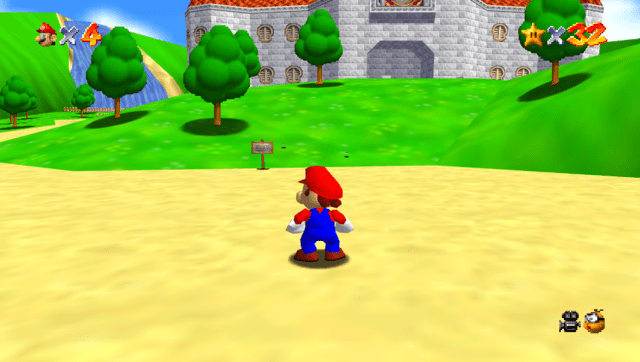
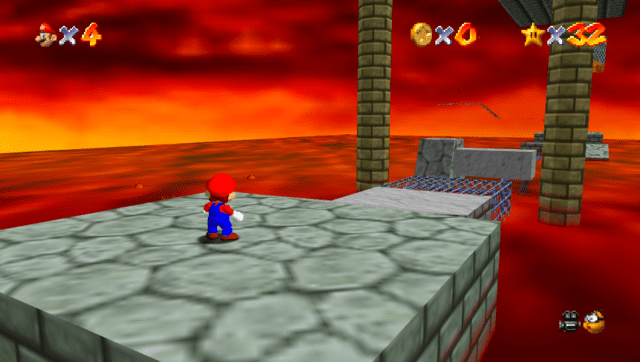
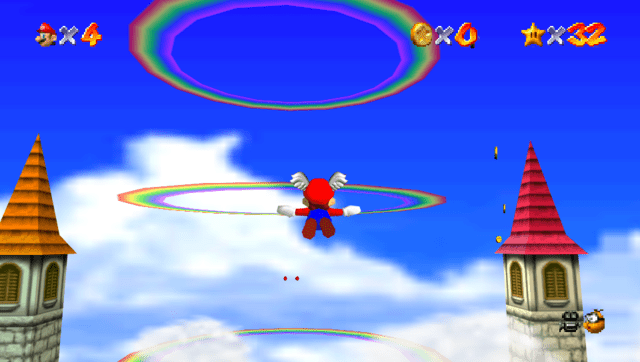
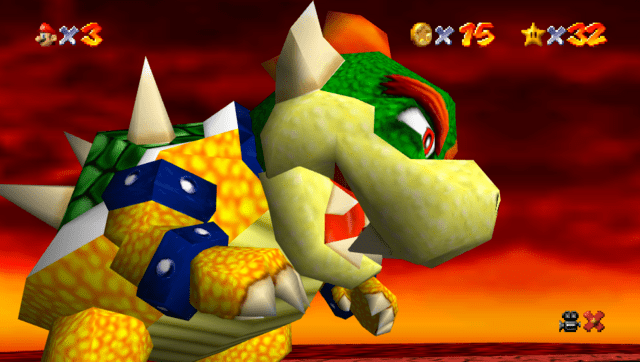
Media
Ghostship PSVita Port - Latest optimizations showcase (Rinne4Fun)
Changelog
v1.1
- Increased available memory for handling mods. Now more complex mods can be used.
- Restored alternative assets support: this will make all kind of mods working as with the PC build.
- Optimized the Fast3D rendering pipeline with a 5-10% performance boost.
- Moved the internal circular vertex buffer to vitaGL scratch memory usage, saving 32MBs of memory usage.
- Updated to latest vitaGL.
v1.0
- First Release.
Credits
- Rinnegatamante - PSVita port
- TheIronUniverse - Livearea assets
- hatoving - Testing
- Lywx - Lead developer of the original Ghostship project
- HM64 Team - libultraship and various contributions
- garrettjoecox - Fixes to the port
- inspectredc - Asset extraction contributions
- Malkierian - Asset extraction contributions