3DSx Play Coin Setter Mod: Difference between revisions
From GameBrew
More actions
Created page with "{{Infobox 3DS Homebrews |title=3DSx Play Coin Setter Mod |image=3DSxPlayCoinSetterMod.png |description=Allows modifying the 3DS Play Coin counter, for Ninjhax/homebrew/3dsx users. |author=fthomys |lastupdated=2025/03/12 |type=System Tools |version=1.0.1 |license=N/A |download=https://dlhb.gamebrew.org/3dshomebrews/3DSxPlayCoinSetterMod.7z |website=https://github.com/fthomys/3ds-playcoin-tool |source=https://github.com/fthomys/3ds-playcoin-tool }} Allows Ninjhax users to..." |
No edit summary |
||
| Line 25: | Line 25: | ||
An option is also available to backup and restore the decrypted gamecoin.dat to the SD card. | An option is also available to backup and restore the decrypted gamecoin.dat to the SD card. | ||
== Screenshots == | |||
https://dlhb.gamebrew.org/3dshomebrews/images/3DSxPlayCoinSetterMod.png | |||
== External links == | == External links == | ||
GitHub - https://github.com/fthomys/3ds-playcoin-tool | GitHub - https://github.com/fthomys/3ds-playcoin-tool | ||
Latest revision as of 05:07, 21 March 2026
| 3DSx Play Coin Setter Mod | |
|---|---|
 | |
| General | |
| Author | fthomys |
| Type | System Tools |
| Version | 1.0.1 |
| License | N/A |
| Last Updated | 2025/03/12 |
| Links | |
| Download | |
| Website | |
| Source | |
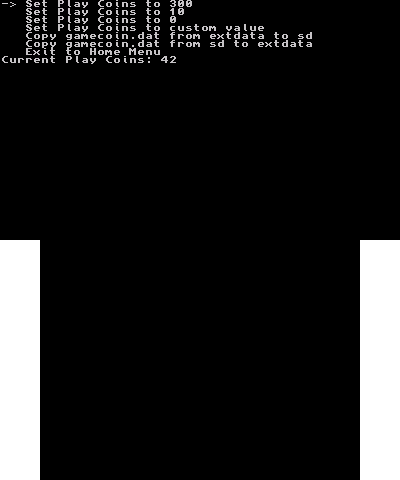
Allows Ninjhax users to modify the 3DS's play coin counter, in other words providing infinite play coins. This mod allows to read the current amount of coins and allows to set a custom value.
Note that this code is simply a modification of yellows8's 3ds_homemenu_extdatatool and MrCheese's 3DSx Play Coin Setter, which contains within it code to modify arbitrary 3ds extdata.
Installation
Copy the 3ds-coinset folder to sdmc:/3ds/ on your SD card and run via Homebrew Launcher.
User guide
Choose the number of coins you want from the list, then exit using B.
No more than 300 coins can be held at a time, this is a system limit.
An option is also available to backup and restore the decrypted gamecoin.dat to the SD card.
Screenshots