
PkHouse Switch: Difference between revisions
More actions
Created page with "{{Infobox Switch Homebrews |title=pkHouse - Local PokeBank |image=pkHouseLocalPokeBankSwitch.png |description=Nintendo Switch homebrew for local bank system for Pokemon Games. |author=Insektaure |lastupdated=2026/02/20 |type=Other Apps |version=1.4.0 |license=GPL-2.0 |download=https://dlhb.gamebrew.org/switchhomebrews/pkHouseLocalPokeBankSwitch.7z |website=https://gbatemp.net/threads/pkhouse-local-bank-system-for-pokemon-switch-games.679665/ |source=https://github.com/In..." |
No edit summary |
||
| Line 4: | Line 4: | ||
|description=Nintendo Switch homebrew for local bank system for Pokemon Games. | |description=Nintendo Switch homebrew for local bank system for Pokemon Games. | ||
|author=Insektaure | |author=Insektaure | ||
|lastupdated=2026/02/ | |lastupdated=2026/02/27 | ||
|type=Other Apps | |type=Other Apps | ||
|version=1. | |version=1.6.0 | ||
|license=GPL-2.0 | |license=GPL-2.0 | ||
|download=https://dlhb.gamebrew.org/switchhomebrews/pkHouseLocalPokeBankSwitch.7z | |download=https://dlhb.gamebrew.org/switchhomebrews/pkHouseLocalPokeBankSwitch.7z | ||
| Line 21: | Line 21: | ||
pkHouse is a Nintendo Switch homebrew application that provides a local bank system for Pokemon games. It allows moving Pokemon between save files and local bank storage directly on the console, similar to Pokemon HOME but as a free offline solution. | pkHouse is a Nintendo Switch homebrew application that provides a local bank system for Pokemon games. It allows moving Pokemon between save files and local bank storage directly on the console, similar to Pokemon HOME but as a free offline solution. | ||
The application supports multiple Pokemon games across different save formats, with automatic save backup, multi-select capabilities, and multiple color themes. | The application supports multiple Pokemon games across different save formats, with automatic save backup, multi-select capabilities, search and filtering, and multiple color themes. | ||
Note: Moving Pokemon between different games is not supported. Banks are separated by game family because transferred Pokemon would lack the HOME Tracker ID required for cross-game compatibility. | Note: Moving Pokemon between different games is not supported. Banks are separated by game family because transferred Pokemon would lack the HOME Tracker ID required for cross-game compatibility. | ||
| Line 50: | Line 50: | ||
|- | |- | ||
| Pokemon Legends: Z-A || 2.0.1 || SCBlock (<code>main</code>) || 32 || 30 | | Pokemon Legends: Z-A || 2.0.1 || SCBlock (<code>main</code>) || 32 || 30 | ||
|- | |||
| Pokemon FireRed || 1.0.0 || — || — || — | |||
|- | |||
| Pokemon LeafGreen || 1.0.0 || — || — || — | |||
|} | |} | ||
== Features == | == Features == | ||
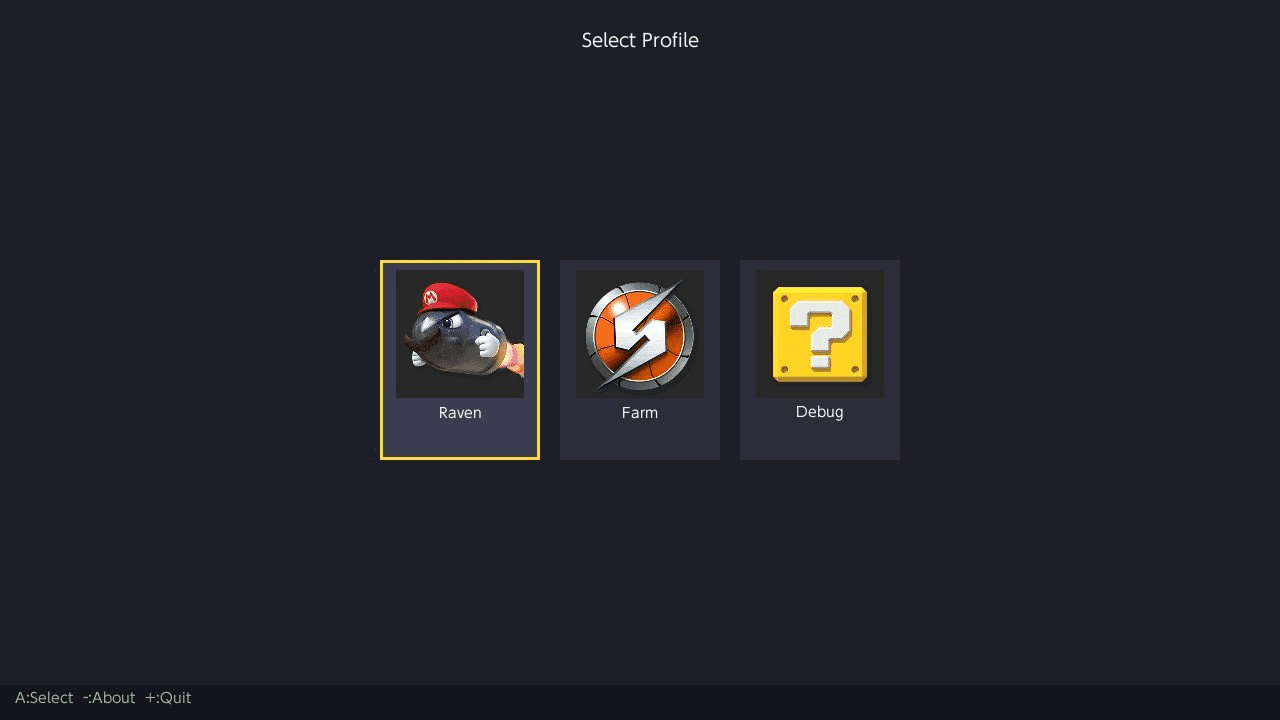
* '''Profile selection''' - Loads all user profiles from the system; detects which games have save data for the selected profile | * '''Profile selection''' - Loads all user profiles from the system; detects which games have save data for the selected profile. Profile name is shown alongside the game name in all views. | ||
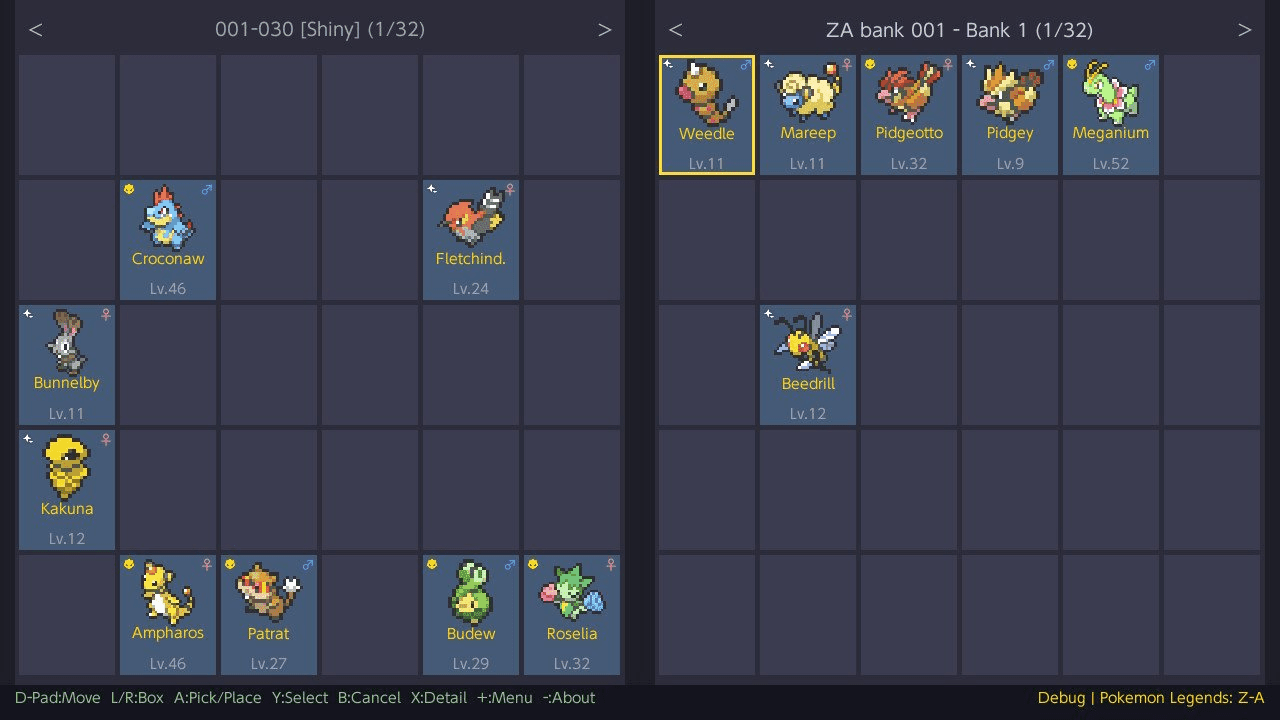
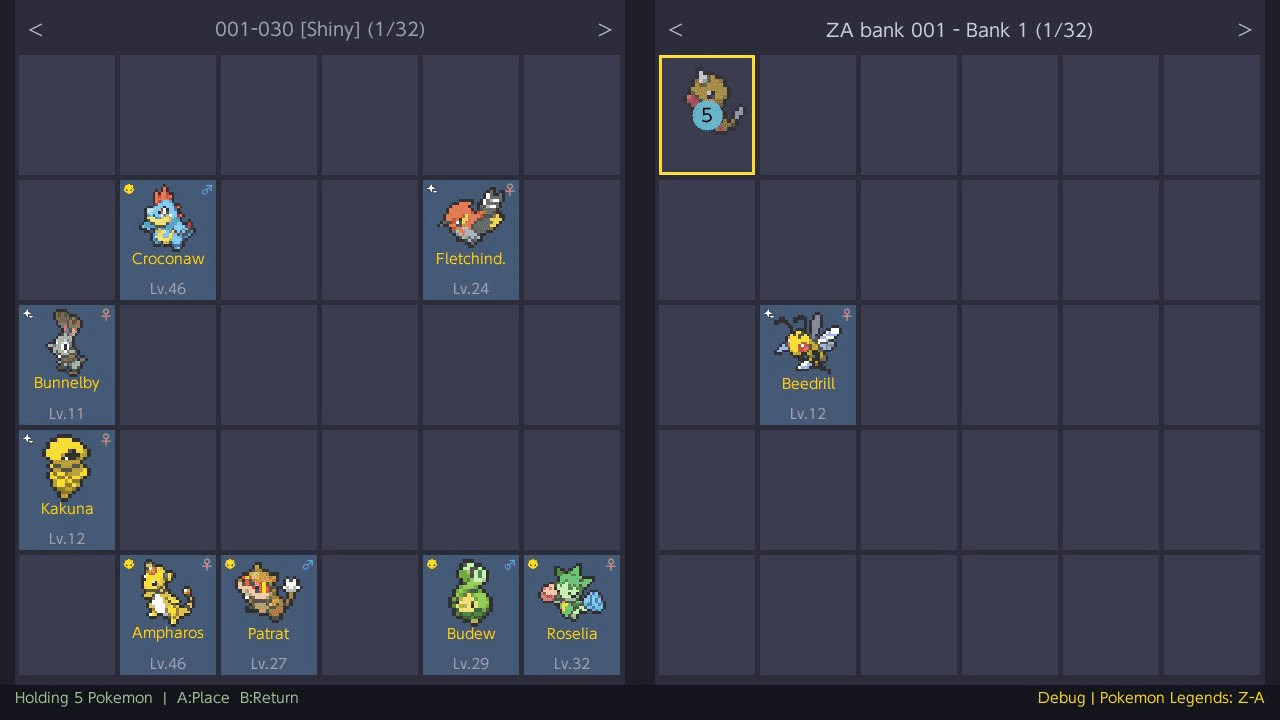
* '''Two-panel box viewer''' - Game save on the left, bank on the right (in title override mode); bank-to-bank in applet mode | * '''Two-panel box viewer''' - Game save on the left, bank on the right (in title override mode); bank-to-bank in applet mode | ||
* '''Pick & place''' - Pick up a Pokemon with A, place in any slot; placing on an occupied slot swaps the two Pokemon | * '''Pick & place''' - Pick up a Pokemon with A, place in any slot; placing on an occupied slot swaps the two Pokemon | ||
* '''Multi-select''' - Tap Y to toggle individual selection, hold Y + D-Pad for rectangular selection, double-tap Y to select all Pokemon in the current box | * '''Multi-select''' - Tap Y to toggle individual selection, hold Y + D-Pad for rectangular selection, double-tap Y to select all Pokemon in the current box (shown in green). Regular selections (cyan) place Pokemon into the first available empty slots. "Select all" selections (green) preserve original positions — each Pokemon is placed at the same slot index in the target box. Selection is cleared when switching boxes or panels. | ||
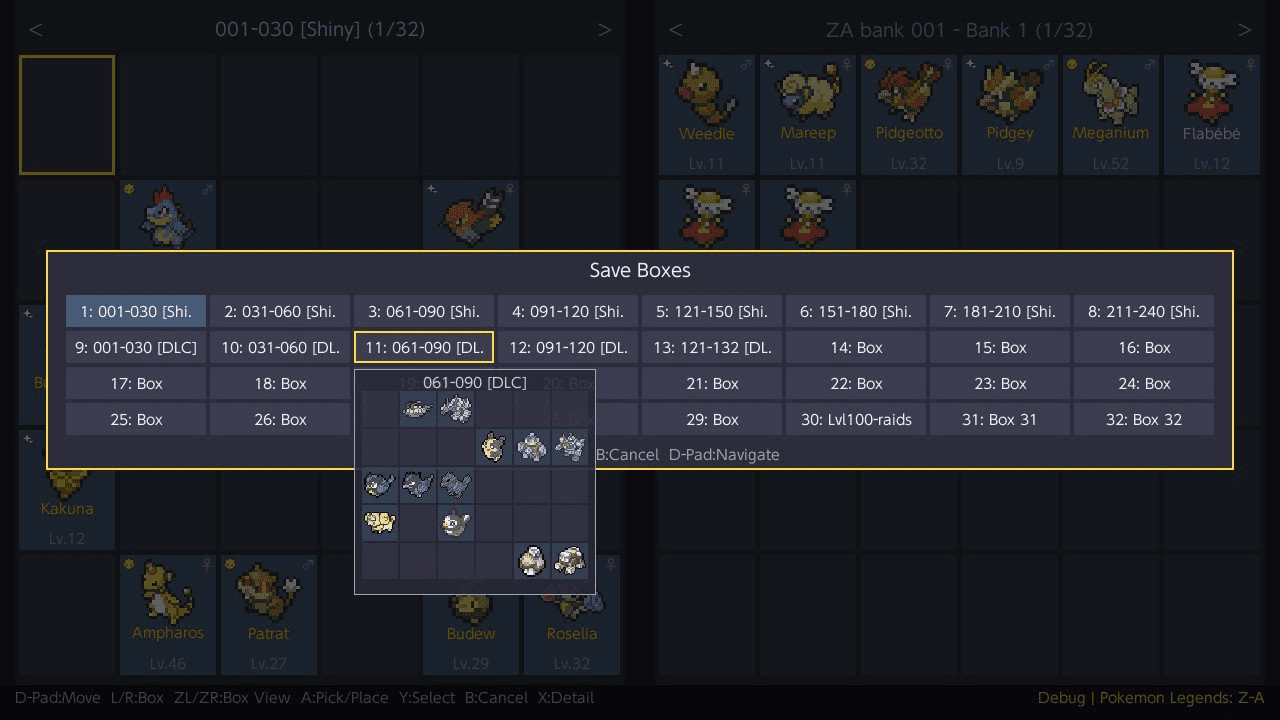
* '''Box view''' - Press ZL/ZR to open an overview of all save/bank boxes with sprite preview | * '''Box view''' - Press ZL/ZR to open an overview of all save/bank boxes with sprite preview. Navigate the grid with D-Pad; a semi-transparent preview of the highlighted box's contents appears as you move. Press A to jump to that box or B to cancel. | ||
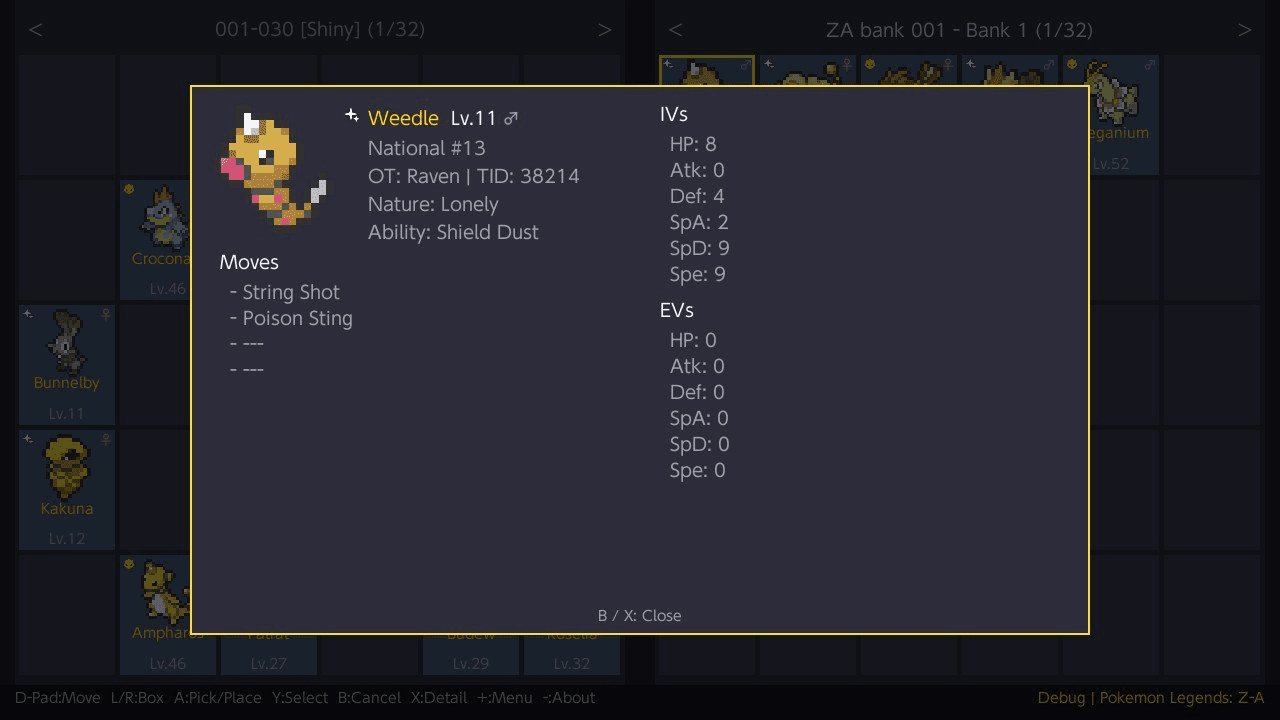
* '''Pokemon details''' - View species, level, gender, National Dex number, OT, Trainer ID, nature, ability, moves, IVs and EVs; shiny Pokemon names shown in gold, Alpha Pokemon display a dedicated icon | * '''Pokemon details''' - View species, level, gender, National Dex number, OT, Trainer ID, nature, ability, moves, IVs and EVs; perfect 31 IVs highlighted in gold; shiny Pokemon names shown in gold, Alpha Pokemon display a dedicated icon | ||
* '''Bank system''' - Local .bin files stored per game family; paired games share the same bank folder (e.g. Sword and Shield); create, rename, and delete banks | * '''Search / Filter''' - Search for Pokemon across both panels (save and bank) from the menu. Filter by species name, OT name, shiny, egg, alpha, gender, level range, and perfect IVs. Results displayed as a scrollable list with status badges; press A to jump to a Pokemon in the box view. | ||
* '''Automatic backup''' - Full copy of the save directory created before any modifications; SD card space is checked before backup | * '''Search highlight mode''' - Choose between highlight mode (matching Pokemon outlined in the box view, non-matches dimmed) and list mode (scrollable result list). Highlights update in real-time when Pokemon are moved, swapped, or deleted. In box view, boxes containing search matches are outlined with matching Pokemon highlighted. | ||
* '''7 color themes''' - Default, HOME, HOME - Violet, HOME - Blue, HOME - Green, HOME - Red, Pikachu | * '''Delete Pokemon''' - Press X while holding Pokemon (single or multi-select) to delete them with confirmation dialog | ||
* '''Save integrity''' - SCBlock saves are decrypted, modified, and re-encrypted with round-trip verification; BDSP saves use MD5 checksum; LGPE saves use CRC16 checksums | * '''Bank box renaming''' - Rename bank boxes from the box view (ZL/ZR) by pressing Y on any box to set a custom name (max 16 characters). Names persist across sessions. | ||
* '''Bank system''' - Local .bin files stored per game family; paired games share the same bank folder (e.g. Sword and Shield); create, rename, and delete banks. Bank list shows the number of occupied slots for each bank. SD card space is checked before creating a new bank. Banks currently in use cannot be deleted. | |||
* '''Automatic backup''' - Full copy of the save directory created before any modifications (only on initial game selection); SD card space is checked before backup (requires 2x save size). If space is low or backup fails, a warning is shown with the option to continue without backup or cancel. | |||
* '''7 color themes''' - Default (dark blue-gray), HOME (light pastels), HOME - Violet (purple/lavender), HOME - Blue, HOME - Green, HOME - Red, Pikachu (yellow and brown). Theme choice saved automatically and persists across sessions. Live preview when scrolling the theme list. | |||
* '''Save integrity''' - SCBlock saves are decrypted, modified, and re-encrypted with round-trip verification; BDSP saves use MD5 checksum; LGPE saves use CRC16 checksums with storage compaction before writing. All saves are written in-place to preserve the Switch filesystem journal. | |||
== Bank folders == | == Bank folders == | ||
| Line 101: | Line 109: | ||
| D-Pad || Move cursor | | D-Pad || Move cursor | ||
|- | |- | ||
| L / R || Switch box | | L / R || Switch box (hold to auto-repeat) | ||
|- | |- | ||
| ZL / ZR || Box view (save / bank) | | ZL / ZR || Box view (save / bank) | ||
| Line 111: | Line 119: | ||
| Y || Toggle multi-select | | Y || Toggle multi-select | ||
|- | |- | ||
| X || View Pokemon details | | X || View Pokemon details (or delete held Pokemon) | ||
|- | |- | ||
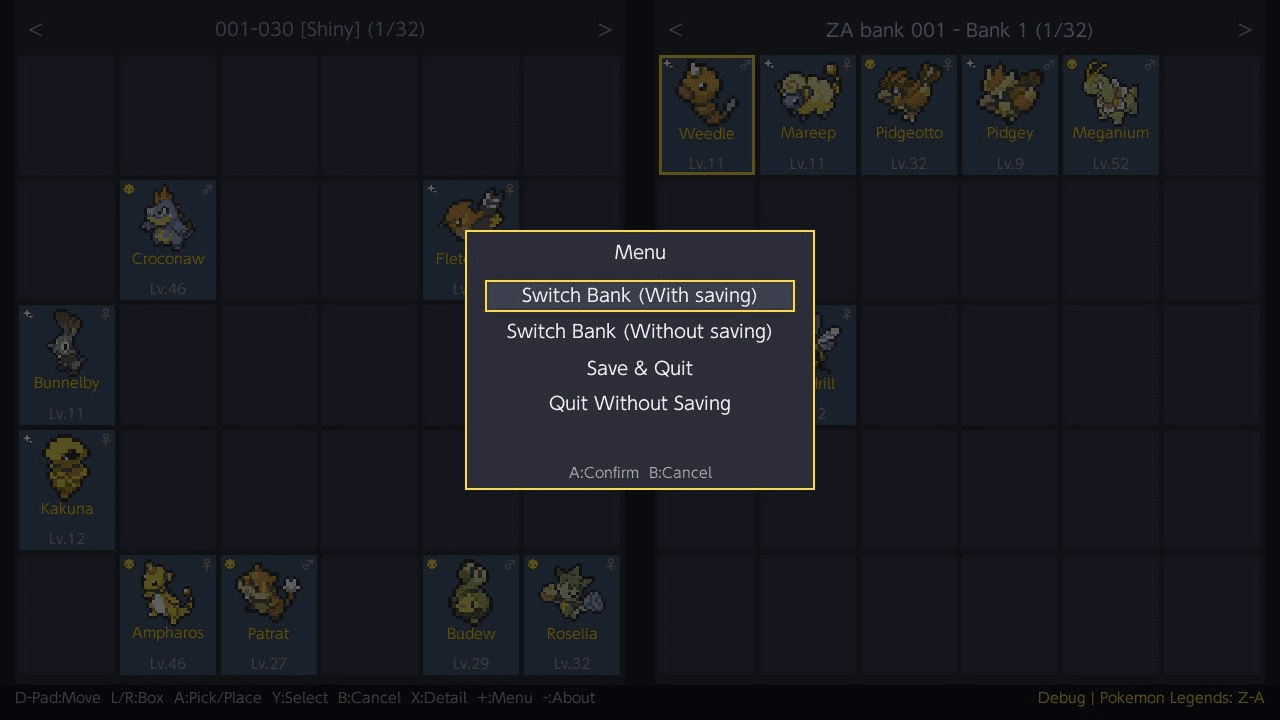
| + || Open menu | | + || Open menu | ||
| Line 170: | Line 178: | ||
| + || Delete bank | | + || Delete bank | ||
|- | |- | ||
| B || Back | | B || Back (main view if bank loaded, otherwise game selector) | ||
|- | |- | ||
| - || About | | - || About | ||
|} | |||
=== Menu options (Title Override Mode) === | |||
{| class="wikitable" | |||
|- | |||
! Option !! Description | |||
|- | |||
| Theme || Open the theme selector | |||
|- | |||
| Search || Search / filter Pokemon across panels | |||
|- | |||
| Switch Bank || Save game and bank, return to bank selector | |||
|- | |||
| Change Game || Save everything, return to game selector | |||
|- | |||
| Save & Quit || Save everything and exit | |||
|- | |||
| Quit Without Saving || Exit without saving changes | |||
|} | |||
=== Menu options (Applet / Bank-Only Mode) === | |||
{| class="wikitable" | |||
|- | |||
! Option !! Description | |||
|- | |||
| Theme || Open the theme selector | |||
|- | |||
| Search || Search / filter Pokemon across panels | |||
|- | |||
| Switch Left Bank || Save both banks, switch the left bank | |||
|- | |||
| Switch Right Bank || Save both banks, switch the right bank | |||
|- | |||
| Change Game || Save both banks, return to game selector | |||
|- | |||
| Save Banks || Save both banks | |||
|- | |||
| Quit || Exit | |||
|} | |} | ||
=== Backup and restore === | === Backup and restore === | ||
When loading a game save, an automatic backup is created at <code>backups/<profile>/<game>/<profile>_YYYY-MM-DD_HH-MM-SS/</code>. | When loading a game save, an automatic backup is created at <code>backups/<profile>/<game>/<profile>_YYYY-MM-DD_HH-MM-SS/</code>. | ||
The backup is only created once when initially selecting a game — switching banks does not trigger additional backups. | |||
If a backup needs to be restored, use a save manager such as [[Checkpoint Switch]] or [[JKSV Switxh]] to import the backup files back onto the Switch. | If a backup needs to be restored, use a save manager such as [[Checkpoint Switch]] or [[JKSV Switxh]] to import the backup files back onto the Switch. | ||
| Line 194: | Line 244: | ||
== Changelog == | == Changelog == | ||
'''v1.6.0''' | |||
* Add FireRed / LeafGreen support (game version 1.0.0). | |||
'''v1.5.2''' | |||
* Rename bank boxes from the box view (ZL / ZR) — press Y on any box to set a custom name (max 16 characters). | |||
* Names are saved in the bank file and persist across sessions. | |||
* Existing banks are fully backward compatible — unnamed boxes display as "Bank 1", "Bank 2", etc. | |||
* Box view overlay now shows a subtitle: bank file name for bank panels, profile and game name for save panels. | |||
* Long bank file names are truncated with (..) in the panel header to prevent overflow. | |||
'''v1.5.1''' | |||
* Hold L / R shoulder buttons to auto-repeat box switching. | |||
* Hold L / R in search results list to fast-scroll through pages. | |||
* New search highlight mode: matching Pokemon outlined in box view, non-matches dimmed. | |||
* Search result modes: choose between Highlight (default) and List via the Mode row in search filter. | |||
* Live highlight tracking: moving, swapping, or deleting Pokemon while highlights are active updates them in real-time. | |||
* Boxes containing search matches are outlined in the box view (ZL / ZR) with matching Pokemon highlighted. | |||
'''v1.5.0''' | |||
* Search for Pokemon across both panels (save and bank) from the menu (+ → Search). | |||
* Filter by species name, OT name, shiny, egg, alpha, gender, level range, and perfect IVs. | |||
* Results displayed as a scrollable list with status badges: [S] shiny, [A] alpha, [E] egg. | |||
* Press A to jump directly to a Pokemon in the box view; L/R to skip 10 results; X to adjust filters. | |||
* Delete Pokemon: press X while holding Pokemon (single or multi-select) to delete them with confirmation. | |||
'''v1.4.0''' | '''v1.4.0''' | ||
* 7 color themes (Default, HOME, HOME - Violet, HOME - Blue, HOME - Green, HOME - Red, Pikachu) | * 7 color themes (Default, HOME, HOME - Violet, HOME - Blue, HOME - Green, HOME - Red, Pikachu) | ||
'''v1.3.1''' | |||
* Save backup now checks SD card free space before backing up (requires 2x save size). | |||
* Warning dialog if space is low, with option to continue without backup or cancel. | |||
* If backup fails, a prompt is shown before proceeding. | |||
* Creating a new bank now checks available SD card space first. | |||
'''v1.3.0''' | '''v1.3.0''' | ||
| Line 205: | Line 291: | ||
* Bank switching now always saves game and bank together to prevent data corruption. | * Bank switching now always saves game and bank together to prevent data corruption. | ||
* Multi-select improvements: drag selection (hold Y + D-Pad) to select a rectangular group of Pokemon at once. | * Multi-select improvements: drag selection (hold Y + D-Pad) to select a rectangular group of Pokemon at once. | ||
* Double-tap Y to select all Pokemon in the current box (green). Position-preserving placement for "select all" selections. | |||
'''v1.2.0''' | '''v1.2.0''' | ||
| Line 213: | Line 300: | ||
* Now supports Let's Go Pikachu / Eevee games. | * Now supports Let's Go Pikachu / Eevee games. | ||
'''v1.0.1''' | |||
* Implement full swap history to avoid losing Pokemon when doing multiple in-place swaps then canceling with B button. | |||
'''v1.0.0''' | '''v1.0.0''' | ||
Revision as of 01:00, 1 March 2026
| pkHouse - Local PokeBank | |
|---|---|
 | |
| General | |
| Author | Insektaure |
| Type | Other Apps |
| Version | 1.6.0 |
| License | GPL-2.0 |
| Last Updated | 2026/02/27 |
| Links | |
| Download | |
| Website | |
| Source | |
pkHouse is a Nintendo Switch homebrew application that provides a local bank system for Pokemon games. It allows moving Pokemon between save files and local bank storage directly on the console, similar to Pokemon HOME but as a free offline solution.
The application supports multiple Pokemon games across different save formats, with automatic save backup, multi-select capabilities, search and filtering, and multiple color themes.
Note: Moving Pokemon between different games is not supported. Banks are separated by game family because transferred Pokemon would lack the HOME Tracker ID required for cross-game compatibility.
Supported games
| Game | Tested Version | Save Format | Boxes | Slots/Box |
|---|---|---|---|---|
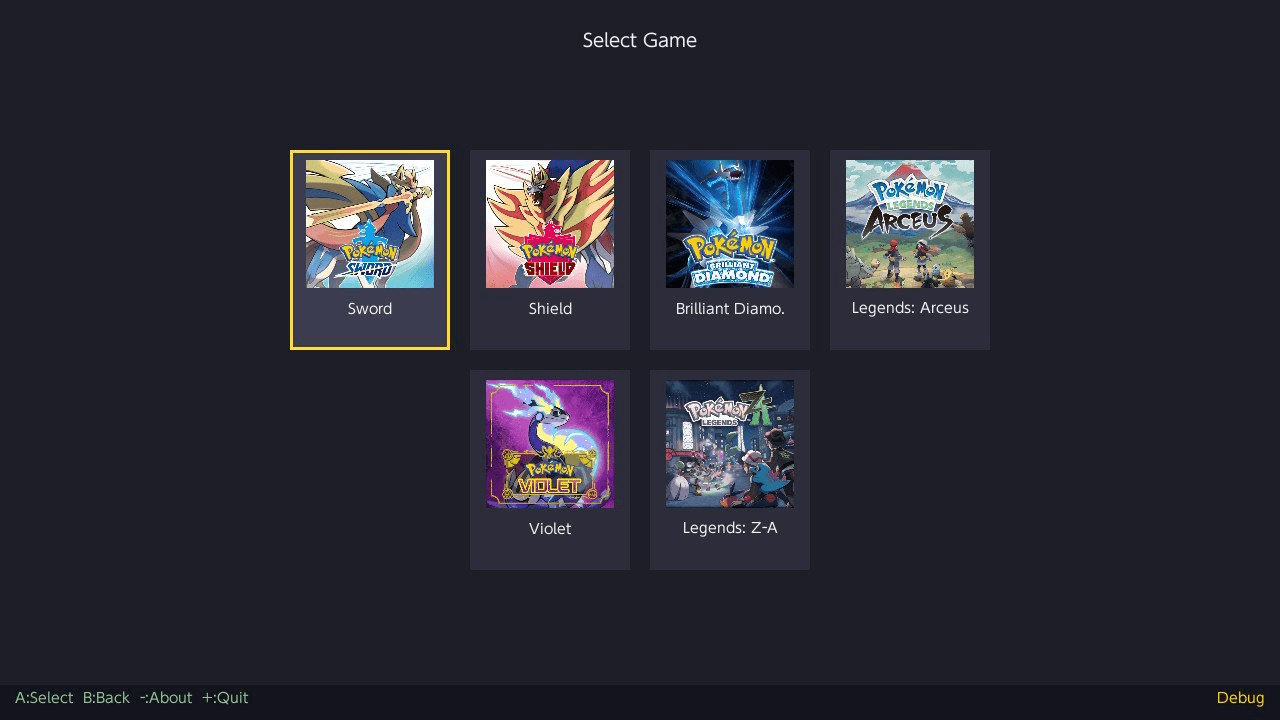
| Pokemon Let's Go Pikachu | 1.0.2 | BEEF blocks (savedata.bin) |
40 | 25 |
| Pokemon Let's Go Eevee | 1.0.2 | BEEF blocks (savedata.bin) |
40 | 25 |
| Pokemon Sword | 1.3.2 | SCBlock (main) |
32 | 30 |
| Pokemon Shield | 1.3.2 | SCBlock (main) |
32 | 30 |
| Pokemon Brilliant Diamond | 1.3.0 | Flat binary (SaveData.bin) |
40 | 30 |
| Pokemon Shining Pearl | 1.3.0 | Flat binary (SaveData.bin) |
40 | 30 |
| Pokemon Legends: Arceus | 1.1.1 | SCBlock (main) |
32 | 30 |
| Pokemon Scarlet | 4.0.0 | SCBlock (main) |
32 | 30 |
| Pokemon Violet | 4.0.0 | SCBlock (main) |
32 | 30 |
| Pokemon Legends: Z-A | 2.0.1 | SCBlock (main) |
32 | 30 |
| Pokemon FireRed | 1.0.0 | — | — | — |
| Pokemon LeafGreen | 1.0.0 | — | — | — |
Features
- Profile selection - Loads all user profiles from the system; detects which games have save data for the selected profile. Profile name is shown alongside the game name in all views.
- Two-panel box viewer - Game save on the left, bank on the right (in title override mode); bank-to-bank in applet mode
- Pick & place - Pick up a Pokemon with A, place in any slot; placing on an occupied slot swaps the two Pokemon
- Multi-select - Tap Y to toggle individual selection, hold Y + D-Pad for rectangular selection, double-tap Y to select all Pokemon in the current box (shown in green). Regular selections (cyan) place Pokemon into the first available empty slots. "Select all" selections (green) preserve original positions — each Pokemon is placed at the same slot index in the target box. Selection is cleared when switching boxes or panels.
- Box view - Press ZL/ZR to open an overview of all save/bank boxes with sprite preview. Navigate the grid with D-Pad; a semi-transparent preview of the highlighted box's contents appears as you move. Press A to jump to that box or B to cancel.
- Pokemon details - View species, level, gender, National Dex number, OT, Trainer ID, nature, ability, moves, IVs and EVs; perfect 31 IVs highlighted in gold; shiny Pokemon names shown in gold, Alpha Pokemon display a dedicated icon
- Search / Filter - Search for Pokemon across both panels (save and bank) from the menu. Filter by species name, OT name, shiny, egg, alpha, gender, level range, and perfect IVs. Results displayed as a scrollable list with status badges; press A to jump to a Pokemon in the box view.
- Search highlight mode - Choose between highlight mode (matching Pokemon outlined in the box view, non-matches dimmed) and list mode (scrollable result list). Highlights update in real-time when Pokemon are moved, swapped, or deleted. In box view, boxes containing search matches are outlined with matching Pokemon highlighted.
- Delete Pokemon - Press X while holding Pokemon (single or multi-select) to delete them with confirmation dialog
- Bank box renaming - Rename bank boxes from the box view (ZL/ZR) by pressing Y on any box to set a custom name (max 16 characters). Names persist across sessions.
- Bank system - Local .bin files stored per game family; paired games share the same bank folder (e.g. Sword and Shield); create, rename, and delete banks. Bank list shows the number of occupied slots for each bank. SD card space is checked before creating a new bank. Banks currently in use cannot be deleted.
- Automatic backup - Full copy of the save directory created before any modifications (only on initial game selection); SD card space is checked before backup (requires 2x save size). If space is low or backup fails, a warning is shown with the option to continue without backup or cancel.
- 7 color themes - Default (dark blue-gray), HOME (light pastels), HOME - Violet (purple/lavender), HOME - Blue, HOME - Green, HOME - Red, Pikachu (yellow and brown). Theme choice saved automatically and persists across sessions. Live preview when scrolling the theme list.
- Save integrity - SCBlock saves are decrypted, modified, and re-encrypted with round-trip verification; BDSP saves use MD5 checksum; LGPE saves use CRC16 checksums with storage compaction before writing. All saves are written in-place to preserve the Switch filesystem journal.
Bank folders
Paired games share the same bank folder:
| Game Family | Bank Folder |
|---|---|
| Let's Go Pikachu / Eevee | banks/LetsGo/
|
| Sword / Shield | banks/SwordShield/
|
| Brilliant Diamond / Shining Pearl | banks/BDSP/
|
| Legends: Arceus | banks/LegendsArceus/
|
| Scarlet / Violet | banks/ScarletViolet/
|
| Legends: Z-A | banks/LegendsZA/
|
User guide
Installation
Download pkHouse.nro from the Releases page and place it on the SD card at sdmc:/switch/pkHouse/.
Launch modes
- Title override mode (recommended): Full access — game save on the left, bank on the right. Launch through a game title by holding R.
- Applet mode (album/homebrew menu): Bank-only access — two banks side by side for bank-to-bank transfers. Save data is not accessible in this mode.
Controls - Main view
| Button | Action |
|---|---|
| D-Pad | Move cursor |
| L / R | Switch box (hold to auto-repeat) |
| ZL / ZR | Box view (save / bank) |
| A | Pick up / Place Pokemon |
| B | Cancel / Return held Pokemon |
| Y | Toggle multi-select |
| X | View Pokemon details (or delete held Pokemon) |
| + | Open menu |
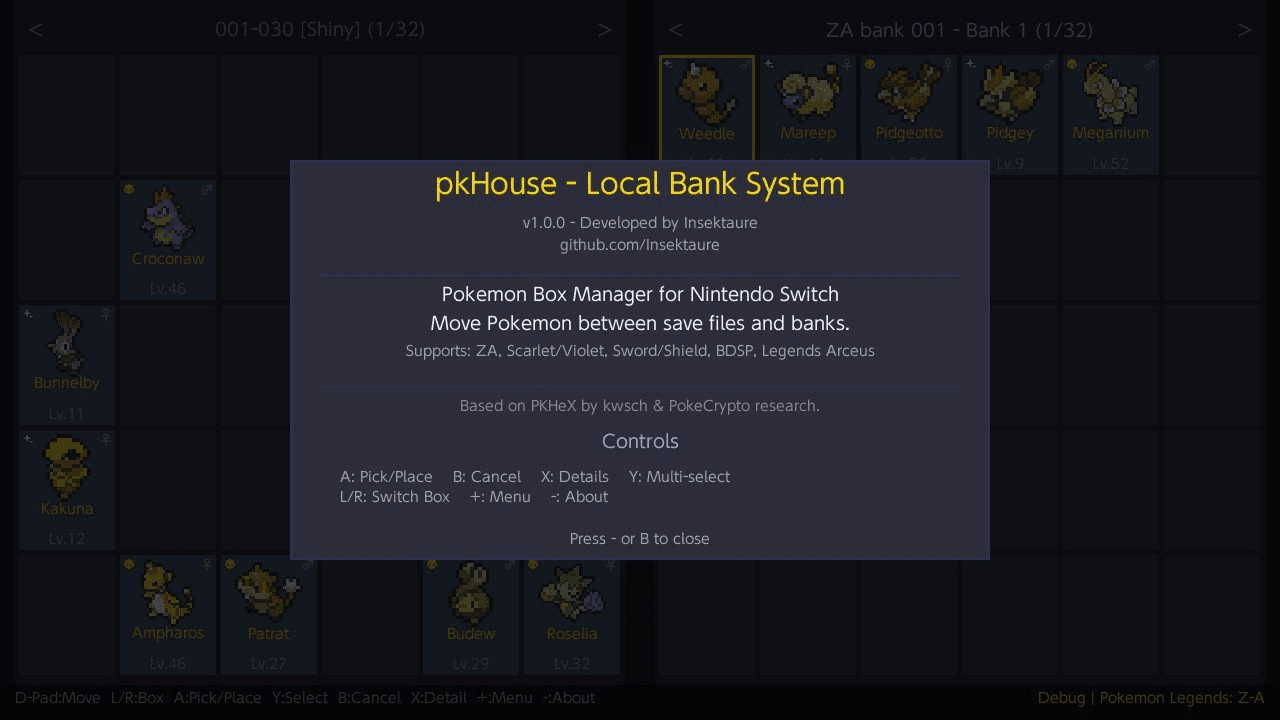
| - | About |
Controls - Profile selector
| Button | Action |
|---|---|
| D-Pad Left/Right | Navigate profiles |
| A | Select profile |
| Y | Theme selector |
| - | About |
| + | Quit |
Controls - Game selector
| Button | Action |
|---|---|
| D-Pad | Navigate game grid |
| A | Select game |
| B | Back to profile selector |
| Y | Theme selector |
| - | About |
| + | Quit |
Controls - Bank selector
| Button | Action |
|---|---|
| D-Pad Up/Down | Navigate bank list |
| A | Open bank |
| Y | Create new bank |
| X | Rename bank |
| + | Delete bank |
| B | Back (main view if bank loaded, otherwise game selector) |
| - | About |
Menu options (Title Override Mode)
| Option | Description |
|---|---|
| Theme | Open the theme selector |
| Search | Search / filter Pokemon across panels |
| Switch Bank | Save game and bank, return to bank selector |
| Change Game | Save everything, return to game selector |
| Save & Quit | Save everything and exit |
| Quit Without Saving | Exit without saving changes |
Menu options (Applet / Bank-Only Mode)
| Option | Description |
|---|---|
| Theme | Open the theme selector |
| Search | Search / filter Pokemon across panels |
| Switch Left Bank | Save both banks, switch the left bank |
| Switch Right Bank | Save both banks, switch the right bank |
| Change Game | Save both banks, return to game selector |
| Save Banks | Save both banks |
| Quit | Exit |
Backup and restore
When loading a game save, an automatic backup is created at backups/<profile>/<game>/<profile>_YYYY-MM-DD_HH-MM-SS/.
The backup is only created once when initially selecting a game — switching banks does not trigger additional backups.
If a backup needs to be restored, use a save manager such as Checkpoint Switch or JKSV Switxh to import the backup files back onto the Switch.
Screenshots
|
|
Changelog
v1.6.0
- Add FireRed / LeafGreen support (game version 1.0.0).
v1.5.2
- Rename bank boxes from the box view (ZL / ZR) — press Y on any box to set a custom name (max 16 characters).
- Names are saved in the bank file and persist across sessions.
- Existing banks are fully backward compatible — unnamed boxes display as "Bank 1", "Bank 2", etc.
- Box view overlay now shows a subtitle: bank file name for bank panels, profile and game name for save panels.
- Long bank file names are truncated with (..) in the panel header to prevent overflow.
v1.5.1
- Hold L / R shoulder buttons to auto-repeat box switching.
- Hold L / R in search results list to fast-scroll through pages.
- New search highlight mode: matching Pokemon outlined in box view, non-matches dimmed.
- Search result modes: choose between Highlight (default) and List via the Mode row in search filter.
- Live highlight tracking: moving, swapping, or deleting Pokemon while highlights are active updates them in real-time.
- Boxes containing search matches are outlined in the box view (ZL / ZR) with matching Pokemon highlighted.
v1.5.0
- Search for Pokemon across both panels (save and bank) from the menu (+ → Search).
- Filter by species name, OT name, shiny, egg, alpha, gender, level range, and perfect IVs.
- Results displayed as a scrollable list with status badges: [S] shiny, [A] alpha, [E] egg.
- Press A to jump directly to a Pokemon in the box view; L/R to skip 10 results; X to adjust filters.
- Delete Pokemon: press X while holding Pokemon (single or multi-select) to delete them with confirmation.
v1.4.0
- 7 color themes (Default, HOME, HOME - Violet, HOME - Blue, HOME - Green, HOME - Red, Pikachu)
v1.3.1
- Save backup now checks SD card free space before backing up (requires 2x save size).
- Warning dialog if space is low, with option to continue without backup or cancel.
- If backup fails, a prompt is shown before proceeding.
- Creating a new bank now checks available SD card space first.
v1.3.0
- New applet mode (album/HB menu): bank-only access for all games, two banks side by side for bank-to-bank transfers.
- Banks that are currently in use cannot be deleted.
- When switching banks, the selector appears on the side being switched while the other panel stays visible.
- Bank switching now always saves game and bank together to prevent data corruption.
- Multi-select improvements: drag selection (hold Y + D-Pad) to select a rectangular group of Pokemon at once.
- Double-tap Y to select all Pokemon in the current box (green). Position-preserving placement for "select all" selections.
v1.2.0
- Implement all boxes overview for save and bank boxes (access with ZL / ZR).
v1.1.0
- Now supports Let's Go Pikachu / Eevee games.
v1.0.1
- Implement full swap history to avoid losing Pokemon when doing multiple in-place swaps then canceling with B button.
v1.0.0
- Initial release.