
Bbloc Switch: Difference between revisions
From GameBrew
More actions
m Text replacement - "ForTheUsers - " to "Homebrew App Store - " |
No edit summary |
||
| Line 4: | Line 4: | ||
|description=A text editor that works with a command prompt. | |description=A text editor that works with a command prompt. | ||
|author=notnotme | |author=notnotme | ||
|lastupdated= | |lastupdated=2026/07/03 | ||
|type=Other Apps | |type=Other Apps | ||
|version=alpha | |version=alpha 5 | ||
|license=N/A | |license=N/A | ||
|download=https://dlhb.gamebrew.org/switchhomebrews/bblocSwitch.7z | |download=https://dlhb.gamebrew.org/switchhomebrews/bblocSwitch.7z | ||
| Line 45: | Line 45: | ||
==Changelog== | ==Changelog== | ||
'''alpha 5''' | |||
* Changes: | |||
** Added Undo (Ctrl+Z) and Redo (Ctrl+Shift+Z) features. | |||
** Added light ("Ctrl+Shift+L") and dark ("Ctrl+Shift+D") theme. | |||
** Changed text storage buffer from VectorBuffer to LineBuffer. | |||
** Reworked command flow (ex: Cut/Copy/Paste working from prompt). | |||
** Proper syntax highlight (JSON, CPP). | |||
** Better auto complete for path and arguments. | |||
** General system stability improvements to enhance the user's experience. | |||
* Note: | |||
** Light or dark theme are not by default. You must select one of theme manually. | |||
** When auto completing a path, to enter a listed folder, type "/", then auto complete will list what is inside that folder. | |||
* Planned: | |||
** More syntax highlight (INI, YAML, ???). | |||
** Automatic theme selection according to user switch theme will comes in later release. | |||
'''alpha 4''' | '''alpha 4''' | ||
* Fix update logic (refresh only when necessary on all platforms). | * Fix update logic (refresh only when necessary on all platforms). | ||
Latest revision as of 04:25, 5 July 2026
| bbloc | |
|---|---|
 | |
| General | |
| Author | notnotme |
| Type | Other Apps |
| Version | alpha 5 |
| License | N/A |
| Last Updated | 2026/07/03 |
| Links | |
| Download | |
| Website | |
| Source | |
bbloc is a minimalist, open-source text editor for the Nintendo Switch.
Developed in C++ and utilizing SDL2, OpenGL, glad, Freetype, utfcpp, and tree-sitter.
Features
- Undo/Redo.
- Search/Replace.
- "\t" does not align on columns (does not align well when mixing with spaces).
- More and better syntax highlight.
- Better error handling.
- Better inline documentation.
User guide
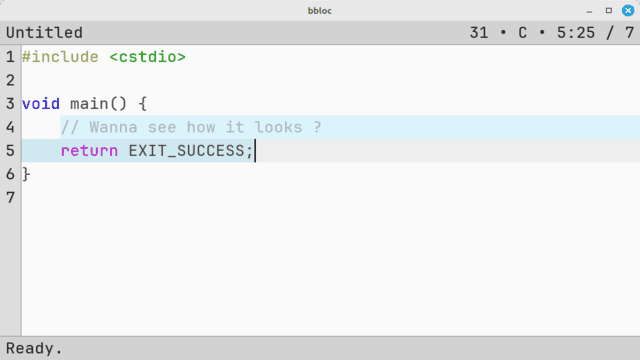
The editor is divided into three main sections:
- A top information bar displaying character position, current highlight mode, font size, etc.
- A central text area for editing.
- A bottom prompt bar for command input.
All editor functions, apart from direct text entry, are executed through a command system, accessible via the prompt (opened by default with "Ctrl+Shift+Space").
See readme for list of commands.
Screenshots
Changelog
alpha 5
- Changes:
- Added Undo (Ctrl+Z) and Redo (Ctrl+Shift+Z) features.
- Added light ("Ctrl+Shift+L") and dark ("Ctrl+Shift+D") theme.
- Changed text storage buffer from VectorBuffer to LineBuffer.
- Reworked command flow (ex: Cut/Copy/Paste working from prompt).
- Proper syntax highlight (JSON, CPP).
- Better auto complete for path and arguments.
- General system stability improvements to enhance the user's experience.
- Note:
- Light or dark theme are not by default. You must select one of theme manually.
- When auto completing a path, to enter a listed folder, type "/", then auto complete will list what is inside that folder.
- Planned:
- More syntax highlight (INI, YAML, ???).
- Automatic theme selection according to user switch theme will comes in later release.
alpha 4
- Fix update logic (refresh only when necessary on all platforms).
- Fix wrong mapping bol -> bof.
- Fix wrong mapping bof <-> eof.
- cursor column position stick to column when possible.
alpha 3
- Latest build including all refactoring.
alpha 2
- Contains latest changes and better keyboard support (added some missing keys).
alpha 1
- First Release.
External links
- GitHub - https://github.com/notnotme/bbloc
- Homebrew App Store - https://hb-app.store/switch/bbloc