
DBFM Switch: Difference between revisions
From GameBrew
More actions
Created page with "{{Infobox Switch Homebrews |title=DBFM |image=DBFMSwitch.png |description=The perfect file manager for switch, similar to goldleaf and dbi. |author=dragonexplorer5 |lastupdated=2025/10/02 |type=Utilities |version=beta 1 |license=LGPL-2.1 |download=https://dlhb.gamebrew.org/switchhomebrews/DBFMSwitch.7z |website=https://gbatemp.net/threads/dbfm-switch-file-manager.676840/ |source=https://github.com/dragonexplorer5/DBFM-for-switch |donation= }} {{#seo: |title=Switch Homebr..." |
No edit summary |
||
| Line 19: | Line 19: | ||
|image_alt=DBFM | |image_alt=DBFM | ||
}} | }} | ||
A comprehensive all-in-one homebrew file manager and system toolset for the Nintendo Switch. | |||
It featuring dynamic applet loading and optimizes Switch resources through: | |||
* Core system always loaded | * Core system always loaded | ||
* Applets loaded on demand | * Applets loaded on demand | ||
| Line 101: | Line 27: | ||
* Resource monitoring | * Resource monitoring | ||
* State preservation | * State preservation | ||
== Features == | |||
* '''File management:''' | |||
** Complete file browser for SD, NAND, and USB devices | |||
** Remote PC access via USB (Quark protocol) | |||
** Advanced file operations (copy, move, delete, rename) | |||
** Hex viewer and text editor | |||
** Search functionality with filters | |||
** Bulk operations and batch processing | |||
** Size calculation and space management | |||
* '''Game management:''' | |||
** Dump and convert games (NSP/XCI/NSZ) | |||
** Install from multiple sources (SD/USB/Network) | |||
** Title management system | |||
** NCA/NSP verification | |||
** Title key and ticket management | |||
** Version control and rollback | |||
* '''System tools:''' | |||
** NAND backup and restore | |||
** emuMMC creation and management | |||
** Firmware management | |||
** Account handling | |||
** PRODINFO tools | |||
** System monitoring | |||
* '''Save management:''' | |||
** Game save backup/restore | |||
** Multi-user save handling | |||
** Save versioning | |||
** Bulk operations | |||
** Save verification | |||
* '''Homebrew management:''' | |||
** Download and update apps | |||
** Repository system | |||
** Update checker | |||
** Dependency handling | |||
** Installation verification | |||
* '''Connectivity:''' | |||
** USB connection (Quark) | |||
** Network file transfer | |||
** Remote installation | |||
** Hidden browser access | |||
* '''Additional features:''' | |||
** Dynamic applet loading | |||
** Task queue system | |||
** Custom themes | |||
** Security tools | |||
** Encrypted logging | |||
** File validation | |||
** Auto-cleanup | |||
== Installation == | == Installation == | ||
'''Instruction:''' | |||
*Copy <code>dbfm.nro</code> to <code>/switch/</code> on your SD card. | |||
*Launch through hbmenu. | |||
*Optional components will be downloaded on first use. | |||
'''Documentation:''' | |||
* [https://github.com/dragonexplorer5/DBFM-for-switch/blob/main/docs/user_guide.md User Guide] | * [https://github.com/dragonexplorer5/DBFM-for-switch/blob/main/docs/user_guide.md User Guide] | ||
* [https://github.com/dragonexplorer5/DBFM-for-switch/blob/main/docs/dev_guide.md Developer Guide] | * [https://github.com/dragonexplorer5/DBFM-for-switch/blob/main/docs/dev_guide.md Developer Guide] | ||
* [https://github.com/dragonexplorer5/DBFM-for-switch/blob/main/docs/security.md Security Guide] | * [https://github.com/dragonexplorer5/DBFM-for-switch/blob/main/docs/security.md Security Guide] | ||
* [https://github.com/dragonexplorer5/DBFM-for-switch/blob/main/docs/api_ref.md API Reference] | * [https://github.com/dragonexplorer5/DBFM-for-switch/blob/main/docs/api_ref.md API Reference] | ||
==Screenshots== | ==Screenshots== | ||
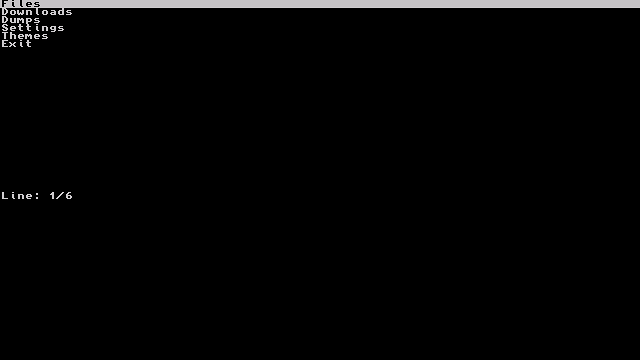
[[image:DBFMSwitch.png]] | [[image:DBFMSwitch.png|link=]] | ||
==Changelog== | ==Changelog== | ||
| Line 128: | Line 96: | ||
* First Release. | * First Release. | ||
== | == Credits == | ||
Thanks to the developers of: | Thanks to the developers of: | ||
* Goldleaf | * Goldleaf | ||
* Checkpoint | * Checkpoint | ||
| Line 138: | Line 105: | ||
== External links == | == External links == | ||
* | * GitHub - https://github.com/dragonexplorer5/DBFM-for-switch | ||
* | * GBAtemp - https://gbatemp.net/threads/dbfm-switch-file-manager.676840/ | ||
Revision as of 03:30, 9 November 2025
| DBFM | |
|---|---|
 | |
| General | |
| Author | dragonexplorer5 |
| Type | Utilities |
| Version | beta 1 |
| License | LGPL-2.1 |
| Last Updated | 2025/10/02 |
| Links | |
| Download | |
| Website | |
| Source | |
A comprehensive all-in-one homebrew file manager and system toolset for the Nintendo Switch.
It featuring dynamic applet loading and optimizes Switch resources through:
- Core system always loaded
- Applets loaded on demand
- Automatic memory cleanup
- Resource monitoring
- State preservation
Features
- File management:
- Complete file browser for SD, NAND, and USB devices
- Remote PC access via USB (Quark protocol)
- Advanced file operations (copy, move, delete, rename)
- Hex viewer and text editor
- Search functionality with filters
- Bulk operations and batch processing
- Size calculation and space management
- Game management:
- Dump and convert games (NSP/XCI/NSZ)
- Install from multiple sources (SD/USB/Network)
- Title management system
- NCA/NSP verification
- Title key and ticket management
- Version control and rollback
- System tools:
- NAND backup and restore
- emuMMC creation and management
- Firmware management
- Account handling
- PRODINFO tools
- System monitoring
- Save management:
- Game save backup/restore
- Multi-user save handling
- Save versioning
- Bulk operations
- Save verification
- Homebrew management:
- Download and update apps
- Repository system
- Update checker
- Dependency handling
- Installation verification
- Connectivity:
- USB connection (Quark)
- Network file transfer
- Remote installation
- Hidden browser access
- Additional features:
- Dynamic applet loading
- Task queue system
- Custom themes
- Security tools
- Encrypted logging
- File validation
- Auto-cleanup
Installation
Instruction:
- Copy
dbfm.nroto/switch/on your SD card. - Launch through hbmenu.
- Optional components will be downloaded on first use.
Documentation:
Screenshots
Changelog
beta
- First Release.
Credits
Thanks to the developers of:
- Goldleaf
- Checkpoint
- Tinfoil
- Hekate
- DBI