
Bbloc Switch: Difference between revisions
From GameBrew
More actions
Created page with "{{Infobox Switch Homebrews |title=bbloc |image=bblocSwitch.png |description=A text editor which work with a command prompt. |author=notnotme |lastupdated=2025/09/04 |type=Other Apps |version=alpha 4 |license=N/A |download=https://dlhb.gamebrew.org/switchhomebrews/bblocSwitch.7z |website=https://github.com/notnotme/bbloc/tree/nintendo_switch |source=https://github.com/notnotme/bbloc |donation= }} {{#seo: |title=Switch Homebrew Apps (Other Apps) - GameBrew |title_mode=appe..." |
No edit summary |
||
| Line 2: | Line 2: | ||
|title=bbloc | |title=bbloc | ||
|image=bblocSwitch.png | |image=bblocSwitch.png | ||
|description=A text editor | |description=A text editor that works with a command prompt. | ||
|author=notnotme | |author=notnotme | ||
|lastupdated=2025/09/04 | |lastupdated=2025/09/04 | ||
| Line 18: | Line 18: | ||
|image=bblocSwitch.png | |image=bblocSwitch.png | ||
|image_alt=bbloc | |image_alt=bbloc | ||
}} | }}{{lowercase title}} | ||
bbloc is a minimalist, open-source text editor | bbloc is a minimalist, open-source text editor for the Nintendo Switch. | ||
Developed in C++ and utilizing SDL2, OpenGL, glad, Freetype, utfcpp, and tree-sitter. | |||
== Features == | |||
* Undo/Redo. | |||
* Search/Replace. | |||
* "\t" does not align on columns (does not align well when mixing with spaces). | |||
* More and better syntax highlight. | |||
* Better error handling. | |||
* Better inline documentation. | |||
== User guide == | |||
The editor is divided into three main sections: | |||
* A top information bar displaying character position, current highlight mode, font size, etc. | |||
* A central text area for editing. | |||
* A bottom prompt bar for command input. | |||
All editor functions, apart from direct text entry, are executed through a command system, accessible via the prompt (opened by default with "Ctrl+Shift+Space"). | |||
See [https://github.com/notnotme/bbloc/blob/main/README.md readme] for list of commands. | |||
==Screenshots== | ==Screenshots== | ||
[[image:bblocSwitch.png]] | [[image:bblocSwitch.png|link=]] | ||
==Changelog== | ==Changelog== | ||
'''alpha 4''' | '''alpha 4''' | ||
* | * Fix update logic (refresh only when necessary on all platforms). | ||
* | * Fix wrong mapping bol -> bof. | ||
* | * Fix wrong mapping bof <-> eof. | ||
*cursor column position stick to column when possible | *cursor column position stick to column when possible. | ||
'''alpha 3''' | '''alpha 3''' | ||
* Latest build including all refactoring. | * Latest build including all refactoring. | ||
| Line 43: | Line 58: | ||
== External links == | == External links == | ||
* | * GitHub - https://github.com/notnotme/bbloc | ||
* | * ForTheUsers - https://hb-app.store/switch/bbloc | ||
Revision as of 03:09, 21 September 2025
| bbloc | |
|---|---|
 | |
| General | |
| Author | notnotme |
| Type | Other Apps |
| Version | alpha 4 |
| License | N/A |
| Last Updated | 2025/09/04 |
| Links | |
| Download | |
| Website | |
| Source | |
bbloc is a minimalist, open-source text editor for the Nintendo Switch.
Developed in C++ and utilizing SDL2, OpenGL, glad, Freetype, utfcpp, and tree-sitter.
Features
- Undo/Redo.
- Search/Replace.
- "\t" does not align on columns (does not align well when mixing with spaces).
- More and better syntax highlight.
- Better error handling.
- Better inline documentation.
User guide
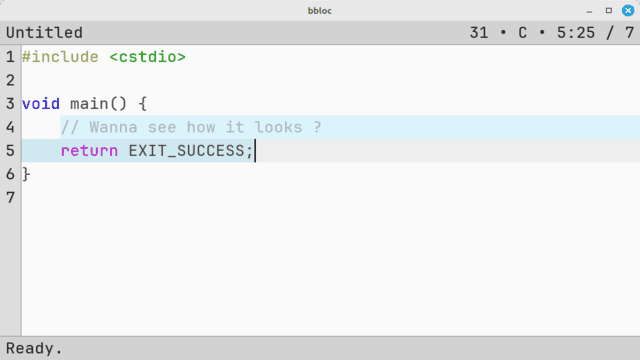
The editor is divided into three main sections:
- A top information bar displaying character position, current highlight mode, font size, etc.
- A central text area for editing.
- A bottom prompt bar for command input.
All editor functions, apart from direct text entry, are executed through a command system, accessible via the prompt (opened by default with "Ctrl+Shift+Space").
See readme for list of commands.
Screenshots
Changelog
alpha 4
- Fix update logic (refresh only when necessary on all platforms).
- Fix wrong mapping bol -> bof.
- Fix wrong mapping bof <-> eof.
- cursor column position stick to column when possible.
alpha 3
- Latest build including all refactoring.
alpha 2
- Contains latest changes and better keyboard support (added some missing keys).
alpha 1
- First Release.
External links
- GitHub - https://github.com/notnotme/bbloc
- ForTheUsers - https://hb-app.store/switch/bbloc