
Pomegranate 3DS: Difference between revisions
From GameBrew
More actions
Created page with "{{Infobox 3DS Homebrews |title=Pomegranate |image=Pomegranate3DS.png |description=Pomegranate is a silly GUI music player and organizer. |author=sheepy0125 |lastupdated=2025/08/18 |type=Media Players |version=1.1.4 |license=MIT |download=https://dlhb.gamebrew.org/3dshomebrews/Pomegranate3DS.7z |website=https://github.com/sheepy0125/pomegranate |source=https://github.com/sheepy0125/pomegranate |donation= }} {{#seo: |title= (Media Players) - GameBrew |title_mode=append |im..." |
No edit summary |
||
| Line 2: | Line 2: | ||
|title=Pomegranate | |title=Pomegranate | ||
|image=Pomegranate3DS.png | |image=Pomegranate3DS.png | ||
|description= | |description=A GUI music player and organizer. | ||
|author=sheepy0125 | |author=sheepy0125 | ||
|lastupdated=2025/08/18 | |lastupdated=2025/08/18 | ||
| Line 19: | Line 19: | ||
|image_alt=Pomegranate | |image_alt=Pomegranate | ||
}} | }} | ||
A GUI music player and organizer for Nintendo 3DS. | |||
== Features == | == Features == | ||
| Line 49: | Line 49: | ||
To get started: | To get started: | ||
* go to the settings menu, | * go to the settings menu, | ||
* choose a music library folder, | * choose a music library folder, | ||
| Line 56: | Line 55: | ||
* and press "reindex." | * and press "reindex." | ||
This | This process will take quite a bit of time (~1-5 sec/song, depending on the format!). | ||
=== Bumper controls === | === Bumper controls === | ||
| Line 76: | Line 75: | ||
| style="padding: 6px 13px; border-color: rgb(209, 217, 224); border-width: 0.727273px; border-image: none 100% / 1 / 0 stretch"| previous song | | style="padding: 6px 13px; border-color: rgb(209, 217, 224); border-width: 0.727273px; border-image: none 100% / 1 / 0 stretch"| previous song | ||
|} | |} | ||
==Screenshots== | ==Screenshots== | ||
https://dlhb.gamebrew.org/3dshomebrews/images/Pomegranate3DS-01.png | https://dlhb.gamebrew.org/3dshomebrews/images/Pomegranate3DS-01.png | ||
https://dlhb.gamebrew.org/3dshomebrews/images/Pomegranate3DS-02.png | |||
https:// | ==Media== | ||
'''YOUTUBETITLE''' ([https://www.youtube.com/watch?v=zzzzzzzzzzz YUOTUBE]) <br> | |||
<youtube width="640">zzzzzzzzzzzzz</youtube> | |||
==Changelog== | ==Changelog== | ||
'''v1.1.4''' | '''v1.1.4''' | ||
* Bumper controls for next song (triple tap R) and previous song (triple tap L) | * Bumper controls for next song (triple tap R) and previous song (triple tap L). | ||
* Fix regression of crashing on certain songs with large sample buffers | * Fix regression of crashing on certain songs with large sample buffers. | ||
* Fix hanging on non-main thread panics | * Fix hanging on non-main thread panics. | ||
* Fix wrong inferred track number for files with numbers after the track number (e.g. 38 123456 Pokémon.flac) | * Fix wrong inferred track number for files with numbers after the track number (e.g. 38 123456 Pokémon.flac). | ||
'''v1.1.3''' | '''v1.1.3''' | ||
* Added auto-playing the next song in folder or album (start of song queue) | * Added auto-playing the next song in folder or album (start of song queue). | ||
* Rudimentary theming support (custom color schemes, c.f. https://git.sr.ht/~sheepy/pomegranate/tree/main/item/meta/theming.md) | * Rudimentary theming support (custom color schemes, c.f. https://git.sr.ht/~sheepy/pomegranate/tree/main/item/meta/theming.md). | ||
* Fixed a few home-menu and hanging related bugs | * Fixed a few home-menu and hanging related bugs. | ||
'''v1.1.2''' | '''v1.1.2''' | ||
* Faster indexing on a separate thread. | * Faster indexing on a separate thread. | ||
| Line 103: | Line 99: | ||
* Fixed console freezing on power button press and home menu. | * Fixed console freezing on power button press and home menu. | ||
'''v1.1.0''' | '''v1.1.0''' | ||
* Indexing now caches decoded 128x128 album art images. These cached album arts are instead loaded for the playback UI, with decoding the PNG/JPEG/etc. image as a fallback (much faster load times for indexed songs) | * Indexing now caches decoded 128x128 album art images. These cached album arts are instead loaded for the playback UI, with decoding the PNG/JPEG/etc. image as a fallback (much faster load times for indexed songs). | ||
* No longer crashes when loading a folder with hundreds of files/directories | * No longer crashes when loading a folder with hundreds of files/directories. | ||
* Updated banner | * Updated banner. | ||
* Fixed evil bug (thread channel deadlock, caused intermittent hanging) | * Fixed evil bug (thread channel deadlock, caused intermittent hanging). | ||
* Minor bugfixes | * Minor bugfixes. | ||
'''v1.0''' | '''v1.0''' | ||
* First Release. | * First Release. | ||
| Line 124: | Line 120: | ||
== External links == | == External links == | ||
* | * GitHub - https://github.com/sheepy0125/pomegranate | ||
Revision as of 05:03, 7 September 2025
| Pomegranate | |
|---|---|
 | |
| General | |
| Author | sheepy0125 |
| Type | Media Players |
| Version | 1.1.4 |
| License | MIT License |
| Last Updated | 2025/08/18 |
| Links | |
| Download | |
| Website | |
| Source | |
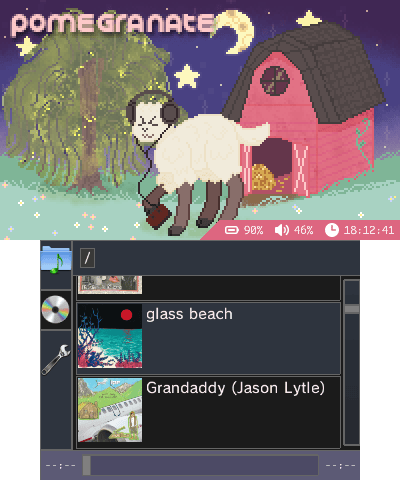
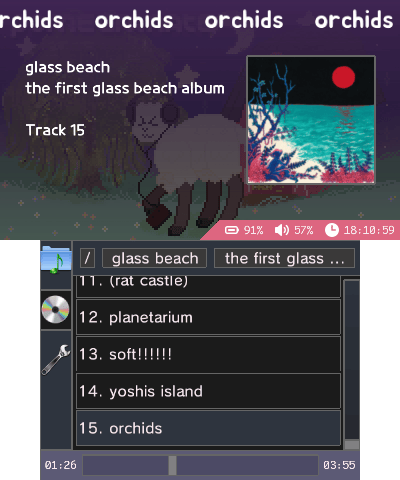
A GUI music player and organizer for Nintendo 3DS.
Features
- Audio playback
- flac
- mp3
- m4a
- Pausing
- Seeking
- Track metadata
- Album art
- From metadata
- From indexing
- Bumper controls
- Pause/play
- Next / previous
- Playlists
- Enqueuing songs
- Loop
- Shuffle
- Music organization
- Folder-based navigation
- Metadata-based indexing navigation
- Cool UI
Usage
Indexing
Indexing organizes your music by artist -> album -> tracks by looking at the metadata of every file recursively from your selected root directory.
To get started:
- go to the settings menu,
- choose a music library folder,
- go to the the CD menu,
- scroll to the bottom,
- and press "reindex."
This process will take quite a bit of time (~1-5 sec/song, depending on the format!).
Bumper controls
| Input | Action |
|---|---|
| double (2x) tap R | pause or play |
| double (2x) tap L | stop playback |
| triple (3x) tap R | next song |
| triple (3x) tap L | previous song |
Screenshots
Media
YOUTUBETITLE (YUOTUBE)
Changelog
v1.1.4
- Bumper controls for next song (triple tap R) and previous song (triple tap L).
- Fix regression of crashing on certain songs with large sample buffers.
- Fix hanging on non-main thread panics.
- Fix wrong inferred track number for files with numbers after the track number (e.g. 38 123456 Pokémon.flac).
v1.1.3
- Added auto-playing the next song in folder or album (start of song queue).
- Rudimentary theming support (custom color schemes, c.f. https://git.sr.ht/~sheepy/pomegranate/tree/main/item/meta/theming.md).
- Fixed a few home-menu and hanging related bugs.
v1.1.2
- Faster indexing on a separate thread.
v1.1.1
- Fixed console freezing on power button press and home menu.
v1.1.0
- Indexing now caches decoded 128x128 album art images. These cached album arts are instead loaded for the playback UI, with decoding the PNG/JPEG/etc. image as a fallback (much faster load times for indexed songs).
- No longer crashes when loading a folder with hundreds of files/directories.
- Updated banner.
- Fixed evil bug (thread channel deadlock, caused intermittent hanging).
- Minor bugfixes.
v1.0
- First Release.
Credits
- Backgrounds
- Icons
- Audio
- Banner audio: Cipher by Kevin MacLeod, source
