
CIA Installer 3DS: Difference between revisions
From GameBrew
More actions
Created page with "{{Infobox 3DS Homebrews |title=CIA Installer |image=CIAInstaller3DS.png |description=Simple app for installing CIA files. |author=Zachary-Rude |lastupdated=2025/06/12 |type=Utilities |version=1.1.0 |license=MIT |download=https://dlhb.gamebrew.org/3dshomebrews/CIAInstaller3DS.7z |website=https://github.com/Zachary-Rude/CIA-Installer |source=https://github.com/Zachary-Rude/CIA-Installer |donation= }} {{#seo: |title= (Utilities) - GameBrew |title_mode=append |image=CIAInsta..." |
No edit summary |
||
| Line 19: | Line 19: | ||
|image_alt=CIA Installer | |image_alt=CIA Installer | ||
}} | }} | ||
A simple homebrew application for installing CIA files, with a file browser interface based on [https://github.com/psidex/3DES 3DES]. | |||
== Features == | == Features == | ||
* File browser interface based on [https://github.com/psidex/3DES 3DES] | * File browser interface based on [https://github.com/psidex/3DES 3DES]. | ||
* Options to install CIAs with or without deleting them | * Options to install CIAs with or without deleting them. | ||
* A queue to quickly install multiple CIA files | * A queue to quickly install multiple CIA files. | ||
* Remote install with direct URL entry | * Remote install with direct URL entry. | ||
== | == Installation == | ||
Download either <code>CIA-Installer.3dsx</code> or <code>CIA-Installer.cia</code> from [https://github.com/Zachary-Rude/CIA-Installer/releases/latest releases]. | |||
* 3DSX - Copy the .3dsx file to <code>sdmc:/3ds/CIA-Installer</code> on your 3DS's SD card. | |||
* CIA - Copy the .cia file to your 3DS's SD card, and install it with [[FBI 3DS|FBI]]. | |||
'''Warning:''' Unless you are running the 3DSX version of this app, DO NOT use this app to install its own CIA as it will NOT work properly. | |||
==Screenshots== | ==Screenshots== | ||
https://dlhb.gamebrew.org/3dshomebrews/images/CIAInstaller3DS-01.png | https://dlhb.gamebrew.org/3dshomebrews/images/CIAInstaller3DS-01.png | ||
https://dlhb.gamebrew.org/3dshomebrews/images/CIAInstaller3DS-02.png | https://dlhb.gamebrew.org/3dshomebrews/images/CIAInstaller3DS-02.png | ||
https://dlhb.gamebrew.org/3dshomebrews/images/CIAInstaller3DS-03.png | https://dlhb.gamebrew.org/3dshomebrews/images/CIAInstaller3DS-03.png | ||
https://dlhb.gamebrew.org/3dshomebrews/images/CIAInstaller3DS-04.png | https://dlhb.gamebrew.org/3dshomebrews/images/CIAInstaller3DS-04.png | ||
==Changelog== | ==Changelog== | ||
'''v1.1.0''' | '''v1.1.0''' | ||
* Updated header to show build date | * Updated header to show build date. | ||
* Updated instructions window with new wording and capitalization | * Updated instructions window with new wording and capitalization. | ||
* Added error handling for errno errors | * Added error handling for errno errors. | ||
** Starting the queue when it is empty now uses the new errno error handler | ** Starting the queue when it is empty now uses the new errno error handler. | ||
* Code formatting is now much more consistent | * Code formatting is now much more consistent. | ||
* CIA installation can now be canceled by pressing B | * CIA installation can now be canceled by pressing B. | ||
* A prompt is now shown when a CIA installs or cancels successfully (not shown when installing from queue) | * A prompt is now shown when a CIA installs or cancels successfully (not shown when installing from queue). | ||
* "Empty folder" screen has been updated | * "Empty folder" screen has been updated. | ||
* Red text is now brighter and easier to read | * Red text is now brighter and easier to read. | ||
* CIA download progress now works properly | * CIA download progress now works properly. | ||
'''v1.0''' | '''v1.0''' | ||
| Line 62: | Line 58: | ||
== Credits == | == Credits == | ||
* File browser interface taken from [https://github.com/psidex/3DES 3DES], with modifications by | * File browser interface taken from [https://github.com/psidex/3DES 3DES], with modifications by Zachary-Rude. | ||
* Progress bar code from [ | * Progress bar code from [https://github.com/KunoichiZ/lumaupdate Luma Updater 3DS], with modifications by Zachary-Rude. | ||
* Error code decoding taken from [ | * Error code decoding taken from [https://github.com/Steveice10/FBI FBI]. | ||
* Everything else made by me, except where stated otherwise | * Everything else made by me, except where stated otherwise. | ||
== External links == | == External links == | ||
* | * GitHub - https://github.com/Zachary-Rude/CIA-Installer | ||
Revision as of 04:30, 31 August 2025
| CIA Installer | |
|---|---|
 | |
| General | |
| Author | Zachary-Rude |
| Type | Utilities |
| Version | 1.1.0 |
| License | MIT License |
| Last Updated | 2025/06/12 |
| Links | |
| Download | |
| Website | |
| Source | |
A simple homebrew application for installing CIA files, with a file browser interface based on 3DES.
Features
- File browser interface based on 3DES.
- Options to install CIAs with or without deleting them.
- A queue to quickly install multiple CIA files.
- Remote install with direct URL entry.
Installation
Download either CIA-Installer.3dsx or CIA-Installer.cia from releases.
- 3DSX - Copy the .3dsx file to
sdmc:/3ds/CIA-Installeron your 3DS's SD card. - CIA - Copy the .cia file to your 3DS's SD card, and install it with FBI.
Warning: Unless you are running the 3DSX version of this app, DO NOT use this app to install its own CIA as it will NOT work properly.
Screenshots
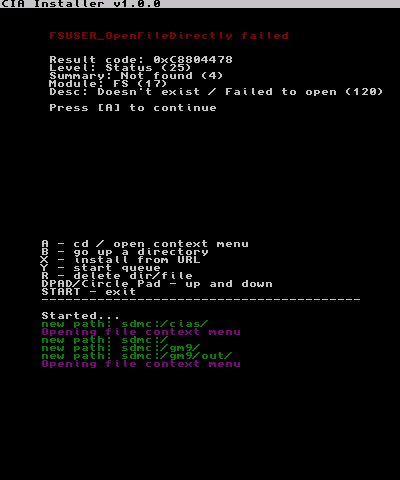
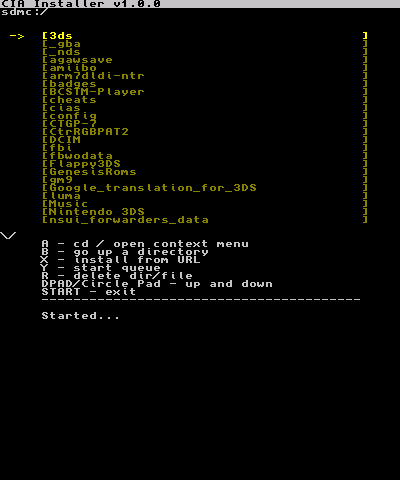
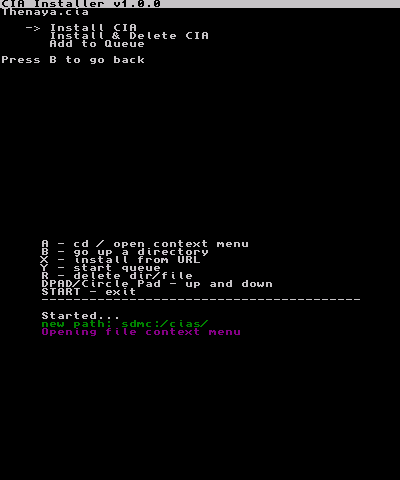
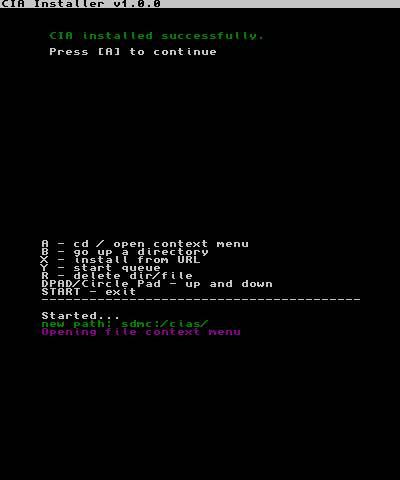
Changelog
v1.1.0
- Updated header to show build date.
- Updated instructions window with new wording and capitalization.
- Added error handling for errno errors.
- Starting the queue when it is empty now uses the new errno error handler.
- Code formatting is now much more consistent.
- CIA installation can now be canceled by pressing B.
- A prompt is now shown when a CIA installs or cancels successfully (not shown when installing from queue).
- "Empty folder" screen has been updated.
- Red text is now brighter and easier to read.
- CIA download progress now works properly.
v1.0
- First Release.
Credits
- File browser interface taken from 3DES, with modifications by Zachary-Rude.
- Progress bar code from Luma Updater 3DS, with modifications by Zachary-Rude.
- Error code decoding taken from FBI.
- Everything else made by me, except where stated otherwise.