
Ninja Monkey Fight: Difference between revisions
From GameBrew
More actions
Created page with "{{Infobox DS Homebrews |title=Ninja Monkey Fight |image=ninjamonkeyfight.png |description=A small fighting game. |author=godslayer500 |lastupdated=2010/04/18 |type= |version=1.2 |license=N/A |download=https://dlhb.gamebrew.org/dshomebrew2/ninjamonkeyfight.zip |website=https://web.archive.org/web/20100425235938/http://dsgamemaker.com/forum/viewtopic.php?f=28&t=4237 |source= }} Ninja Monkey Fight (Dutch) is a small fighting game where you can battle as monkeys across three..." |
No edit summary Tag: Reverted |
||
| Line 5: | Line 5: | ||
|author=godslayer500 | |author=godslayer500 | ||
|lastupdated=2010/04/18 | |lastupdated=2010/04/18 | ||
|type= | |type=Other Games | ||
|version=1.2 | |version=1.2 | ||
|license=N/A | |license=N/A | ||
Revision as of 10:01, 3 August 2025
| Ninja Monkey Fight | |
|---|---|
| Error creating thumbnail: Unable to save thumbnail to destination | |
| General | |
| Author | godslayer500 |
| Type | Other Games |
| Version | 1.2 |
| License | N/A |
| Last Updated | 2010/04/18 |
| Links | |
| Download | |
| Website | |

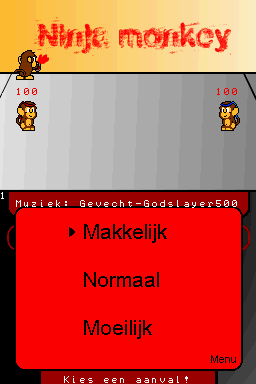
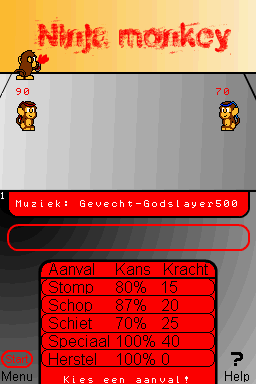
Ninja Monkey Fight (Dutch) is a small fighting game where you can battle as monkeys across three different difficulty levels.
User guide
The goal is to reduce the enemy's health (HP) to 0 or below. Just make sure your own HP doesn’t hit 0, or you’ll lose!
Some attacks can be used more than once.
Controls
Stylus - Select option (Main screen, In game)
A - Select option (Menu)
Screenshots
Changelog
1.2
- I fixed what Eldude sad and I made the "Choose Difficulty" different, because if you touched easy (makkelijk) you also touched an attack. So you have to choose with the D - Pad and press A to choose it! I also made some new music, because the credits are boring without some music!
Credits
Sprites and Backgrounds made by Elspongie, Music and program made by Godslayer500.
External links
- DS Game Make - http://dsgamemaker.com/forum/viewtopic.php?f=28&t=4237 (archived)