
Trogdor - Reburninated PSP: Difference between revisions
More actions
No edit summary |
No edit summary |
||
| Line 4: | Line 4: | ||
|description=Recreation of the Flash game Trogdor. | |description=Recreation of the Flash game Trogdor. | ||
|author=Mode8fx | |author=Mode8fx | ||
|lastupdated=2025/ | |lastupdated=2025/08/24 | ||
|type=Action | |type=Action | ||
|version=2. | |version=2.31 | ||
|license=MIT | |license=MIT | ||
|download=https://dlhb.gamebrew.org/psphomebrew/trogdorreburninatedpsp.7z | |download=https://dlhb.gamebrew.org/psphomebrew/trogdorreburninatedpsp.7z | ||
| Line 42: | Line 42: | ||
==Changelog== | ==Changelog== | ||
'''v2.31''' | |||
* Changes: | |||
** Music now plays at a lower volume during late level transitions. | |||
** [PC] You can now input cheats using original keyboard keys (e.g. the Konami code now supports using the A and B keys like the Flash version). | |||
* Bug Fixes: | |||
** Fixed Level Beaten animation being wobbly. | |||
** Improved Level Beaten animation on low-res displays. | |||
** [3DS, FunKey] Fixed the player spawning slightly inside a cottage on one level layout. | |||
** [FunKey] Shifted HUD slightly to the left to prevent cutoff. | |||
** [PC] Fixed a couple minor bugs involving mid-game window scaling. | |||
** [Wii U (Aroma)] Moved WHUB file to the correct location so the RPX won't appear alongside it in the Home Menu. | |||
'''v2.3''' | '''v2.3''' | ||
* New Port: | * New Port: | ||
Revision as of 02:50, 30 August 2025
| Trogdor Reburninated | |
|---|---|
 | |
| General | |
| Author | Mode8fx |
| Type | Action |
| Version | 2.31 |
| License | MIT License |
| Last Updated | 2025/08/24 |
| Links | |
| Download | |
| Website | |
| Source | |
This is an enhanced recreation of the Homestar Runner Flash game, Trogdor. It is currently available for PC, Switch, Wii U, Wii, 3DS, Vita, and PSP.
Homestar Runner is no stranger to fan ports of its Flash games, and its impact on Flash media, as well as Internet media as a whole, cannot be overstated. Though the original game is still playable on modern devices through its HTML5 port, this project aims to expand on the original release with new features and multiplatform libraries that allow for porting to a wide variety of systems.
Features
- Recreated the original Flash game faithfully, complete with intermissions.
- Easily tweak gameplay settings like enemy speed and extra life points or choose from new difficulty options.
- Supports any frame rate, up to 144 FPS (or 30/60 on consoles).
- Save your game anytime, including mid-play, and keep track of your high scores.
- Convenient level selection and shuffle options.
- Discover new cheats in addition to the classic Konami code.
- Opt for the optional soundtrack from the Homestar Runner game Stinkoman 20X6.
- Choose screen scaling options for both full-screen and pixel-perfect views.
- Fixed bugs from the original game.
- Big head mode.
User guide
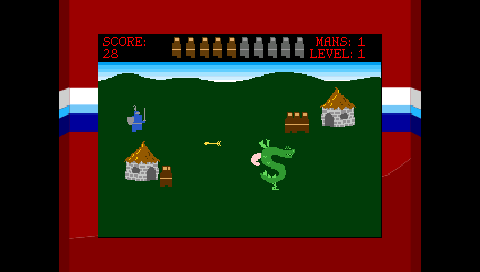
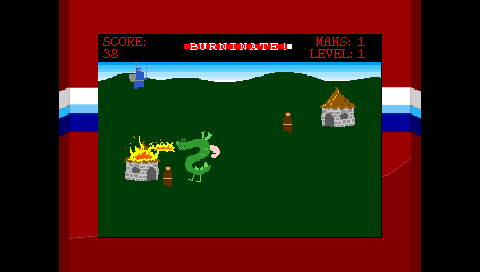
Stomp 10 peasants to achive burnination. Burn all cottages to advance.
Avoid knights and archers.
Controls
D-Pad - Control Trogdor
Screenshots
Changelog
v2.31
- Changes:
- Music now plays at a lower volume during late level transitions.
- [PC] You can now input cheats using original keyboard keys (e.g. the Konami code now supports using the A and B keys like the Flash version).
- Bug Fixes:
- Fixed Level Beaten animation being wobbly.
- Improved Level Beaten animation on low-res displays.
- [3DS, FunKey] Fixed the player spawning slightly inside a cottage on one level layout.
- [FunKey] Shifted HUD slightly to the left to prevent cutoff.
- [PC] Fixed a couple minor bugs involving mid-game window scaling.
- [Wii U (Aroma)] Moved WHUB file to the correct location so the RPX won't appear alongside it in the Home Menu.
v2.3
- New Port:
- Added Android port! No on-screen touch controls, you're gonna need a controller/keyboard.
- Changes:
- Enhanced controller support! Input is now read from all connected controllers, and you can freely connect/disconnect controllers as desired.
- Replaced some Stinkoman Flash music with CD quality versions from the Homestar Runner Original Soundtrack plus remastered tracks by CoolGuyBug.
- Improved looping in some audio tracks.
- [Linux] Set Native resolution as default.
- [Linux] Assets/save data can now be read from the same directory as the executable.
- Bug Fixes:
- Fixed collision issue that caused the player to sometimes get stuck directly above a cottage.
- [3DS] Fixed screen tearing/glitchy top screen.
- [3DS] Restored screen scaling options.
- [3DS] Restored transparency on pause screen.
- [Gamecube] Fixed asset path, so audio and saving now work as intended.
- [Windows+Linux] Fixed assets not being read when you run the game from a directory other than the one containing the executable.
- Other assorted minor bug fixes and polish.
- Optimizations:
- Reduced file size, RAM usage, and load times by optimizing graphics and music.
- Slightly optimized graphics rendering.
- [3DS] Significantly reduced file size by switching to optimized OGG audio.
- [Windows] The game is now compiled with MSYS instead of Visual Studio, and DLLs are now statically linked to the executable. That means the entire game is now a single EXE (minus audio).
- Known Bugs:
- [Gamecube] Audio and saving only work properly on an SD Gecko or SD2SP2; optical drive emulators such as FlippyDrive are not supported.
v2.21
- Quality of Life Improvements:
- You can now exit a game by pressing Select instead of A+Select.
- The original combination was intentionally complicated to prevent players from accidentally quitting and losing their progress, but with autosave, that's no longer necessary.
- Overlay setting is now saved, and it has a new menu option in Cosmetic settings.
- You can still change it via button input, as well.
- Fixed a very small menu bug.
- Minor text polish.
- [PC] Fullscreen setting is now saved.
- [Wii U] Resolution increased from 720p to 1080p.
- By extension, this means an additional scaling option has been added.
- [Wii] Minor Gamecube controller polish for consistency with Gamecube version.
- You can now exit a game by pressing Select instead of A+Select.
- Technical Changes:
- [PC] DLLs are now statically linked so they no longer bloat the game directory; it's just an EXE and audio.
- Additionally, the non-Visual Studio Windows makefile actually works now, and there's a new x86 makefile to go with it.
- If you want to compile it yourself, Visual Studio is still an option.
- [Other] Scaling options are now frozen/unfrozen based on display resolution instead of being hardcoded per-system.
- This doesn't affect current releases, but it does make scaling options one less thing to worry about when porting to other systems.
- PC still allows all options regardless of display because of windowed mode.
- [PC] DLLs are now statically linked so they no longer bloat the game directory; it's just an EXE and audio.
v2.2
- New Additions:
- Upgraded Sound Test menu to 'Theater menu'. In addition to listening to sounds, you can now watch the game's cutscenes.
- 'Added two new overlays'. In addition to Strong Bad's basement, you can now play Trogdor on your Compy, or from the land of Strong Badia!
- Fixes + Polish:
- Added 'Uncapped FPS' option. This replaces the 90/120/144 FPS options from earlier versions.
- 'Added VSync and fixed a frame pacing bug at max FPS'. Earlier versions ran slightly faster than intended depending on the frame rate. This issue should now be fixed when running the game at your screen's refresh rate (probably 60, or just choose Uncapped to be safe), and should be somewhat remedied for frame rates lower than max.
- 'Remade+upscaled overlay and menu graphics' from 240p to 480p on supported systems.
- Cheats are now allowed in all difficulty presets; however, enabling a cheat disables high scores.
- Cheats are no longer immediately enabled upon unlock.
- Rearranged some menu settings; most notably, Other Settings has been moved up and renamed to Gameplay Settings.
- Fixed text on main screen remaining small after changing scaling.
- Minor text changes.
- Polish and code cleanup.
- [PC] Key to toggle fullscreen has been changed from
ESC or FtoESC, F11, or R3 on controller - [WII] Added analog input for Classic Controller.
- [3DS] Changed the .cia version's icon to match the .3dsx version.
v2.1
- New Features:
- Added Knight Movement option: "Original" retains the Flash version's behavior, while "New" (default) is similar to how knights move in the HTML5 version (reworked some code from Trogba for this one).
- Added Chance preset: Enemy speeds and behaviors are shuffled at the start of each level, and level order is also shuffled! Do you feel lucky?
- Added Sound Test: Listen to songs, sound effects, and Strong Bad whenever you want!
- Bug Fixes:
- Fixed level 31 being unbeatable due to the player spawning inside a cottage.
- Fixed a bug where high scores wouldn't always save.
- Fixed autosave not happening under specific circumstances.
- Fixed the Level Beaten smoke animation replaying for a single frame.
- Fonts and graphics are now packaged into the executable for neatness (audio is still separate). More importantly, startup load times are greatly improved on consoles.
- [PSP] Fixed console crash, meaning the game now works on real PSP hardware again (sorry for the wait on this one).
- Other minor bug fixes.
- Other:
- [GAMECUBE] Added beta Gamecube build (file I/O is still not implemented, so no audio or save data).
- Updated SDL2 libraries on most, if not all, systems.
- Renamed "Mips's Choice" preset to "Mode 8" to reflect my new username.
- Renamed "Knight Behavior" option to "Respawn Behavior".
- Other minor text changes.
v2.0
- Added Frame Rate setting; you can now play at higher frame rates instead of being limited to the original game's 16 FPS!
- PC goes up to 144 FPS, consoles go up to 60, and 3DS goes up to 30
- Added save data support for settings, high scores, unlocked cheats, and mid-game progress (the idea for that last one is shamelessly stolen from inspired by Trogba)
- Added the following options:
- Arrow Speed: Self-explanatory
- Knight Speed: Self-explanatory
- Knight Behavior: Makes knights continue moving in a constant pattern after you lose a life, similar to the HTML5 port
- Shuffle Levels: Shuffles the level order so it's different every time you play
- Level Transition: Lets you leave the Level Beaten screen by pressing the Confirm button instead of waiting for it to happen automatically (thanks again, Trogba!)
- Speedy Mode (cheat): Lets you move up to 2x as fast
- Difficulty Presets: Too many settings to dig through? Just choose one of the five new presets! Your high score is saved for each preset.
- Restructured menu into multiple sub-menus instead of everything being lumped together
- Added "Reset to Default" menu button that resets all settings to default except screen scaling
- Added Doom-style Quit confirmation screen
- You can now press Start at the title screen to skip it
- Big Head Mode is now a normal setting instead of a cheat
- Changed several menu text strings
- Assorted polish, optimizations, and minor bug fixes
v.1.1
- Added Treasure Hut Behavior settings
- Changed Archer Frequency settings
- Changed Commentary Frequency settings
- Fixed sprite bugs that occurred when changing scaling mid-game
- Polished cutscenes
- Adjusted opening screen text
- [PSP] Fixed crashes related to audio
- [PSP] Changed default screen scaling option
v.1.0
- First Release.
Credits
This is an unofficial fan project made without any involvement from anyone who contributed to the original game.
Trogdor and Homestar Runner are owned by the Brothers Chaps, Mike and Matt Chapman.
The original Flash game was programmed by Jonathan Howe.