
LineageOS Switch: Difference between revisions
From GameBrew
More actions
No edit summary |
|||
| Line 20: | Line 20: | ||
}} | }} | ||
<!-- not download yet-https://dlhb.gamebrew.org/switchhomebrews/LineageOSSwitch.7z--> | <!-- not download yet-https://dlhb.gamebrew.org/switchhomebrews/LineageOSSwitch.7z--> | ||
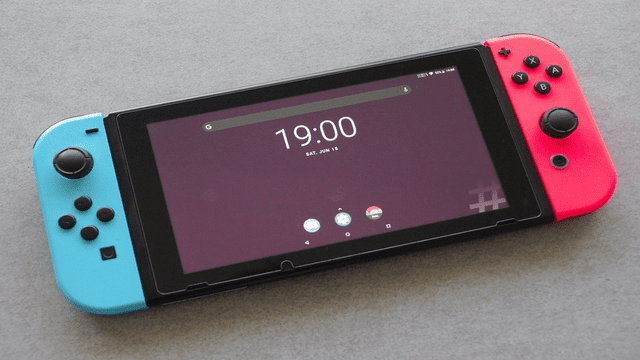
An open-source operating system based on the Android. This allows you to run Android 14 (LineageOS 21) or Android 15 (LineageOS 22.2) on the console. | |||
Download and setup guide: | |||
* [https://wiki.lineageos.org/devices/nx/ Android TV] | * [https://wiki.lineageos.org/devices/nx/ Android TV] | ||
* [https://wiki.lineageos.org/devices/nx_tab/ Tablet] | * [https://wiki.lineageos.org/devices/nx_tab/ Tablet] | ||
==Media== | ==Media== | ||
'''How to Install Android 15 on Modded Nintendo Switch // Lineage OS''' ([https://www.youtube.com/watch?v=Xn480gk9Ob4 IDX3]) <br> | '''How to Install Android 15 on Modded Nintendo Switch // Lineage OS''' ([https://www.youtube.com/watch?v=Xn480gk9Ob4 IDX3]) <br> | ||
<youtube width= | <youtube width="640">Xn480gk9Ob4</youtube> | ||
'''INSTALLING LINEAGE OS 21 (ANDROID 14) TO THE N-X V2 CONSOLE''' ([https://www.youtube.com/watch?v=DFT2Hyp-rFc sthetix]) <br> | '''INSTALLING LINEAGE OS 21 (ANDROID 14) TO THE N-X V2 CONSOLE''' ([https://www.youtube.com/watch?v=DFT2Hyp-rFc sthetix]) <br> | ||
<youtube width= | <youtube width="640">DFT2Hyp-rFc</youtube> | ||
==Screenshots== | ==Screenshots== | ||
https://dlhb.gamebrew.org/switchhomebrews/images/LineageOSSwitch-02.png | https://dlhb.gamebrew.org/switchhomebrews/images/LineageOSSwitch-02.png | ||
==Compatibility== | |||
Supports v1, v2, Lite, and OLED models. | |||
==Known issues== | |||
ADB doesn't work due to an Android TV platform bug. | |||
== External links == | == External links == | ||
* Official Site - https://www.lineageos.org/ | * Official Site - https://www.lineageos.org/ | ||
* | * GBAtemp - https://gbatemp.net/threads/lineageos-21-android-14-released.657245/ | ||
Revision as of 06:01, 8 June 2025
| LineageOS | |
|---|---|
 | |
| General | |
| Author | LineageOS Team |
| Type | Operating systems |
| Version | 22.5 |
| License | Mixed |
| Last Updated | 2025/06/01 |
| Links | |
| Download Android TV - Download Tablet | |
| Website | |
| Source | |
| Support Author | |
An open-source operating system based on the Android. This allows you to run Android 14 (LineageOS 21) or Android 15 (LineageOS 22.2) on the console.
Download and setup guide:
Media
How to Install Android 15 on Modded Nintendo Switch // Lineage OS (IDX3)
INSTALLING LINEAGE OS 21 (ANDROID 14) TO THE N-X V2 CONSOLE (sthetix)
Screenshots
Compatibility
Supports v1, v2, Lite, and OLED models.
Known issues
ADB doesn't work due to an Android TV platform bug.
External links
- Official Site - https://www.lineageos.org/
- GBAtemp - https://gbatemp.net/threads/lineageos-21-android-14-released.657245/