
QuickNTP Switch: Difference between revisions
More actions
No edit summary |
No edit summary |
||
| Line 13: | Line 13: | ||
|donation= | |donation= | ||
}} | }} | ||
Using a custom DNS (or a limited connection) it's not possible to update your clock with Nintendo's servers and the Switch appears to gain some minutes each month. | Using a custom DNS (or a limited connection) it's not possible to update your clock with Nintendo's servers and the Switch appears to gain some minutes each month. | ||
| Line 22: | Line 20: | ||
==Features== | ==Features== | ||
* Update the time by selecting from a list of servers customizable | * Update the time by selecting from a list of servers customizable. | ||
* Show the current offset compared to the selected server | * Show the current offset compared to the selected server | ||
* Set the internal network time to the time set by the user in system settings (time traveling, yay!) | * Set the internal network time to the time set by the user in system settings (time traveling, yay!) | ||
| Line 29: | Line 27: | ||
Requires Tesla overlay ([[Tesla Menu Switch|Tesla-Menu]] and [[NX-ovlloader Switch|nx-ovlloader]]) installed. | Requires Tesla overlay ([[Tesla Menu Switch|Tesla-Menu]] and [[NX-ovlloader Switch|nx-ovlloader]]) installed. | ||
To install QuickNTP, copy the .ovl file in <code>/switch/.overlays/</code>. | |||
(Optional) Copy the .ini file in /config/ in the same directory. | |||
=== Customize servers === | === Customize servers === | ||
Revision as of 04:04, 1 June 2025
| QuickNTP | |
|---|---|
 | |
| General | |
| Author | nedex |
| Type | Overlays |
| Version | 1.5.1 |
| License | GPL-2.0 |
| Last Updated | 2025/05/28 |
| Links | |
| Download | |
| Website | |
| Source | |
Using a custom DNS (or a limited connection) it's not possible to update your clock with Nintendo's servers and the Switch appears to gain some minutes each month.
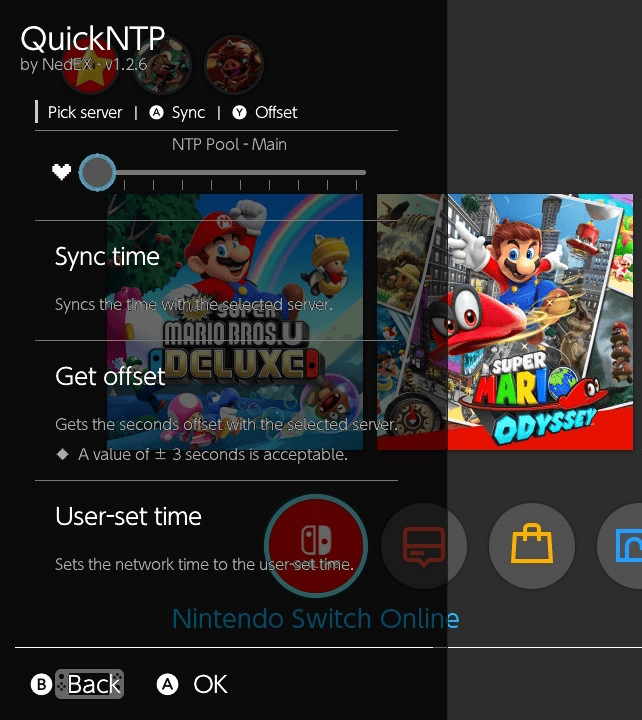
With QuickNTP, you can now quickly update your clock connecting to a public NTP server using Tesla.
Note: This program alters NetworkSystemClock, which could potentially result in a desync between console and servers. Use at your own risk.
Features
- Update the time by selecting from a list of servers customizable.
- Show the current offset compared to the selected server
- Set the internal network time to the time set by the user in system settings (time traveling, yay!)
Installation
Requires Tesla overlay (Tesla-Menu and nx-ovlloader) installed.
To install QuickNTP, copy the .ovl file in /switch/.overlays/.
(Optional) Copy the .ini file in /config/ in the same directory.
Customize servers
Since v1.5.0, you can create or modify the provided quickntp.ini file, with the following syntax:
[Servers]
My_Ntp_Server = ntp.example.com
Underscores will be replaced by spaces in the UI!
The homebrew will look for the file with the following order priority:
- /config/quickntp.ini
- /config/quickntp/config.ini
- /switch/.overlays/quickntp.ini
Note: If the file is missing or invalid, only the NTP Pool Main server will be shown.
User guide
Start the Tesla overlay with L+D-Pad-Down+Right Stick (no need to restart the console).
Then select QuickNTP from the menu.
The "Synchronize Clock via Internet" option should be enabled in System settings as described here, since this program changes the "Network clock" (immutable in settings).
Disclaimer
Please don't send a lot of requests. NTP servers should be requested in 36 hours intervals.
This program changes NetworkSystemClock, which may cause a desync between console and servers. Use at your own risk. It is recommended that you only use the changed clock while offline, and change it back as soon as you are connected (either manually or using ntp.org server.)
Screenshots
Changelog
1.5.1
- Config file can now be placed in several valid locations.
1.5.0
- Updated to latest libnx and libtesla.
1.2.8-1
- Updated to latest libnx.
v1.2.8
- Updated to latest libtesla which fixes a crash in docked mode.
- Special thanks to @DarkMatterCore for this update.
v1.2.7
- Support for 16.0.0
v1.2.6
- Added Cloudflare and Google NTP servers (Thanks to @DraconicNEO).
- Tested up to 15.0.1 with Atmosphere 1.4.0.
v1.2.5
- Updated to C++20.
- Code optimized: now using exceptions and "proper" strings.
- Updated with libnx 4.2.1-1 and latest libtesla (930ce85).
- Tested up to 14.1.2 with Atmosphere 1.3.2.
v1.2.1
- Updated with libnx 4.1.3-1 and newer libtesla.
- Tested up to 12.1.0 with Atmosphere 0.19.5.
v1.2.0
- Added new option to set network time to user-set time.
- Tested up to 10.2.0 with Atmosphere 0.14.4.
v1.1.1
- Updated with libnx 3.3.0 and latest libtesla.
- Tested up to 10.2.0 with Atmosphere 0.14.4.
v1.1.0
- Update including minor changes, with latest libnx and libtesla.
- Tested up to 10.0.2, with Atmosphere 0.12.0.
v1.0
- First Release.
Credits
Contributors:
- @DarkMatterCore (library updates).
- @DraconicNEO (new NTP servers).
Code and libraries:
- @3096 for
SwitchTimewho gave me the initial idea and some code examples. - @thedax for
NX-ntpc, used by @3096. - @SanketDG for the NTP Client using
getaddrinfoinstead ofgethostbyname. - @WerWolv for
libtesla.
NTP Public servers: