
NXMilk Switch: Difference between revisions
More actions
No edit summary |
No edit summary |
||
| Line 24: | Line 24: | ||
== Features == | == Features == | ||
* | * Wide audio file format support. | ||
* Vis using projectM library. | * Vis using projectM library. | ||
* Support Japanese,Chinese,Korean Cyrilic fonts. | * Support Japanese,Chinese,Korean Cyrilic fonts. | ||
| Line 35: | Line 33: | ||
* (Optional) Copy milk files in /switch/NXMilk/presets/milk/. | * (Optional) Copy milk files in /switch/NXMilk/presets/milk/. | ||
* (Optional) Copy texture files in /switch/NXMilk/presets/Textures/. | * (Optional) Copy texture files in /switch/NXMilk/presets/Textures/. | ||
* (Optional) Copy timidity.conf and GUS patch files in /switch/NXMilk/timidity/. | |||
Edit Config file NXMilk.ini: | Edit Config file NXMilk.ini: | ||
| Line 44: | Line 43: | ||
usebuiltinpreset = true | usebuiltinpreset = true | ||
</pre> | </pre> | ||
Since file extensions for audio file can be very "exotic" starting from version 0.1.0 enabled extension can be added also on config file | |||
<pre class="language-ini">[AudioPlayer] | |||
startpath = /switch/NXMilk | |||
milkpresetspath = /switch/NXMilk/presets/milk/ | |||
milktexturespath = /switch/NXMilk/presets/Textures/ | |||
interfacehidesec = 10 | |||
usebuiltinpreset = true | |||
enabled_extensions = .aac,.ac3,.wav | |||
</pre> | |||
NXMilk has some builtin presets. Can be disabled setting to false the usebuiltinpreset option. | NXMilk has some builtin presets. Can be disabled setting to false the usebuiltinpreset option. | ||
milkdrop presets to use: https://github.com/projectM-visualizer/presets-cream-of-the-crop | |||
== User guide == | == User guide == | ||
=== Supported files === | === Supported files using ffmpeg === | ||
* MP3 support (with ID3 tag support) | * MP3 support (with ID3 tag support) | ||
* OGG support (with metadata support if present) | * OGG support (with metadata support if present) | ||
* FLAC support (with metadata support if present) | * FLAC support (with metadata support if present) | ||
* WAV support | |||
* AC3 support | |||
* AAC support | |||
* Many others (ffmpeg is great!) you can unfilter file extensions with config file ini | |||
=== Supported files using libopenmpt === | === Supported files using [https://lib.openmpt.org/libopenmpt/ libopenmpt] === | ||
* Composer 667 (.667) | * Composer 667 (.667) | ||
* Composer 669 / UNIS 669 (.669) | * Composer 669 / UNIS 669 (.669) | ||
* ASYLUM Music Format / Advanced Music Format (.amf / .dmf) | * ASYLUM Music Format / Advanced Music Format (.amf / .dmf) | ||
* | * Extreme's Tracker / Velvet Studio (.ams) | ||
* Composer 670 / CDFM (.c67) | * Composer 670 / CDFM (.c67) | ||
* Digi Booster Pro (.dbm) | * Digi Booster Pro (.dbm) | ||
| Line 69: | Line 80: | ||
* Digital Tracker / Digital Home Studio (.dtm) | * Digital Tracker / Digital Home Studio (.dtm) | ||
* Farandole Composer (.far) | * Farandole Composer (.far) | ||
* Davey W. | * Davey W. Taylor's FM Tracker (.fmt) | ||
* General Digital Music (.gdm) | * General Digital Music (.gdm) | ||
* Graoumf Tracker 1 (.gtk / .gt2) | * Graoumf Tracker 1 (.gtk / .gt2) | ||
| Line 99: | Line 110: | ||
* Astroidea XMF (.xmf) | * Astroidea XMF (.xmf) | ||
=== Supported files using libgme === | === Supported files using [https://github.com/mcfiredrill/libgme libgme] === | ||
* AY ZX Spectrum/Amstrad CPC | * AY ZX Spectrum/Amstrad CPC | ||
* GBS Nintendo Game Boy | * GBS Nintendo Game Boy | ||
| Line 110: | Line 121: | ||
* VGM/VGZ Sega Master System/Mark III, Sega Genesis/Mega Drive,BBC Micro | * VGM/VGZ Sega Master System/Mark III, Sega Genesis/Mega Drive,BBC Micro | ||
=== Supported files using libmodplug === | === Supported files using [https://github.com/Konstanty/libmodplug libmodplug] === | ||
* Nearly all the formats supported by libopenmpt | * Nearly all the formats supported by libopenmpt | ||
* MIDI files (for better result you must use GUS patch file https://www.chocolate-doom.org/wiki/index.php/GUS) | * MIDI files (for better result you must use GUS patch file https://www.chocolate-doom.org/wiki/index.php/GUS) | ||
| Line 126: | Line 137: | ||
Limited Touch Support. | Limited Touch Support. | ||
'''USB:''' | |||
Y - Switch between SD card and USB | |||
== Screenshots == | == Screenshots == | ||
Revision as of 03:28, 25 May 2025
| NXMilk | |
|---|---|
 | |
| General | |
| Author | proconsule |
| Type | Media Players |
| Version | 0.1.0 |
| License | Mixed |
| Last Updated | 2025/05/21 |
| Links | |
| Download | |
| Website | |
| Source | |
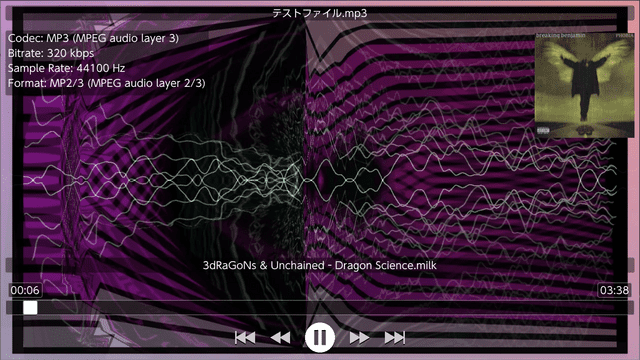
NXMilk is a trivial audio player for Nintendo Switch. It uses FFMpeg for audio decoding and projectM for the vis. The GUI is made with ImGui.
This project started as a test class for new audio player for NXMP.
Features
- Wide audio file format support.
- Vis using projectM library.
- Support Japanese,Chinese,Korean Cyrilic fonts.
- Can read from SD card and from USB storage.
Installation
- Copy NXMilk.nro in a subfolder eg. /switch/NXMilk/.
- (Optional) Copy milk files in /switch/NXMilk/presets/milk/.
- (Optional) Copy texture files in /switch/NXMilk/presets/Textures/.
- (Optional) Copy timidity.conf and GUS patch files in /switch/NXMilk/timidity/.
Edit Config file NXMilk.ini:
[AudioPlayer]
startpath = /switch/NXMilk
milkpresetspath = /switch/NXMilk/presets/milk/
milktexturespath = /switch/NXMilk/presets/Textures/
interfacehidesec = 10
usebuiltinpreset = true
Since file extensions for audio file can be very "exotic" starting from version 0.1.0 enabled extension can be added also on config file
[AudioPlayer]
startpath = /switch/NXMilk
milkpresetspath = /switch/NXMilk/presets/milk/
milktexturespath = /switch/NXMilk/presets/Textures/
interfacehidesec = 10
usebuiltinpreset = true
enabled_extensions = .aac,.ac3,.wav
NXMilk has some builtin presets. Can be disabled setting to false the usebuiltinpreset option.
milkdrop presets to use: https://github.com/projectM-visualizer/presets-cream-of-the-crop
User guide
Supported files using ffmpeg
- MP3 support (with ID3 tag support)
- OGG support (with metadata support if present)
- FLAC support (with metadata support if present)
- WAV support
- AC3 support
- AAC support
- Many others (ffmpeg is great!) you can unfilter file extensions with config file ini
Supported files using libopenmpt
- Composer 667 (.667)
- Composer 669 / UNIS 669 (.669)
- ASYLUM Music Format / Advanced Music Format (.amf / .dmf)
- Extreme's Tracker / Velvet Studio (.ams)
- Composer 670 / CDFM (.c67)
- Digi Booster Pro (.dbm)
- Digi Booster (.digi)
- X-Tracker (.dmf)
- DSIK (.dsm)
- Dynamic Studio (.dsm)
- Digital Symphony (.dsym)
- Digital Tracker / Digital Home Studio (.dtm)
- Farandole Composer (.far)
- Davey W. Taylor's FM Tracker (.fmt)
- General Digital Music (.gdm)
- Graoumf Tracker 1 (.gtk / .gt2)
- Ice Tracker / SoundTracker 2.6 (.ice / .st26)
- Imago Orpheus (.imf)
- Impulse Tracker Project (.itp) – legacy OpenMPT format with instruments stored in external files rather than directly in the module
- Jazz Jackrabbit 2 Music (.j2b)
- SoundTracker and compatible (.m15 / .stk)
- DigiTrakker (.mdl)
- OctaMED (.med)
- MO3 (.mo3)
- MadTracker 2 (.mt2)
- MultiTracker (.mtm)
- Psycho Pinball / Micro Machines 2 music format (.mus)
- Oktalyzer (.okt)
- OggMod-compressed XM files (.oxm)
- Epic Megagames MASI (.psm)
- Disorder Tracker 2 (.plm)
- ProTracker 3.6 IFF (.pt36)
- PolyTracker (.ptm)
- SoundFX / MultiMedia Sound (.sfx / .sfx2 / .mms)
- Scream Tracker 2 (.stm)
- Scream Tracker Music Interface Kit (.stx)
- Soundtracker Pro II (.stp)
- Symphonie / Symphonie Pro (.symmod)
- UltraTracker (.ult)
- Unreal Music (.umx) only from Unreal (Tournament 1), Deus Ex and Jazz Jackrabbit 3D
- Mod's Grave (.wow)
- Astroidea XMF (.xmf)
Supported files using libgme
- AY ZX Spectrum/Amstrad CPC
- GBS Nintendo Game Boy
- GYM Sega Genesis/Mega Drive
- HES NEC TurboGrafx-16/PC Engine
- KSS MSX Home Computer/other Z80 systems (doesn't support FM sound)
- NSF/NSFE Nintendo NES/Famicom (with VRC 6, Namco 106, and FME-7 sound)
- SAP Atari systems using POKEY sound chip
- SPC Super Nintendo/Super Famicom
- VGM/VGZ Sega Master System/Mark III, Sega Genesis/Mega Drive,BBC Micro
Supported files using libmodplug
- Nearly all the formats supported by libopenmpt
- MIDI files (for better result you must use GUS patch file https://www.chocolate-doom.org/wiki/index.php/GUS)
Controls
ZL/ZR - Previous/Next Preset
L/R - Seek -/+ 5 seconds
B - Stop
Y - Disable projectM Vis
Press Y to toogle between SD Card and USB.
Limited Touch Support.
USB:
Y - Switch between SD card and USB
Screenshots
Changelog
v0.1.0
- Added
- user defined file extensions (for exotic audio extensions, FFMpeg format support is huge)
- Fixed
- local/usb switch (now return to startpath)
- Changes
- updated libs (libusbhsfs,projectM,openmpt)
- changed usb behavior (from event to callback)
- fixed minor bugs
v0.0.3
- Add support for Tracker files (.mod,.okt,.xm,.s3m) via libopenmpt (https://lib.openmpt.org/libopenmpt/).
v0.0.2
- First Release.
Credits
Libraries used in this project:
- FFMpeg https://ffmpeg.org/
- ImGui https://github.com/ocornut/imgui
- projectM https://github.com/projectM-visualizer/projectm
- Many code parts are taken form NXMP https://github.com/proconsule/nxmp
Thanks to: