
Sphaira Switch: Difference between revisions
More actions
No edit summary |
No edit summary |
||
| Line 4: | Line 4: | ||
|description=A hombrew menu for the Nintendo Switch. | |description=A hombrew menu for the Nintendo Switch. | ||
|author=ITotalJustice | |author=ITotalJustice | ||
|lastupdated=2025/05/ | |lastupdated=2025/05/22 | ||
|type=Title Launchers | |type=Title Launchers | ||
|version=0. | |version=0.10.3 | ||
|license=GPL-3.0 | |license=GPL-3.0 | ||
|download=https://github.com/ITotalJustice/sphaira/releases | |download=https://github.com/ITotalJustice/sphaira/releases | ||
| Line 165: | Line 165: | ||
==Changelog== | ==Changelog== | ||
'''v0.10.3''' | |||
* Fixed potential crash when trying to load an nro icon if it had invalid asset entry. | |||
* Pt patches by [https://github.com/ninstar @ninstar] in [https://github.com/ITotalJustice/sphaira/pull/140 #140] | |||
* Fix handling of unicode filenames in usb_install_pc.py by [https://github.com/DCNick3 @DCNick3] in [https://github.com/ITotalJustice/sphaira/pull/143 #143] | |||
'''v0.10.2''' | |||
* Added Ukrainian language by [https://github.com/rashevskyv @rashevskyv] in [https://github.com/ITotalJustice/sphaira/pull/139 #139] | |||
* Fix hbmenu not being updated on exit due to faulty string compare. | |||
'''v0.10.1''' | |||
* Fix sd card dumping due to not creating the output path. | |||
'''v0.10.0''' | |||
* Update pt.json by [https://github.com/ninstar @ninstar] in [https://github.com/ITotalJustice/sphaira/pull/133 #133] | |||
* Update zh.json by [https://github.com/BIGBIGSUI @BIGBIGSUI] in [https://github.com/ITotalJustice/sphaira/pull/136 #136] | |||
* add layout options (list, icons, grid) to all grid based menus (homebrew, games, appstore). | |||
* remove bubbles. | |||
* fix building for gcc 15. | |||
* haze (mtp) now runs on its own thread, rather than the main thread. | |||
* add sysmmc / emummc install enable options, to allow for install to be toggled per setup. | |||
* [games menu] loading the control data is ran on its own thread, it does not block the main thread. allows for smooth scrolling like nintendos home menu. | |||
* [games menu] on fw20+, sphaira manually parses the control data, rather than using ns. manually parsing takes 20-40ms, which is faster than ms which can take 50-500ms. | |||
* [games menu] on fw19 and below, if the control data is not in ns cache, sphaira will manually parse the data as its twice as fast as ns. You can see how fast this is by loading the gamecard menu as that manually parses everything, and it loads the gamecard faster than the home menu. | |||
* optimise theme meta loading. | |||
* [gc menu] tries to load control data from ns cache before manually loading. | |||
* fix installing failing during setup if prod.keys isn't found. thanks to Marulv for helping with debugging this issue. | |||
* don't fail if the control nca cannot be parsed during install, as it may depend on ticket not yet installed. | |||
* [games menu] add game dumping. | |||
* [games menu] add usb game transfer (switch 2 switch). | |||
* add support for custom upload locations (http, ftp, webdav etc). | |||
* [games menu] add support for game dumping to custom upload location. | |||
* [file browser] add support for uploading files / folders to custom upload locations. | |||
'''v0.9.1''' | '''v0.9.1''' | ||
* Fix freeze when closing the usb menu whilst a usb cable is not connected. | * Fix freeze when closing the usb menu whilst a usb cable is not connected. | ||
Revision as of 12:19, 24 May 2025
| Sphaira | |
|---|---|
 | |
| General | |
| Author | ITotalJustice |
| Type | Title Launchers |
| Version | 0.10.3 |
| License | GPL-3.0 |
| Last Updated | 2025/05/22 |
| Links | |
| Download | |
| Website | |
| Source | |
Sphaira is hbmenu alternative. It currently has feature parity with hbmenu (that is, launches homebrew + nxlink) whilst adding quite a few features.
Features
HomeBrew
The main menu tab, it lists all the .nro found in "/switch/". From there, you can launch, sort, delete, create a forwarder etc.
You can navigate to the other menu tabs using "L" and "R", explained below.
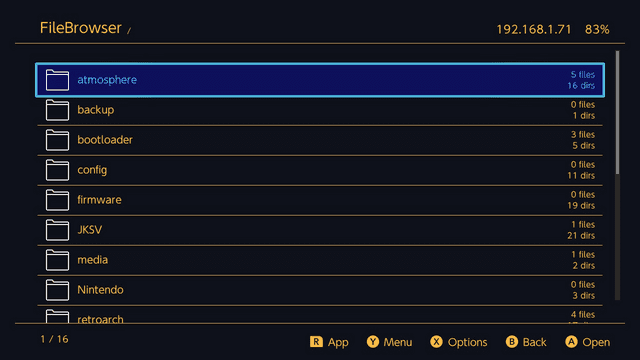
FileBrowser
By pressing "L" from the main menu, you can access the file browser. You can Cut, Copy, Delete, Rename etc.
You can select multiple files / folders by using the "ZR" button and then se the above functions of that group of files.
Forwaders can be created if the selected file has a file assoc, see below for more details.
Appstore
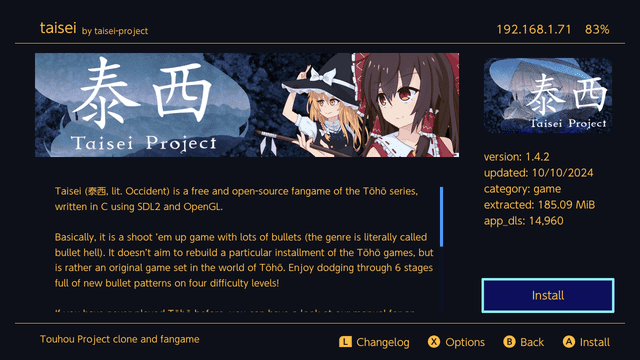
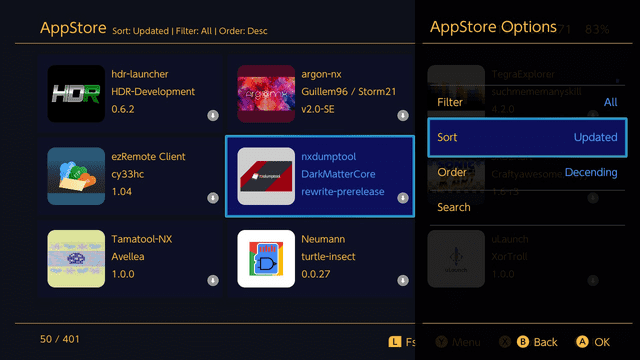
sphaira features an appstore, using the api from https://hb-app.store/switch. It can be navigated to by pressing "R" from the main menu.
The appstore is feature parity with hb-appstore app, as well as installing the manifests in the same folder as hb-appstore, in order to not break compatibility between the two.
Themes
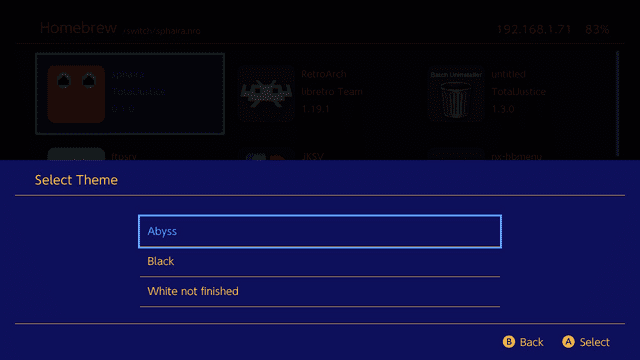
sphaira comes with 3 themes, abyss (default), black and white (unfinished).
custom themes can be added to "/config/sphaira/themes/", here is the abyss theme for example:
INI:
[meta]
name=Abyss
author=TotalJustice
version=1.0.0
; unused currently
preview=romfs:/theme/preview.jpg

[theme]
background=0x0f111aff
grid=0x0f115c30
selected=0x0f115cff
selected_overlay=0x529cffff
text=0xffbc41ff
text_selected=0x529cffff

icon_audio=romfs:/theme/icon_audio.png
icon_video=romfs:/theme/icon_video.png
icon_image=romfs:/theme/icon_image.png
icon_file=romfs:/theme/icon_file.png
icon_folder=romfs:/theme/icon_folder.png
icon_zip=romfs:/theme/icon_zip.png
icon_nro=romfs:/theme/icon_nro.png
music can be added to a theme, as long as the music is converted to bfstm format. simply add an entry like so: music=/config/sphaira/themes/music/bgmusic_pcm.bfstm
For theme creation, refer to the examples in the themes folder and this post for what each entry is for.
Forwaders
sphaira can create and install forwarders for any .nro. It will use the icon of the .nro and the name + author.
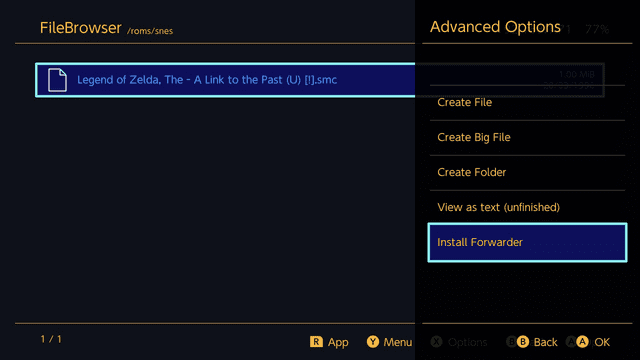
It can also install forwarders for files that have a file assoc. For example, if mgba is installed and a game is located in "/roms/gba/game.gba", then the "Install Fowarder" option will appear. In this case, it will try to scrape the icon of the game, otherwise it will use the icon of the .nro and the name will be a combination of the .nro name and game name.
File Assoc
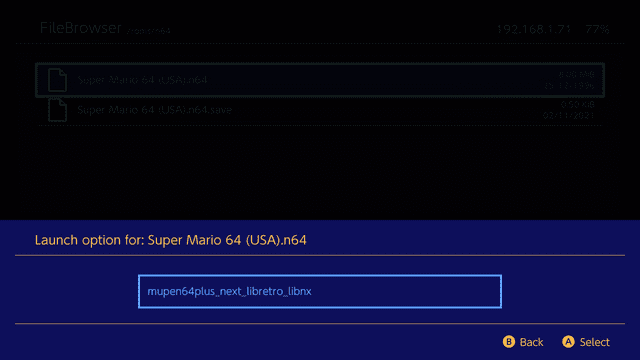
file assoc is a way to associate file extensions (.gba, .nro etc) with a homebrew app. For example, clicking on rom.gbc that has an file assoc will bring up a list of all the applications that can handle it.
This can be used for emulators, media players, text editors etc...
custom file assoc should go in the folder "/config/sphaira/assoc/"
the format is very simple, here is an example of vgedit.ini
INI:
[config]
supported_extensions=txt|json|cfg|ini|md|log
and again for mgba.ini
INI:
[config]
supported_extensions=gba|gbc|sgb|gb
database=Nintendo - Game Boy|Nintendo - Game Boy Color|Nintendo - Game Boy Advance
"path": (optional) fullpath to the .nro. if not specified, it uses the name of the ini, ie, mgba.ini will use mgba.nro.
"supported_extensions": list of extensions the application supports, separated by |. plea
"database": (optional) name of the rom database to use defined by the left-side of this table <https://gist.github.com/ITotalJustice/d5e82ba601ca13b638af9b00e33a4a86>..
All of the retroarch cores has file assoc built into sphaira, so if you download retroarch using the appstore, and then navigate to "/roms/gbc/game.gbc", gambatte and mgba will be available to be selected.
Games can be kept in .zip format, sphaira will peek into the .zip and find the real extension and use that for displaying icons / file assoc.
Roms
roms should be placed in "/roms/system_name/" where system name is defined by this table right-side entries <https://gist.github.com/ITotalJustice/d5e82ba601ca13b638af9b00e33a4a86>.
this is the same layout emulation station uses. the reason for forcing roms to be in specific folders is due to many roms for different systems using the same file extension, ie, .bin / .cue or .chd.
roms placed in subfolders are allowed, for example "/roms/psx/scooby-doo/scooby-doo.bin" is valid.
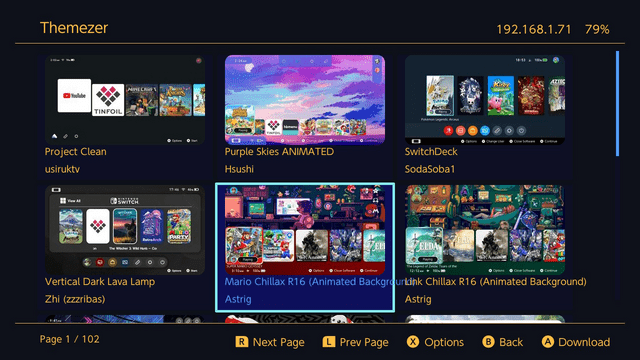
Themezer
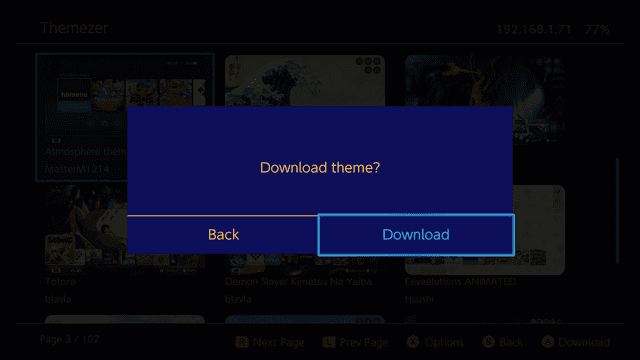
themes can be browsed and download by going Menu Options -> Misc -> Themezer. Themes will be downloaded to "/themes/sphaira/Theme Name - By Author/".
To install themes, launch "NXThemes Installer" and browse to the selected folder listed above.
Irs
InfaRed Sensor. its a toy app i made 4(?) years ago where it shows the output of the joycon irs, use it to take a selfie.
Web
Launches the builtin web browser, it's not very good.
Nxlink
For homebrew developers, nxlink is built into sphaira. You do not have to press any special buttons, just do "nxlink .nro" and send your nro like normal, console logging works to be using "nxlink -s .nro"
By default, this is enabled in the background, to disable it: Menu Options -> Network -> Nxlink.
GitHub downloader
For GitHub downloader, see the examples in the github folder. In summary, all that is needed is a url to the github page. In sphaira, clicking on the entry will return all assets to download from the latest release. You can filter out using text found in the assets. For example, ftpsrv has builds for different platforms, and has 2 builds for the switch, both releases contain the name "switch". so to only display those 2 releases, you would add "switch" in the assets field, see here for an example.
FTP
FTP can be enabled via the network menu. It uses the same config as ftpsrv /config/ftpsrv/config.ini. See here for the full list of all configs available.
MTP
MTP can be enabled via the Network menu.
Installing (applications)
Sphaira can install applications (nsp, xci, nsz, xcz) from various sources (sd card, gamecard, ftp, usb).
For informantion about the install options, see the wiki.
Usb (install)
The USB protocol is the same as tinfoil, so tools such as ns-usbloader and fluffy should work with sphaira. You may also use the provided python script found here.
Ftp (install)
Once you have connected your ftp client to your switch, you can upload files to install into the install folder.
Notes
That's most of the features spahira has. If you enjoy it so much that you'd rather it be launched over regular hbmenu, you can enable the option in "Menu Options -> Replace hbmenu on exit" where it will do just that. It will create a backup of hbmenu in "/switch/hbmenu.nro" should you wish to swap back.
Screenshots
Changelog
v0.10.3
- Fixed potential crash when trying to load an nro icon if it had invalid asset entry.
- Pt patches by @ninstar in #140
- Fix handling of unicode filenames in usb_install_pc.py by @DCNick3 in #143
v0.10.2
- Added Ukrainian language by @rashevskyv in #139
- Fix hbmenu not being updated on exit due to faulty string compare.
v0.10.1
- Fix sd card dumping due to not creating the output path.
v0.10.0
- Update pt.json by @ninstar in #133
- Update zh.json by @BIGBIGSUI in #136
- add layout options (list, icons, grid) to all grid based menus (homebrew, games, appstore).
- remove bubbles.
- fix building for gcc 15.
- haze (mtp) now runs on its own thread, rather than the main thread.
- add sysmmc / emummc install enable options, to allow for install to be toggled per setup.
- [games menu] loading the control data is ran on its own thread, it does not block the main thread. allows for smooth scrolling like nintendos home menu.
- [games menu] on fw20+, sphaira manually parses the control data, rather than using ns. manually parsing takes 20-40ms, which is faster than ms which can take 50-500ms.
- [games menu] on fw19 and below, if the control data is not in ns cache, sphaira will manually parse the data as its twice as fast as ns. You can see how fast this is by loading the gamecard menu as that manually parses everything, and it loads the gamecard faster than the home menu.
- optimise theme meta loading.
- [gc menu] tries to load control data from ns cache before manually loading.
- fix installing failing during setup if prod.keys isn't found. thanks to Marulv for helping with debugging this issue.
- don't fail if the control nca cannot be parsed during install, as it may depend on ticket not yet installed.
- [games menu] add game dumping.
- [games menu] add usb game transfer (switch 2 switch).
- add support for custom upload locations (http, ftp, webdav etc).
- [games menu] add support for game dumping to custom upload location.
- [file browser] add support for uploading files / folders to custom upload locations.
v0.9.1
- Fix freeze when closing the usb menu whilst a usb cable is not connected.
v0.9.0
- Reduce rounding of icons from 15 -> 5.
- Add image support to option boxes.
- Fix potential memleak when deleting homebrew from the homebrew menu. this would cause the image to not be free'd.
- Added scrolling text support for all text that gets clipped. Highlighting the entry will start scrolling the text. You can adjust the scroll speed in the "Advanced options" menu by selecting "Text scroll speed".
- Added "Games" menu. This allows you to launch and delete installed games. There's some bonus options such as "launch random" which picks a random game to launch, and "hide forwarders" which hides installed forwarders.
- Changed the title_id generation for forwarders. This change was to support the above "hide forwarders" option (see below).
- Add option to extract zip files to the root of the sd card.
- Added option to change the right-side menu (see below).
- Replaced the "enabled" and "disabled" options with "On" and "Off".
- Fixed file browser crash when using select all (L2) whilst there exists a hidden file and the hide hidden files option was enabled.
- Improve USB (installer) exiting speed by now waiting on an event, rather than relying on timeout.
- Update de.json (added 12h format) by @glitched-nx in #130
v0.8.2
- Update zh.json by @BIGBIGSUI in #129
- highlight the currently select entry in popup list.
- remove stale etags if the server does not send back a new etag. fixes appstore images constantly being requested.
- only append etag if the dst file already exists.
- enable the curl option to request compressed data from the server. this allows for slightly faster download speeds when requesting text (json, xml) data.
- add option to extract multiple / single zip files.
- add option to compress multiple single files into a zip.
- themezer now displays the file name when it's extracting.
- the "install forwarder" option in the filebrowser has been move outside of the "advanced menu".
- added select all option in the filebrowser by pressing ZL.
- added back the irs menu.
- irs menu will now try and connect to the first available joycon that supports irs.
- irs menu now displays the name of the connected joycon in the title bar.
v0.8.1
- fix appstore author search being case sensitive.
- gc_menu now waits on the gamecard inserted event, rather than polling. slightly reduces core3 usage.
- fix control nca (name and icon) mounting due to uses the app_id rather than the program id when mounting.
- stream installs can now parse the control nca, allowing for artwork and application name to be parsed during installs.
- improved "skip_if_already_installed" option by checking each nca existence, rather than checking if all exist in order to skip.
- re-write usb protocol to match Tinfoils. this allows applications such as ns-usbloader and fluffy to be used with sphaira.
- add "boost mode" option for installing. this increases the CPU clock and reduces the GPU clock, can improve transfer speed.
- removed the irs menu. no one used it.
- removed the web menu. the switch web browser sucks, and no one used it.
- add option in the theme menu to download the default background music, i highly recommend it.
- added shortcut for the "misc" menu, triggered by pressing "-" (minus), this allows for faster navigation between menus.
- small optimisations throughout the code base.
v0.8.0
- Added support for stream installs.
- Added ftp install menu.
- Added GameCard install menu.
- Fix screenshot permission not being set in applet mode (you can now take screenshots in applet mode).
- Add transfer speed and time remaining to the progress bar.
- Added forwarder support for mame and neogeo.
v0.7.0
- Fixed themezer search.
- Fix swkbd numpad not displaying (used in themezer set page).
- Add basic support for title installing.
- Add EXPERIMENTAL support for title installing via USB.
v0.6.3
- Add new string by @Yorunokyujitsu in #101
- Updated se.json with the latest added string. by @HenryBaby in #103
- [Theme] alt icons + theme by @spkats1 in #102
- Edited README, updated Italian translations by @LNLenost in #117
- Update french translation by @shadow2560 in #108
- Update pt.json by @ninstar in #109
- Update zh.json by @BIGBIGSUI in #110
- Added 12 hour clock to main menu by @therealbungus in #113
- Add 12 our time string in translation files and translated it for French language by @shadow2560 in #120
- Fix themezer
v0.6.2
- Audio is now only disabled if launched in applet mode with a suspended (background) game running.
v0.6.1
- fixed deko3d mem leak when using docked mode.
- fixed applet mode crash if launched with a game that uses multiple audren services. audio is now currently disabled in applet mode until i write an audio driver for libpulsar.
- fixed edge case in "restore hbmenu" option where the option wouldn't trigger if /hbmenu.nro didn't exist.
- bumped ftpsrv from 1.2.1 to 1.2.2
- fixed bug with appstore where if a field wasn't found in the repo.json, it would get set to a garbage value. this only effected sorting via downloads.
- add new strings and update ko.json, ja.json by @Yorunokyujitsu in #88
- Update es.json by @cucholix in #90
- Update pt.json by @ninstar in #93
- Update french language. by @shadow2560 in #94
- Fixed the "decending" typo. by @HenryBaby in #91
- Updated the “de.json” with the missing translations. by @glitched-nx in #95
v0.6.0
- add github downloader, add entries in /config/sphaira/github/name.json
- fix appstore bug where i forgot to add a break in a switch case.
- greatly optimise asset downloading by using etags to cache all assets and only re-downloading upon the etag changing.
- all internal events now have a timeout, meaning if many events happen at once, it will only process as much as possible within the given timeslice.
- lazy loading images are now capped at loading 2 per frame. this removes frame drops when scrolling through the appstore (due to slow io).
- daybreak detection now supports custom paths.
- ftp server now uses ftpsrv config and all of its moutpoints.
- ftp server download (write) speed has been greatly improved by using ftpsrv io code.
- option to restore hbmenu when disabling the "Replace hbmenu on exit" option.
- add custom mount points for fs (sd and image).
- patch forwarder npdm to support the new debug flags.
- add touch screen support.
- improve the load time of libpulsar (sound loading lib).
- option to set default background music, place file in /config/sphaira/themes/default_music.bfstm
- revamp themes, now more customisable.
- add theme inheritance, greatly simplifying creating new themes.
- fix popup list being drawn offscreen.
- fix scrollbar being draw offscreen.
- sidebar text will now scroll if the length of the text is too big for the region.
v0.5.0
- Fix core3 being pinned due to nxlink polling too frequently.
- Add ftp server, uses ftpsrv.
- Add mtp server, uses haze from Atmosphere.
- Update Retroarch core file assoc.
- Optimise file assoc parsing even further.
- Add "stars" feature from hbmenu.
- Add text wrapping for popup box.
- Remove "Set Archive Bit" option.
- Installing a update will now ask if you want to restart sphaira.
- Forwarder install is now disabled by default, it can be re-enabled via the advanced menu.
- Forwarder install warning message can now be disabled via the advanced menu.
- Web browser is now disabled in applet mode.
- Init and close Set service so auto language work now. by @shadow2560 in #31
- Swedish translation by @HenryBaby in #26
- Almost all strings for translation. by @Yorunokyujitsu in #32
- Update french translation by @shadow2560 in #35
- Updated Swedish translation by @HenryBaby in #36
- Update es.json by @cucholix in #38
- Chinese translation update by @do-kiss in #42
- New strings added and Korean and Japanese translations. by @Yorunokyujitsu in #44
- Some fixes and update french language by @shadow2560 in #46
- Update de.json and fr.json by @glitched-nx in #48
v0.4.1
v0.4.0
- Improve Portuguese translation by @ninstar in #1
- use translatation from native Chinese by @WE1ZARD in #3
- Added Italian translation by @LNLenost in #8
- Improve french language by @shadow2560 in #10
- Chinese translation by @do-kiss in #12
- Japanese Translation by @ITotalJustice in #11
- i18n: improve de locale by @acuteaura in #16
- New icon by @ninstar in #18
- Add OLED Black Theme by @Sanrax in #20
- Korean translation by @Yorunokyujitsu in #19
- Update fr.json by @Battosai94 in #17
- Added updater
- Clip text in filebrowser #13
- Fix inconsistent sound effects #6
- Added time to the main menu
- Fix sphaira not exiting to home menu whilst launched as hbmenu
- Add support for loading translations locally in
/config/sphaira/i18n/ - Add option to install an nro forwader via the filebrowser
v0.3.0
- First Release.
Credits
- borealis
- stb
- yyjson
- nx-hbmenu
- nx-hbloader
- deko3d-nanovg
- libpulsar
- minIni
- GBATemp
- hb-appstore
- haze
- Everyone who has contributed to this project!