
Counter-Strike 1.6 Vita: Difference between revisions
From GameBrew
More actions
Created page with "{{Infobox Vita Homebrews |title=Counter-Strike 1.6 |image=CounterStrike16Vita.png |description=Counter-Strike 1.6 port for PS Vita. |author=Velaron |lastupdated=2025/04/02 |type=Shooter |version=continuous |license=Mixed |download=https://github.com/Velaron/cs16-client/releases |website=https://www.reddit.com/r/vitahacks/comments/1jwmx81/counterstrike_16_port_for_ps_vita_was_made/ |source=https://github.com/Velaron/cs16-client |donation=https://www.buymeacoffee.com/velar..." |
No edit summary |
||
| Line 20: | Line 20: | ||
}} | }} | ||
<!--https://dlhb.gamebrew.org/vitahomebrews/CounterStrike16Vita.7z--> | <!--https://dlhb.gamebrew.org/vitahomebrews/CounterStrike16Vita.7z--> | ||
A | A port of Counter-Strike 1.6 on the PS Vita based on the open-source engine [[Xash3D FWGS Vita|Xash3D FWGS]]. | ||
This port uses cs16client, a reverse-engineered client library of the original Counter-Strike 1.6. | |||
Some features are not yet implemented: | |||
* Touchscreen buttons for buymenu, voice chat, map voting, etc.. | |||
* Touchscreen | |||
* Gyroscopic aiming, similar to what is available in the vitaQuake3 port. | * Gyroscopic aiming, similar to what is available in the vitaQuake3 port. | ||
==Installation== | ==Installation== | ||
To run CS16Client you need the latest developer build of Xash3D FWGSm, as well as the game which can be purchased on [https://store.steampowered.com/app/10/CounterStrike/ Steam]. | |||
* Download the latest [https://github.com/FWGS/xash3d-fwgs/releases/tag/continuous xash3d-fwgs-psvita.7z]. | |||
' | * Install xash.vpk from the 7z archive onto your PS Vita. | ||
* Copy the data directory from the 7z archive to the root of your PS Vita's SD card. | |||
* Copy the valve folder from your Half-Life install to ux0:/data/xash3d/ (you can use other mountpoints instead of ux0). Do not overwrite anything. | |||
* Download the latest [https://github.com/Velaron/cs16-client/releases/tag/continuous CS16Client] and copy the cstrike folders into your Xash3D FWGS directory. | |||
==Screenshots== | ==Screenshots== | ||
https://dlhb.gamebrew.org/vitahomebrews/images/CounterStrike16Vita-01.png | https://dlhb.gamebrew.org/vitahomebrews/images/CounterStrike16Vita-01.png | ||
== | ==Credits== | ||
Huge thanks to the developers and community keeping classic titles alive on modern platforms. Your support helps this project grow! | Huge thanks to the developers and community keeping classic titles alive on modern platforms. Your support helps this project grow! | ||
== External links == | == External links == | ||
* GitHub - https://github.com/Velaron/cs16-client | |||
* Reddit - https://www.reddit.com/r/vitahacks/comments/1jwmx81/counterstrike_16_port_for_ps_vita_was_made/ | * Reddit - https://www.reddit.com/r/vitahacks/comments/1jwmx81/counterstrike_16_port_for_ps_vita_was_made/ | ||
Revision as of 00:10, 13 April 2025
| Counter-Strike 1.6 | |
|---|---|
 | |
| General | |
| Author | Velaron |
| Type | Shooter |
| Version | continuous |
| License | Mixed |
| Last Updated | 2025/04/02 |
| Links | |
| Download | |
| Website | |
| Source | |
| Support Author | |
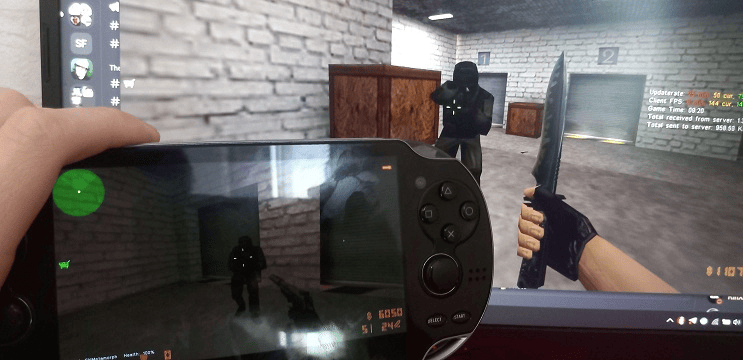
A port of Counter-Strike 1.6 on the PS Vita based on the open-source engine Xash3D FWGS.
This port uses cs16client, a reverse-engineered client library of the original Counter-Strike 1.6.
Some features are not yet implemented:
- Touchscreen buttons for buymenu, voice chat, map voting, etc..
- Gyroscopic aiming, similar to what is available in the vitaQuake3 port.
Installation
To run CS16Client you need the latest developer build of Xash3D FWGSm, as well as the game which can be purchased on Steam.
- Download the latest xash3d-fwgs-psvita.7z.
- Install xash.vpk from the 7z archive onto your PS Vita.
- Copy the data directory from the 7z archive to the root of your PS Vita's SD card.
- Copy the valve folder from your Half-Life install to ux0:/data/xash3d/ (you can use other mountpoints instead of ux0). Do not overwrite anything.
- Download the latest CS16Client and copy the cstrike folders into your Xash3D FWGS directory.
Screenshots
Credits
Huge thanks to the developers and community keeping classic titles alive on modern platforms. Your support helps this project grow!